

In short
Expenses holds the costs Amazon never sees, like software, prep and supplies. SourceDock takes them off your profit on Sales and Capital Recovery. Say you paid $60.00 for a label printer in September. Add it once as a one-time cost. The September card then shows One-time $60.00 and Total off profit $60.00. Click your picture, then Expenses, or press E. For one made-up month walked through every expense, see Step by step below.
Label printer: the month card stepped back to September 2026, the month it was paid. Notice One-time $60.00 and Total off profit $60.00.
More details
A quick example
A quick example
Add an expense
Add an expense
Pick how often
Name it and type the amount
Pick the day
Add it
Spread a cost over its days
Spread a cost over its days
The page
The page
- Change its Price. SourceDock asks if the new price starts from a month on, so earlier charges keep the old price, or if it was a typo to fix every month.
- Stop after a month, when you cancel that tool. Keep charging undoes it.
- Delete it. You can Undo.
Import and export
Click Import to bring in a file of expenses: a Sellerboard expenses file, a file you exported from this page, or any file with a date, a name, and an amount. You can Undo import for 30 days. Export downloads your expenses as a CSV file.How expenses change your profit
How expenses change your profit
- Sales: net profit is gross profit less your expenses. Each cost counts in full on the day it’s charged, or a little each day when you spread it.
- Capital Recovery: the profit card becomes Net profit or Net loss once there are expenses in its dates. It counts only costs charged up to today, not ones still to come.
Rules
Rules
- An amount must be more than $0 and at most $1,000,000, in whole cents.
- A cost charged on the 31st falls on the last day of a shorter month.
Plans and team members
Plans and team members
Step by step
About this walk-through
About this walk-through
- Boxes and packing tape: a one-time $40.00, paid 120 days before the seed day.
- Label printer: a one-time $60.00, paid 45 days before the seed day.
One month, three costs
One month, three costs
- “Toy truck labels” on March 20 is $60.00.
- “Shelf tape” on March 2 is $18.00.
- “Blender boxes” on March 25 is $40.00.
Open Expenses
Open Expenses
Label printer: the month card stepped back to September 2026, the month it was paid. Notice One-time $60.00 and Total off profit $60.00.
Add the boxes and the labels
Add the boxes and the labels

Demo store: the add row on the seed day, before you type. Notice it starts on Monthly, the amount ends in /mo, and the date is the seed day.
Add the boxes
Add the labels
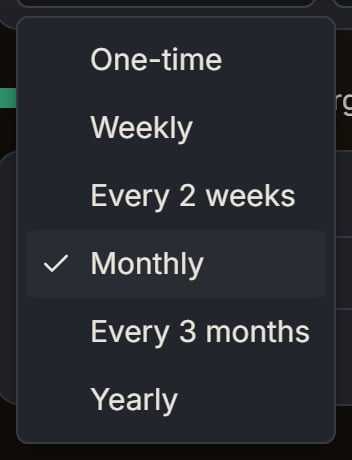
Demo store: the first box of the add row, opened. Notice the six choices, with Monthly ticked.
Import the tape
Import the tape
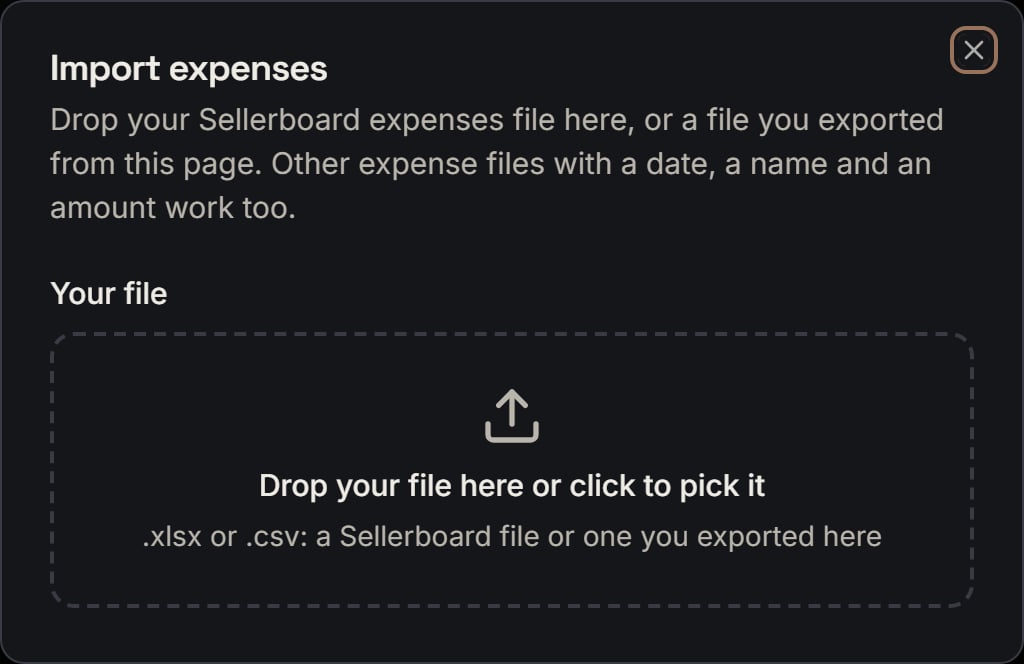
Demo store: Import, opened, before you pick a file. Notice the drop box and its hint about Sellerboard files. Close it without picking one.
When a file has a problem
A file needs a date column and an amount column. If either one is missing, the toast Could not read your file says SourceDock couldn’t find a date column and an amount column. An old .xls file has to be saved as .xlsx or CSV first.A file can hold up to 20,000 expense rows and 20 MB. A bigger file is refused.A row is skipped when it is blank, a total line, $0, money back, or has a date or an amount SourceDock can’t read. A row that is totally empty is not counted at all.A row whose currency column names a currency the store doesn’t use is skipped too. If the whole file names one other currency and you have only one store in that currency, the expenses go to that store instead, and a note says so.Dollar amounts written with $, USD, CA$, or CAD are read. An amount with a euro sign, or a decimal comma like “12,99”, can’t be read, so its row is skipped.A file with no how-often column counts each row as one-time. This file has Repeats, so “Shelf tape” is monthly.Drop the same file again, and the line says “All 1 expense in this file are already in SourceDock. There is nothing new to add.” An expense already on the store also matches a row when the name, amount, repeat, and start day are the same.Undo import is offered for 30 days, and only for the store’s latest import. After 30 days, or once another file comes in, the dialog stops offering it. An old Undo from a toast then shows Could not undo the import, with There is nothing to undo. It’s past 30 days, or another file was imported after it.Export saves this store’s expenses as a CSV. While it runs, the button says Exporting…. On a plan without export, the toast says Export requires an upgrade.How a charge lands on a day
How a charge lands on a day
Spread per day
These examples are not part of the $118.00. Turn Amortize daily on when you want a share of a charge on each day.A repeating charge covers its own day through the day before the next charge. The end day only picks which charges happen. It never makes a charge’s days shorter.A $62.00 monthly bill from March 1 has its next charge on April 1. So the charge covers March 1 through March 31, which is 31 days. $62.00 / 31 = $2.00 a day, and 31 × $2.00 = $62.00.The shares are whole cents. SourceDock rounds the running total down, so one day can get a cent more than another, and the shares always add back to the charge. A one-time $10.00 spread over 3 days is $3.33, $3.33, and $3.34, and $3.33 + $3.33 + $3.34 = $10.00.A one-time cost with Amortize daily on gets a second day box after an arrow, for the last day of the spread. In the cost’s editor, that box is labeled Spread through. A one-time $40.00 spread from March 6 through March 9 is 4 days, so each day is $10.00.March on the screen
March on the screen

Demo store: the legend above the grid. Notice the four marks, then Import and Export on the right.
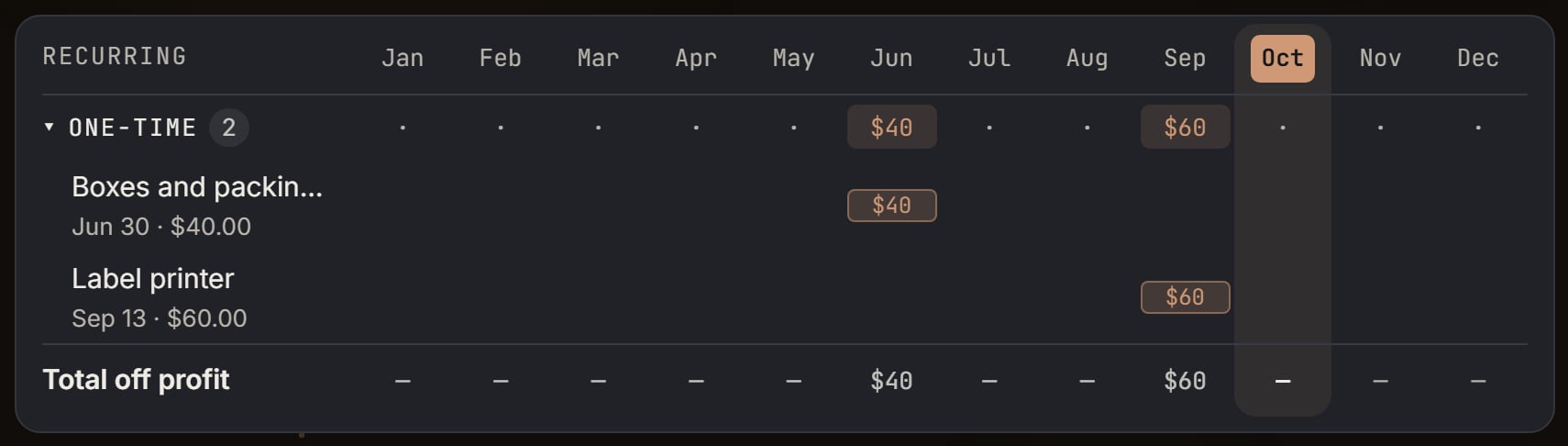
Boxes and packing tape, and Label printer: the One-time row, opened. Notice the count 2, $40 in June, $60 in September, and a dot in the other months.
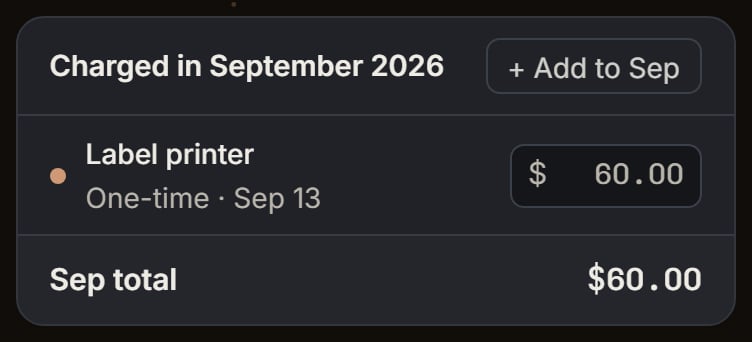
Label printer: the side list for September 2026. Notice the title Charged in September 2026, the line One-time · Sep 13, and Sep total $60.00.
- “Toy truck labels”, “Monthly · Active”, “60.00”.
- “Shelf tape”, “Monthly · Active”, “18.00”.
- “Blender boxes”, “One-time · Mar 25”, “40.00”.
Change a price, stop a bill, or delete it
Change a price, stop a bill, or delete it
A new price
You are on March. You type “75.00” in the labels’ price box. The editor asks “Change Toy truck labels to $75.00/mo?”“From March 2026 on” uses the first charge on or after March 1, which is March 20. The old price ends March 19, so February stays $60.00. March’s labels charge becomes $75.00. March is now $75.00 + $18.00 + $40.00 = $133.00, and the card says ”+$55.00 vs Feb”.The toast says “Toy truck labels is $75.00/mo from March 2026”, with Undo. The grid now has two “Toy truck labels” rows. The new one shows “$75.00/mo · Active” and still charges on the 20th. The old one moves to the bottom and shows “$60.00/mo · Stopped · last Feb 2026”.Every month (fix a typo) changes every charge, February too. Cancel keeps $60.00. In the bill’s first month, the only yes button is Yes, update it, and it changes every charge.A one-time cost’s new amount saves right away. The toast says the name is now the new amount, like “Blender boxes is now $45.00”, with Undo.Stop or delete
“Stop after Mar” sets the last day to March 31, 2026. March 20 still counts, so the state becomes Last charge this month, and April has no charge. The toast says “Toy truck labels stops after March 2026”. Keep charging clears the end, and the toast says “Toy truck labels keeps charging”.Delete removes the expense. The toast title is Expense deleted, with the name and Undo. After Undo, the toast says Expense is back.If neither Sales nor Capital Recovery is shared with you, the page says The account owner hasn’t shared this page with you. Ask the owner to turn it on.Where the money shows up
Where the money shows up
Sales, month to date
Month to date is March 1 through March 18, and its corner reads “Mar 1–18”. March 20 and March 25 are outside, so only “Shelf tape” on March 2 is inside. Expenses are $18.00.The blender’s sales here are made up too. They show what the $18.00 does. A tile starts with every line on:- Sales is $200.00. That is the big number.
- Orders / Units counts orders and units. It is not money, so this walk skips it.
- Refunds is $0.00.
- Promo is $0.00.
- Ad spend has no total yet, so it shows a dash. The math uses $0.00.
- Amazon fees is -$30.00.
- COGS is -$50.00.
- Gross profit is $120.00.
- Net profit is $102.00.
- Margin / ROI is 51.0% / 204.0%.
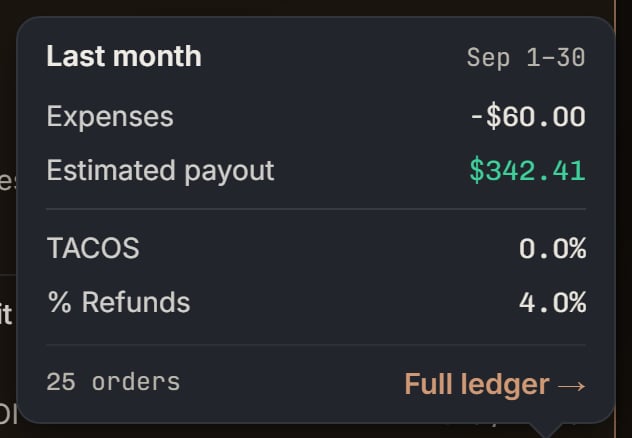
Label printer: More on the Sales page's Last month tile, the month it was paid. Notice the expenses line reads -$60.00.
Products never carry expenses
The product table does not give the blender any of the store’s expenses. The blender’s Net profit is $120.00, its Profit margin % is 60.0%, and its ROI is 240.0%. Open its row, and its own ledger shows Expenses recorded by you as $0.00. That hover says the expenses belong to the whole store, so no product carries them.Store fees (no product) shows under the products when the list is not filtered and that row has money. Here it carries the -$18.00, so its Net profit is -$18.00. It has no sales, so its margin and ROI are a dash.The total row, “Total · Month to date”, is the tile itself. The blender’s $120.00 plus the store row’s -$18.00 is its $102.00 net profit.The chart’s net bars take off each day’s expenses. On month to date, March 2’s bar is $18.00 lower. March 20 and March 25 are after today, so no bar has them. On an hourly chart, a day’s expense sits on its first hour.Sales, this month
The This month tile has a Forecast mark beside it. Its expense days run from March 1 through March 31, so charges still to come are in. Its More shows Expenses recorded by you as -$118.00, which matches the Expenses page.The tile’s sales, fees, and cost are SourceDock’s forecast for the whole month. This walk-through does not fill those in, so do not read its net profit as $102.00. The $102.00 belongs to month to date.A custom range on Sales can’t end after today, so on March 18 you can’t set March 1 through March 31 there. This month is the tile that counts the later charges.Capital Recovery
Capital Recovery shows the money for units you bought in the days you pick. It takes off the expenses charged in those same days, but never past the store’s today. A charge still ahead is left out, and a product’s own profit never takes these store costs.Set the start and end dates to March 1 through March 18. The calendar won’t let you pick a day after today. Only the $18.00 for “Shelf tape” is in those days.Say the units you bought in those days brought back $250.00 and cost you $50.00, with no ads paid outside Amazon. The Profit card’s hover adds it up: Cash recovered $250.00, What the sold units cost -$50.00, and Profit on what sold +$200.00. $250.00 + (-$50.00) = $200.00.Then it takes off Expenses recorded by you, -$18.00. The card’s name becomes Net profit, and its big number is +$182.00, because $200.00 - $18.00 = $182.00. Under the name, two lines show Profit on what sold +$200.00 and Expenses recorded by you -$18.00. The card’s ROI and margin use the net profit too.With no expenses in the days, the name stays Profit on what sold. If the sold units have no cost yet, the card says No cost yet.A note in the hover says the expenses are the ones charged from “Mar 01, 2026” to “Mar 18, 2026”. The ”?” beside the expenses line lists them, biggest first, up to 8, then one row for the rest. Here the only line is “Shelf tape”.All time runs from the first start day through today, so February 2 through March 18. Its charges are the tape on February 2 ($18.00), the labels on February 20 ($60.00), and the tape on March 2 ($18.00). $18.00 + $60.00 + $18.00 = $96.00, and March 20 and March 25 are not in it.The Desk
The Desk’s date menu sits on Found for you and opens on Last 30 days. A screen reader calls it Dates. The choices are Last 3 days, Last 7 days, Last 30 days, Last 90 days, This year, and All time.These choices use this computer’s calendar. Last 30 days is 30 whole days, with today last. When the computer and the store both say March 18, 2026, that is February 17 through March 18. Capital Recovery stops at the store’s today, the same March 18.In those days are the labels on February 20 ($60.00) and the tape on March 2 ($18.00). February 2 is before February 17, and March 20 and March 25 are after March 18. $60.00 + $18.00 = $78.00.The expenses tile is Expenses recorded by you, shown as -$78.00. Its hover names “Toy truck labels $60.00” and “Shelf tape $18.00”, and says they come off the profit on what sold.Say the profit on what sold, for purchases in those days, is $200.00. The profit tile is Net profit, shown as $122.00, because $200.00 - $78.00 = $122.00. Its hover says “Profit on what sold +$200.00, minus $78.00 in expenses recorded by you, is a net profit of $122.00.”That $122.00 is a different window from Capital Recovery’s +$182.00 above, because the expenses in this window are $78.00, not $18.00. The Desk’s Capital Recovery card follows purchase dates and uses this same expense rule.Which plans include Expenses
Which plans include Expenses