Scenario for this page: the demo store at 5 PM on its seed day. Grogu plush ($12.00 cost): Amazon lost 1, 55 days before the seed day, and 5 days are left to claim it. Plush whale ($8.00): Amazon’s warehouse damaged 1, 25 days before, with 35 days left. Bluey plane (10 bought at $10.00): 4 never came from the store, 40 days before. Darn Tough socks (10 at $12.00): 2 never came. Find them in the demo store on the Desk, on Alerts, and under Capital Recovery > Reconcile > File claims. The pictures show the demo store; the walk’s own numbers are a made-up store. The Needs you picture has Health strip on desk turned off. The demo login has it on, so turn it off under Account > Features > Desk to match it.
Say you sell 40 products on Amazon. Each morning you open SourceDock with your coffee. In about 10 minutes you file the claims that are ready, fix what needs you, see how much money came back, and decide what to buy next. This page walks through that check, one step at a time, with a made-up store. Each step links to the page that explains it in full.

Step 1: Open the Desk (1 minute)

Click Desk on the bar. It’s the first page you see after you sign in.

Found for you: money you can claim

Say Amazon owes you for 3 units you can claim today: $8.00, $28.00 and $12.00. One more unit might be owed, but Amazon’s reports can’t prove it: $8.00.
  • Ready to claim shows $48.00: $8.00 + $28.00 + $12.00. These are claims you can file today, inside Amazon’s time limit.
  • Needs a look shows $8.00: claims Amazon’s reports can’t prove. You can still ask.
  • The line on top adds the two: “You could claim back up to $56.00”.
Both tiles are tagged Now. They always show today, whatever dates you pick. Late claims aren’t in them.
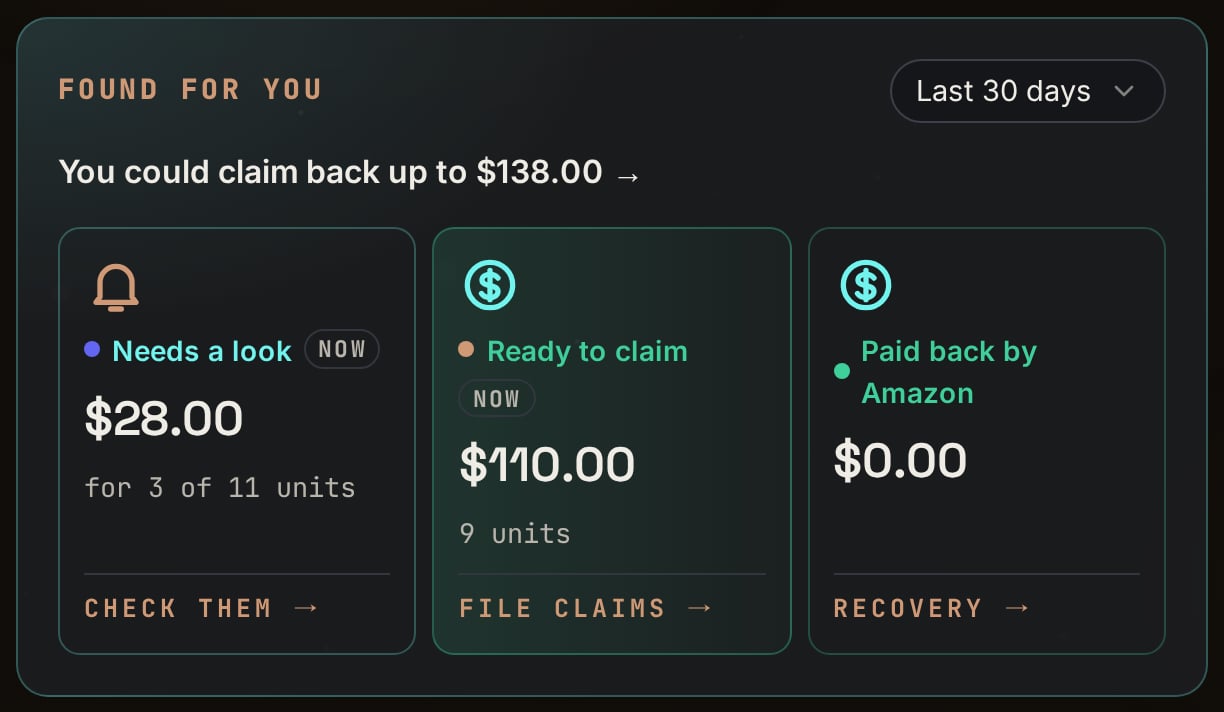
The Found for you card with a Last 30 days menu. It says You could claim back up to $138.00, then three tiles: Needs a look $28.00 for 3 of 11 units, Ready to claim $110.00 and 9 units, and Paid back by Amazon $0.00.

Demo store: Found for you. Notice $110.00 ready plus $28.00 needs a look makes the $138.00 on top.

The third tile, Paid back by Amazon, is what Amazon paid you for units it lost or damaged, less anything it took back. It follows the date menu on this block, which starts on Last 30 days. See What came back for what those dates mean.

Needs you: the 3 things that matter most

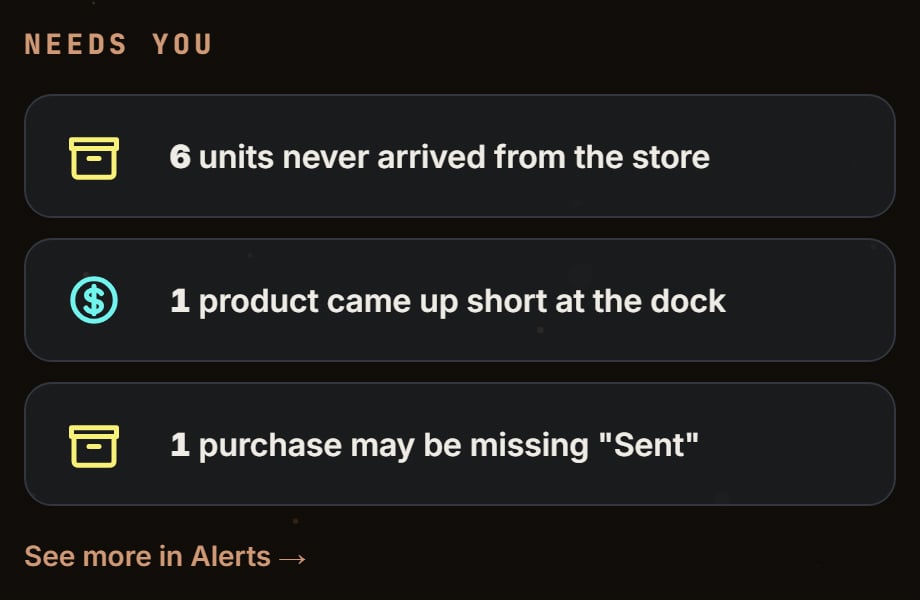
Needs you lists the 3 problems that need you most, not counting claims. Say it shows:
  1. “4 units never arrived from the store”
  2. “1 product came up short at the dock”
  3. “Count too low on 2 orders”
Units that never arrived always come first. Then boxes short at Amazon’s dock. Then the rest, most money first. Click a row to fix it. See more in Alerts shows the rest.
The Needs you card with three rows: 6 units never arrived from the store, 1 product came up short at the dock, and 1 purchase may be missing Sent, then a See more in Alerts link.

Bluey plane and Darn Tough socks: Needs you, with Health strip on desk turned off (the demo login has it on). Notice 6 units never arrived (4 planes and 2 pairs of socks) is first, then the box short at the dock.

The wheel: how your products are doing

In the middle of the wheel, Came back to you is the cash that came back from what you bought in the dates you picked. Say in the last 30 days you bought $1,200 of stock. So far, $420 of it has come back from Amazon, after fees. The wheel shows “$420” and “35% of what you put to work”: $420 ÷ $1,200 = 35%.
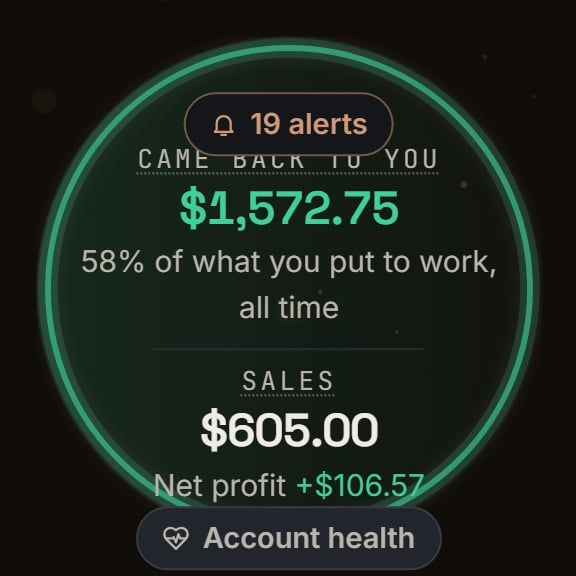
A green ring. Inside: a 19 alerts chip, Came back to you $1,572.75, 58% of what you put to work, all time, then Sales $605.00 and Net profit +$106.57, and an Account health pill.

Demo store: the middle of the wheel. Notice the demo store's middle always counts all time, so it says 58% of what you put to work, all time.

Around it, each circle is one step: Scout, Gate Scanner, Vault, Purchases, Sales and Recovery. A green number on Scout is new products to look at. A copper number is that step’s alerts. More in The Desk.

Step 2: File today’s claims (3 to 5 minutes)

Click Ready to claim. It opens Capital Recovery > Reconcile on File claims. The list on the left shows each claim’s money and days left, like “34d”. Start with the smallest number of days, so nothing runs out.
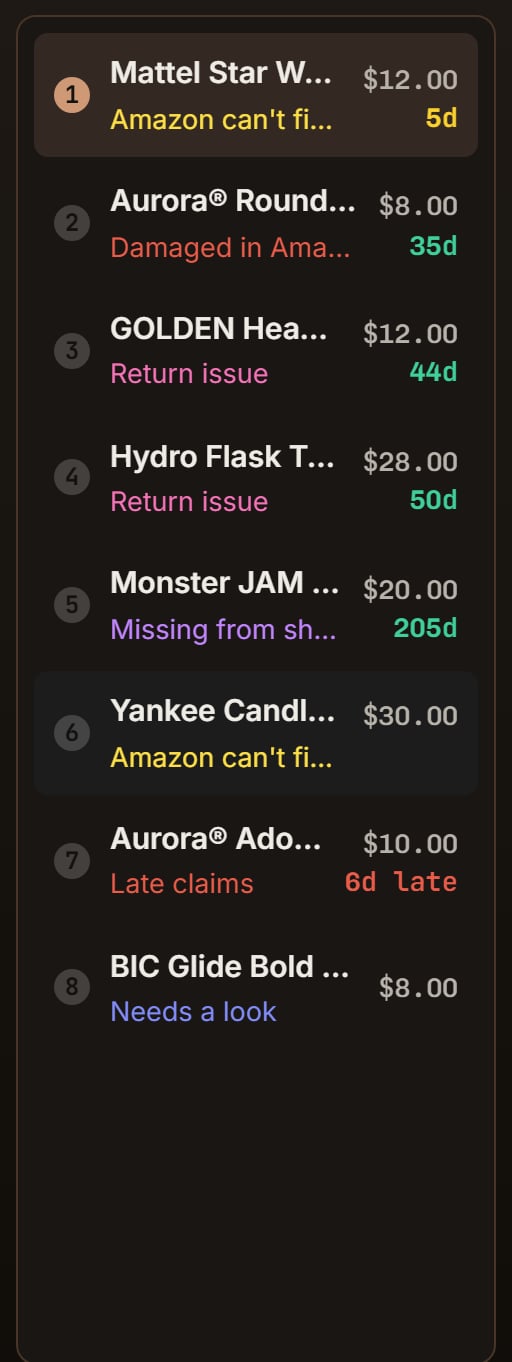
A numbered list of 8 claims. 1: Mattel Star Wars Grogu, Amazon can't find it, $12.00, 5d. 2: Aurora Round Rolly Pet, Damaged in Amazon's warehouse, $8.00, 35d. Then GOLDEN acrylics, Hydro Flask, Monster JAM, Yankee Candle, an Aurora late claim marked 6d late, and BIC Glide Bold, Needs a look.

Grogu plush and plush whale: the File claims list. Notice Grogu is first with 5d left, and the whale is second with 35d.

For each card:
1

Read it

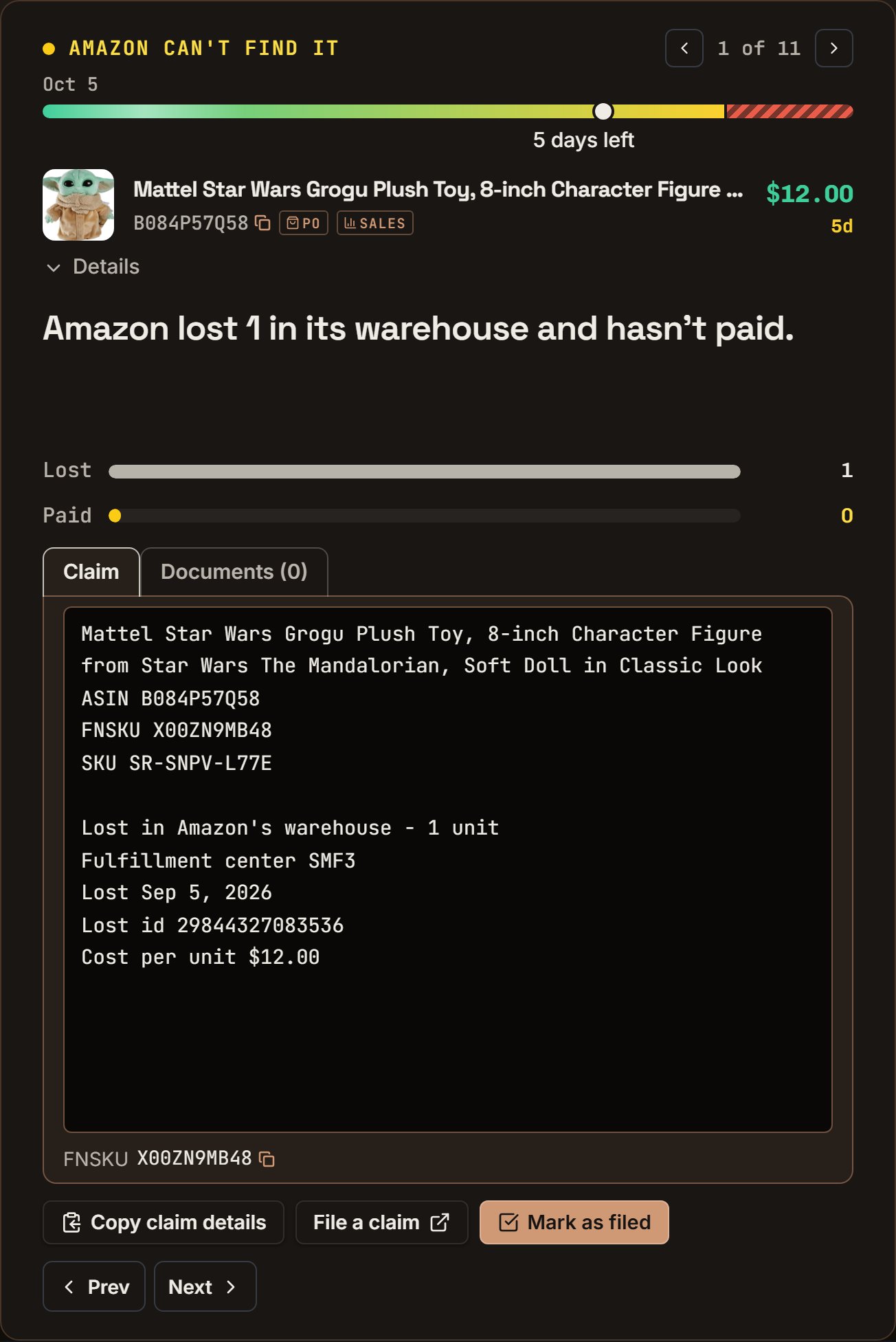
One sentence says what happened, like “Amazon damaged 1 and hasn’t reimbursed you.”
2

Copy and file

Click Copy claim details, then File a claim. Paste it in Seller Central and send it.
3

Mark it filed

Click Mark as filed. Add the case number Amazon gives you, so SourceDock can match Amazon’s payment to it later.
Three claims take about 3 minutes. Every kind of claim is in Claims.
A claim card titled Amazon can't find it, 1 of 11, with a time bar and 5 days left. It names the Grogu plush, $12.00, and says Amazon lost 1 in its warehouse and hasn't paid. Bars show Lost 1 and Paid 0. Under the claim text are Copy claim details, File a claim, and Mark as filed.

Grogu plush: its claim card. Notice the one sentence on top, then the Copy claim details, File a claim and Mark as filed buttons.

Step 3: Check your alerts (1 to 2 minutes)

Click Alerts on the bar. The top says how many there are, like “6 things to look at.” Use the chips to go through them by kind. Say you see:

A row of chips after the words Show me: Everything 19, Claims ready $110.00 6, Possible claims 1, Not received 1, Selling slowly 1, Not on pace 1, Selling out fast 1, Fix counts 8, Buy next 0, and Early warnings 0.

Demo store: the Show me chips on Alerts. Notice Everything counts 19, the same 19 as the top line.

  • Not received (1): an order from 20 days ago. 4 of its 24 units never came. Click Open orders and write them off, or type how many came.
  • Fix counts (2): Amazon holds more units than your orders say came in. Click the row’s button and fix the count.
  • Buy next (1): a product that’s running low. Click Review to see how many to order.
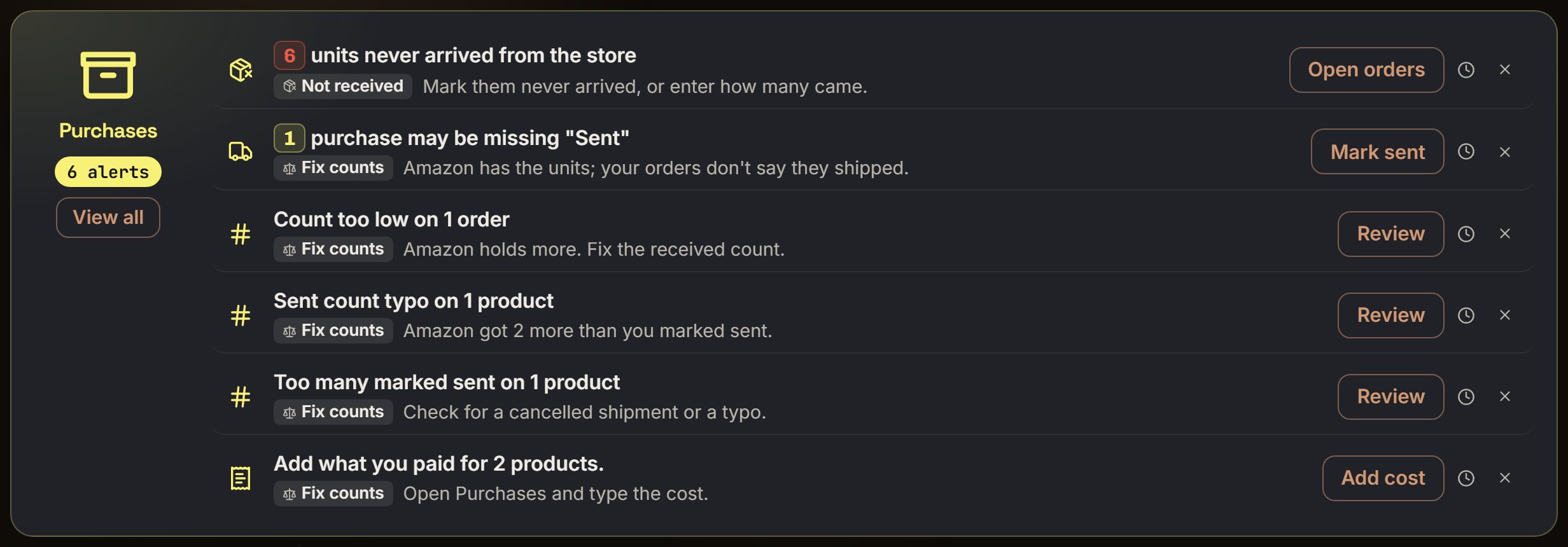
The Purchases card on Alerts with 6 alerts. Rows: 6 units never arrived from the store (Open orders), 1 purchase may be missing Sent (Mark sent), Count too low on 1 order, Sent count typo on 1 product, Too many marked sent on 1 product, and Add what you paid for 2 products (Add cost).

Bluey plane and Darn Tough socks: the Purchases alerts. Notice the Not received row says 6 units never arrived, with an Open orders button.
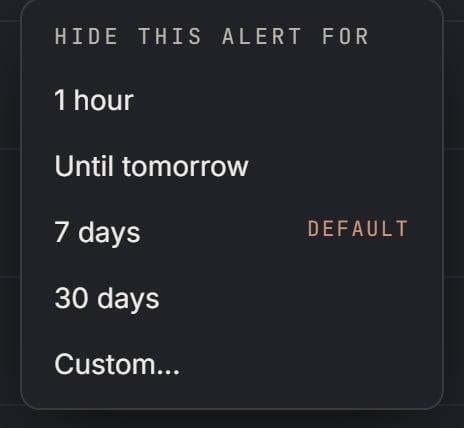
An alert you can’t fix today? Click × to hide it for 7 days. If the problem is still there, it comes back. More in Alerts and the Alerts reference.
A small menu titled Hide this alert for, with 1 hour, Until tomorrow, 7 days marked Default, 30 days, and Custom.

Demo store: the clock next to a row's X. Notice 7 days is the default, the same as the X.

Step 4: See what came back (1 minute)

“How much did I get back?” can mean three things. Each has its own place.

Money back on what you bought in the last 30 days

This is the Desk’s Came back to you with Last 30 days picked, from Step 1. Say it reads $420. The dates pick which purchases count, by the day you bought them. Each one counts with everything it has earned through today.
  • A blender you bought 10 days ago that already sold: its money is in the $420.
  • A toy you bought 6 months ago that sold yesterday: its money is not in the $420, because you didn’t buy it in the last 30 days.
For the same number with more detail, open Capital Recovery and click 30d. The Desk’s Paid back by Amazon follows the same rule: it’s what Amazon paid back on units you bought in those days.

Money Amazon actually paid you

Open Capital Recovery > Wallet. It lists Amazon’s payouts, newest first. Each says when it was paid, like “Paid Oct 21”.
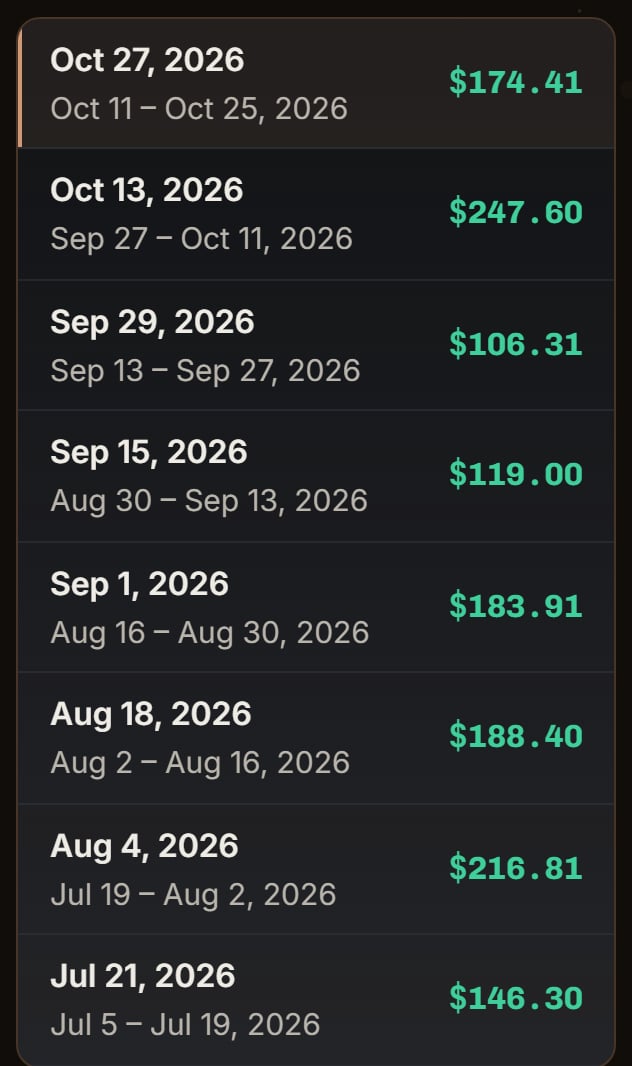
A list of payouts, newest first: Oct 27, 2026 for Oct 11 to Oct 25, $174.41; Oct 13, 2026, $247.60; Sep 29, 2026, $106.31; and older ones.

Demo store: the Wallet's payout list. Notice the newest payout, $174.41, is at the top.

Say the last two payouts were “Paid Oct 21” for $310 and “Paid Oct 7” for $280. In the last 30 days, Amazon paid you $310 + $280 = $590. The total at the top, Paid to you, is all time. At the top you also see the Next payout (estimate) and what Amazon is holding. Click a payout to see what’s in it: what buyers paid, Amazon’s fees, refunds, and claims Amazon paid back.
Three boxes: Paid to you, All time, $1,406.37, 14 US payouts; Next payout (estimate) $54.00 with the day Amazon sends it; and Amazon is holding $0.00.

Demo store: the top of Wallet. Notice Paid to you counts all time, $1,406.37 over 14 US payouts.

Sales by order date

Open Sales. Month to date shows the orders placed since the 1st. For exactly 30 days, click Custom and pick the days. Sales counts each order on the day it was placed. More in Sales.

Step 5: Decide what’s next (2 minutes)

  • Buy more of what sells. Check Buy next on Alerts, or the Reorder soon chip on Capital Recovery. See Restock reminders.
  • Look at new finds. If Scout has a green number, open it and save the good ones to your Vault. See Scout.
  • Record today’s buys. Bought something? Add it in Purchases with Record Purchase, so its profit counts. See Purchases.
  • Add missing costs. A product with no cost isn’t in your profit. Click Cost needed on Purchases and type what you paid.

Once a week

  • Open Filed claims. A claim filed 30 days ago with no payment comes back under Needs a look, with “Follow up with Amazon”. Open the case in Seller Central and ask.
  • Add the week’s costs Amazon doesn’t see, like software or boxes, on Expenses.

Plans

The Desk, Alerts and Purchases are on every plan. Claims, Came back to you, Capital Recovery and Sales come with Pro. A Premier trial has them too.