

In short
Amazon pays you back for units it loses or damages, but only if you ask in time. SourceDock finds them in Amazon’s reports, writes the claim for you, and shows how many days you have left. You file it in Seller Central. SourceDock doesn’t file it for you. Example: Amazon lost one Grogu plush you paid $12.00 for. Its card says “5 days left” and “Amazon lost 1 in its warehouse and hasn’t paid.”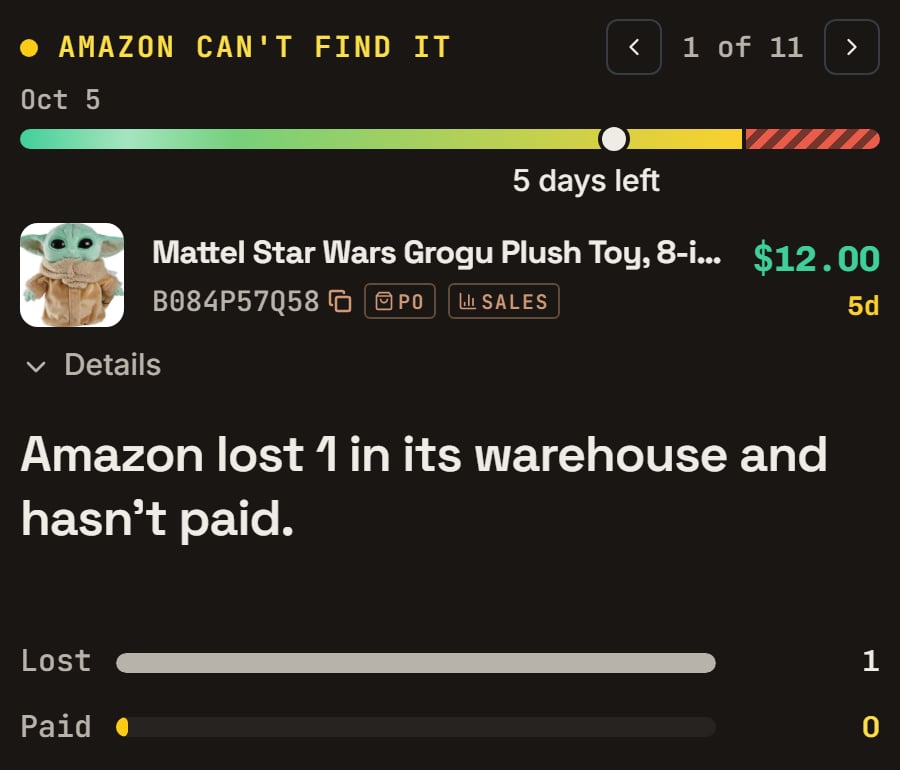
Grogu plush: lost 55 days before the seed day, so it is in its last week. Notice 5 days left and the bars Lost 1 and Paid 0.
More details
About the pictures on this page
About the pictures on this page
Where to find claims
Where to find claims
- Ready to claim: Amazon’s reports show it owes you. This money is in your At risk total.
- Needs a look: it may be a claim, but Amazon’s reports can’t prove it, so Amazon may say no. It isn’t in At risk.
- Late claims: the last day passed less than 14 days ago. Amazon sometimes still reviews a late claim, but it doesn’t have to. It isn’t in At risk.
A tour of Reconcile: the totals, the tabs and the list
A tour of Reconcile: the totals, the tabs and the list

The demo store's claims: the Reconciling bar. Notice it says 8 left, $110.00 ready to claim and $8.00 needs a look.
- “$110.00 ready to claim” adds up the claims you can file now: $8.00 + $12.00 + $12.00 + $28.00 + $20.00 + $30.00.
- “$8.00 needs a look” adds up the claims Amazon’s reports can’t prove: the pens.
- Late claims are in neither number: the rabbit’s $10.00 isn’t counted.

The demo store's claims: the four tabs. Notice the counts: 8 to file, 0 issues, 2 filed, 1 paid out.
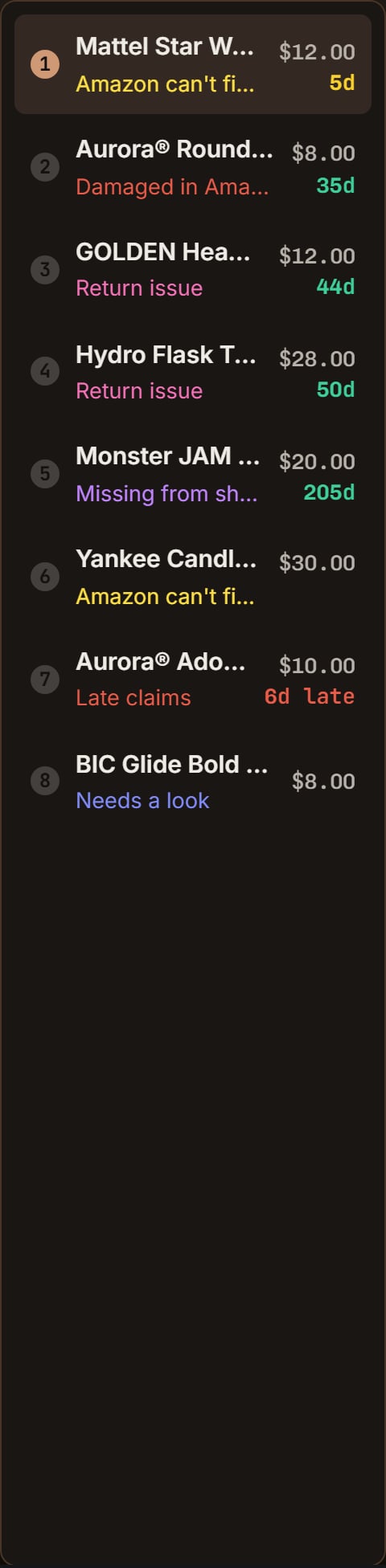
The demo store's claims: the list on the left. Notice each row's kind in color and its days left, like 35d for the whale and 5d for the Grogu plush.
The Issues tab: not a claim yet
The Issues tab: not a claim yet
File a claim
File a claim
Copy it
File it
Mark it filed
Read one card, line by line, and Mark as filed
Read one card, line by line, and Mark as filed

Plush whale: the three buttons. Notice Copy claim details, File a claim and Mark as filed.
The kind
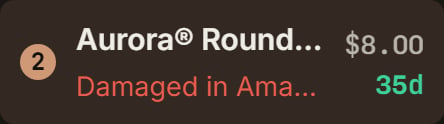
Plush whale: its row in the list. Notice the kind in red, Damaged in Amazon's warehouse, and 35d.
The time bar
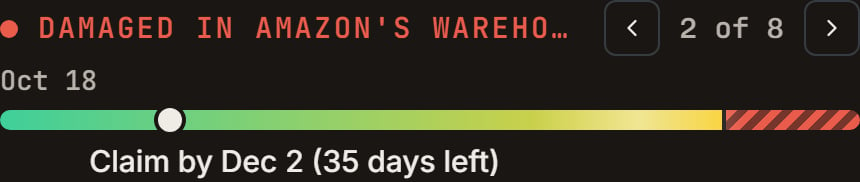
Plush whale: the time bar on the seed day. Notice Oct 18 on the left and Claim by Dec 2 (35 days left) under the bar.
The product

Plush whale: the product line. Notice $8.00 with 35d under it.
What happened
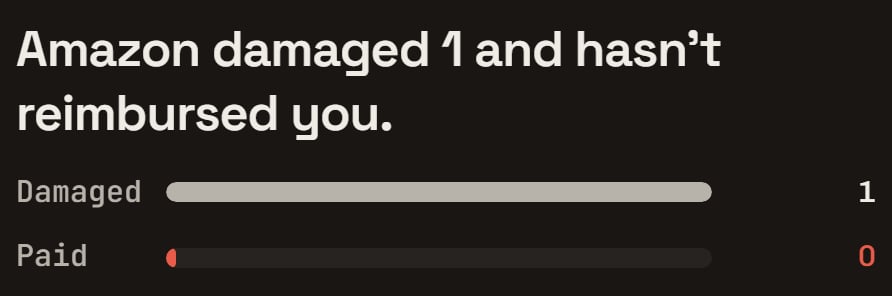
Plush whale: what happened. Notice the two bars, Damaged 1 and Paid 0.
The claim
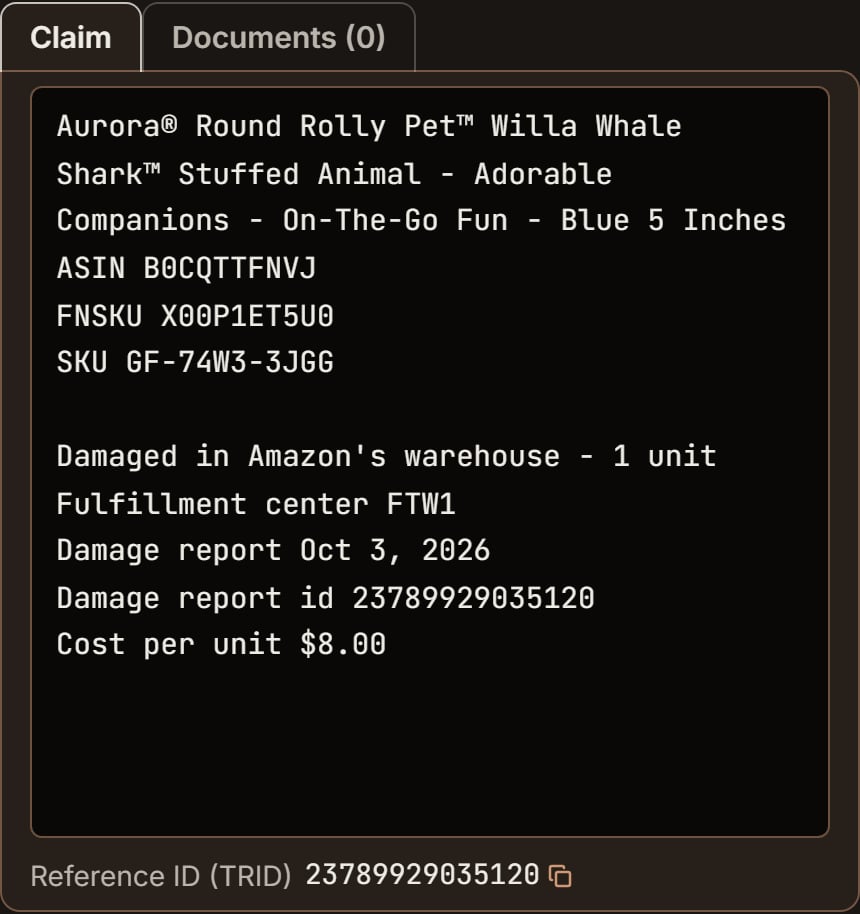
Plush whale: the claim, ready to paste. Notice it starts with the product name, then the ASIN, FNSKU and SKU lines, and ends with Cost per unit $8.00.
File it
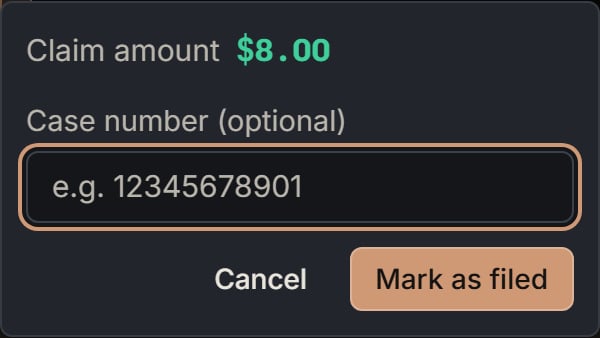
Plush whale: the Mark as filed box. Notice the claim amount, $8.00, and the empty case number.
How much a claim is worth
How much a claim is worth
- Lost, damaged, short, taken: what you paid for each unit, times the units. Two at $12.00 = $24.00.
- Refunded, never returned: what that sale brought in after Amazon’s fees. A $40 sale that netted $28 is worth $28.
- No cost on file: SourceDock uses Amazon’s price, or shows Cost needed. Add the cost in Purchases and the money fills in.
- After Amazon pays: the claim shows what Amazon actually paid.
Read the Details panel, and See details →
Read the Details panel, and See details →
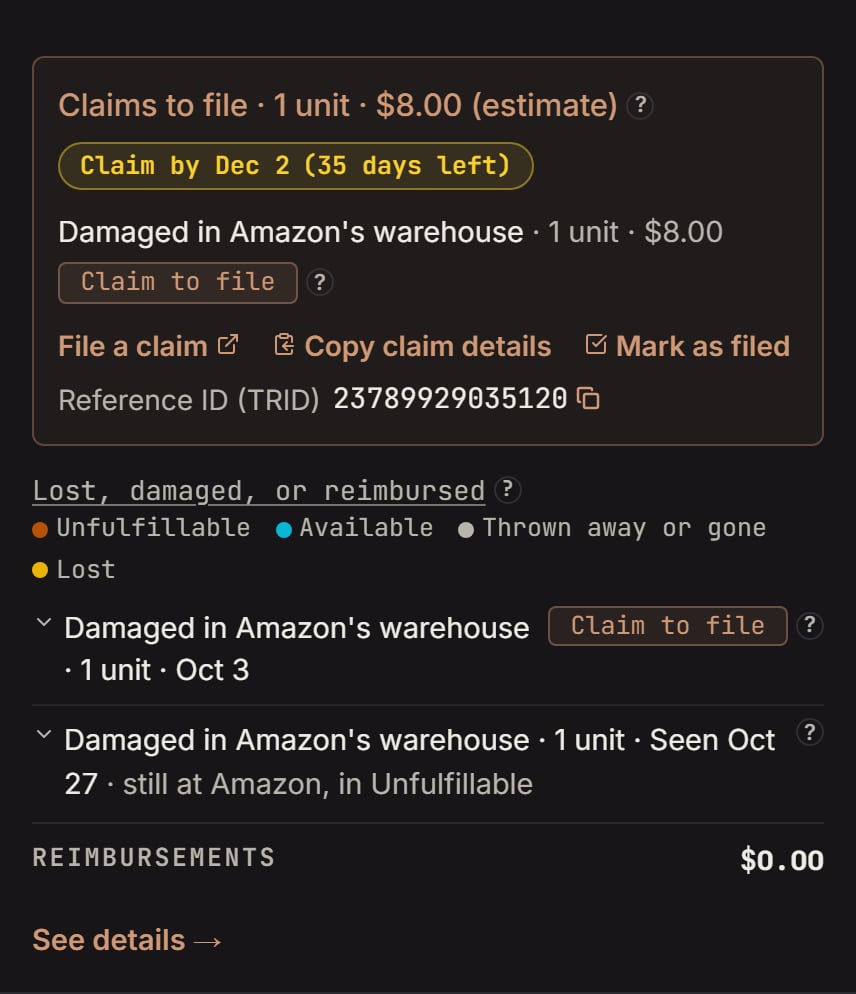
Plush whale: Issues and claims. Notice Claims to file, 1 unit, $8.00, Claim by Dec 2 (35 days left), and the links under it.
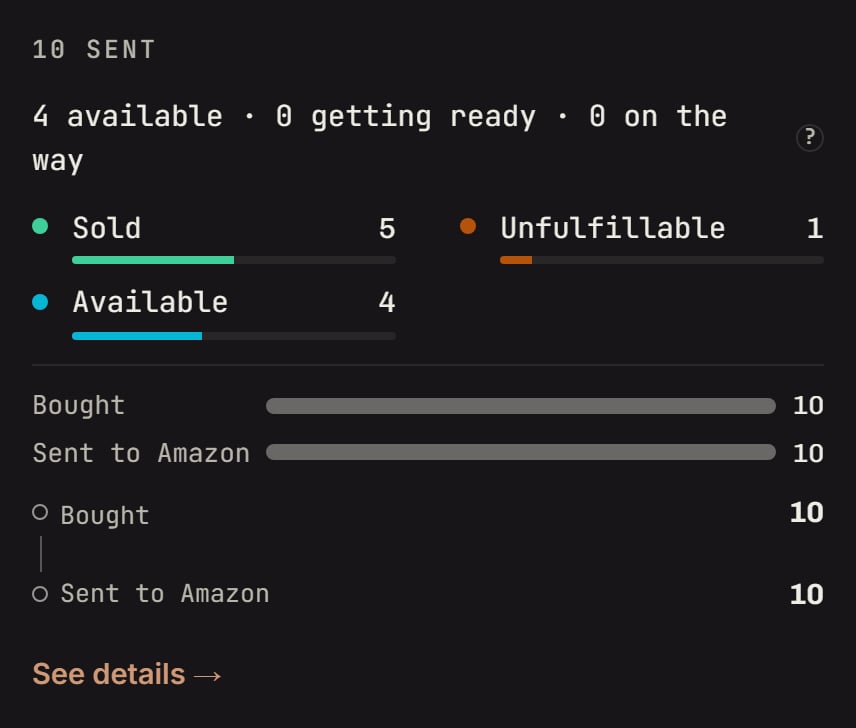
Plush whale: Units at Amazon. Notice the lines add up to the 10 you sent.
- Lost or thrown away: Amazon lost these and never found them, or threw them away.
- Being looked for: Amazon misplaced these and is searching. When found, they go back on the shelf.
- Written off: units you wrote off that Amazon’s count still holds.
- Claims to file: like “Claims to file · 1 unit · $8.00 (estimate)”, with the days left, a Claim to file tag, and the links File a claim, Copy claim details and Mark as filed.
- Late claims: past their last day, by less than 14 days. Each says May be too late to claim.
- Needs a look: claims Amazon’s reports can’t prove either way.
- Filed claims: what you filed, the case number, and where it stands, like “Waiting on Amazon · 14 days”.
- Paid claims: what Amazon paid, and when, like “Paid $12.00 on Oct 8”, or Amazon paid on its own.
- Lost, damaged, or reimbursed: every unit Amazon lost or damaged, tagged Claim to file, Needs a look, Filed or Can’t claim.
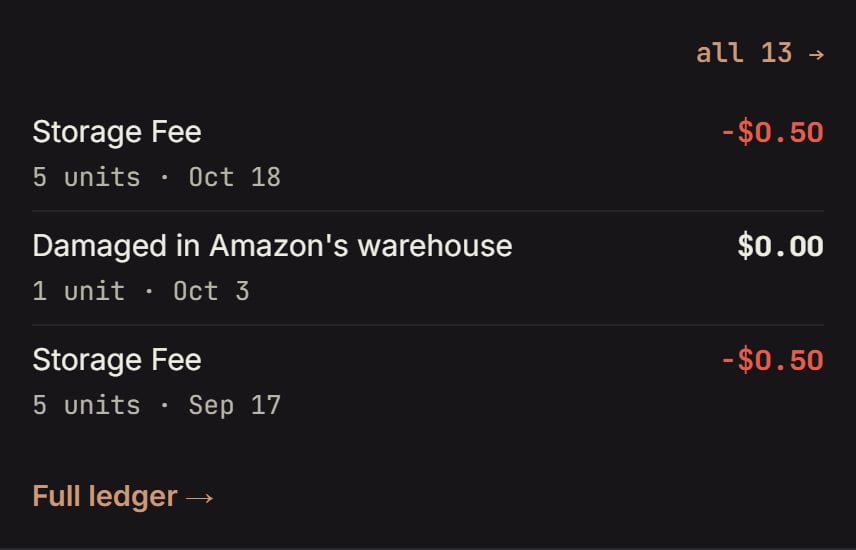
Plush whale: Activity. Notice the damage on Oct 3, between two storage fees.
- CLAIMS lists each claim by kind, like “Damaged in Amazon’s warehouse · 1”, with the unit’s timeline (from Sellable to Damaged in Amazon’s warehouse, with the date, warehouse and Amazon’s reference number), File a claim, Copy claim details and the Reference ID (TRID). Claims past their last day and the 14 extra days show as Too late to claim. With nothing to file it says “No claims you can file right now.” Under the claims are the product’s boxes: what you sent, what Amazon got, and if the box is closed. Then come the Ledger events: Amazon’s own ledger lines, grouped, like “Received 1 line”, “Damaged 1 line”, “Sent to buyers 5 lines”.
- LEDGER is the product’s money: the Financial Breakdown.
- EVENTS is every Amazon event by date. Filter it with Sales, Fees, Refunds, Returns, Losses, Damages and Reimb.
- SHIPMENTS lists your boxes to Amazon: what each box said, what Amazon got, and whether it’s closed.
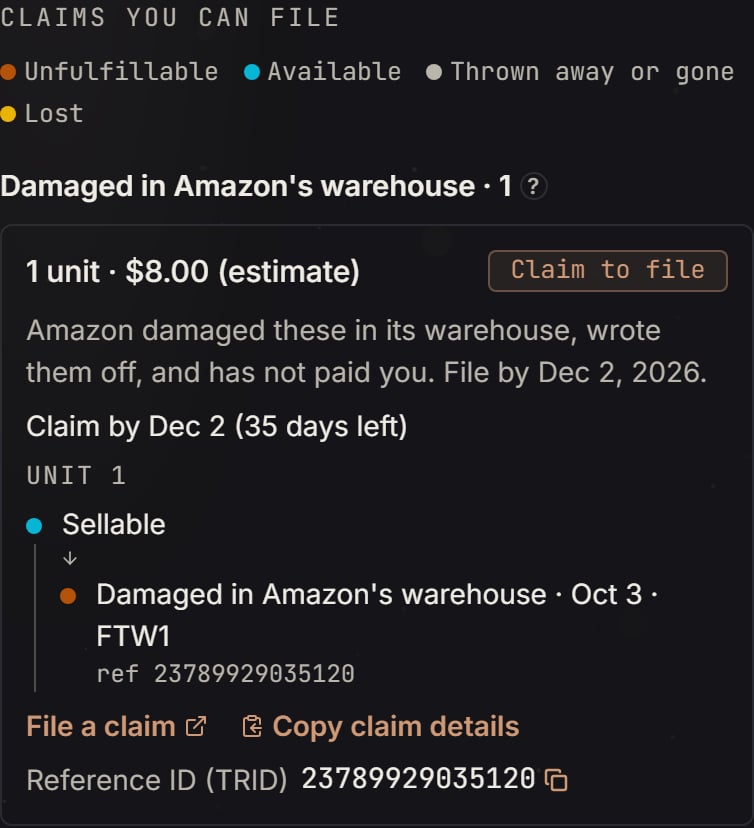
Plush whale: CLAIMS in See details. Notice the unit's timeline from Sellable to Damaged in Amazon's warehouse on Oct 3.
How long you have
How long you have
The time bar, and every kind's window
The time bar, and every kind's window
- Amazon logged the damage on Oct 3. That’s day 0.
- Amazon pays most damage on its own within two weeks, so the claim opens on day 15: Oct 18.
- Amazon takes damage claims until day 60, and day 60 counts: Dec 2.
- On Oct 28, Dec 2 is 35 days away: “Claim by Dec 2 (35 days left)”.
- After Dec 2, the card is under Late claims until Dec 16. Then it leaves the list. It shows as Too late to claim in the product’s Details for 30 more days, so you can see what happened, and then goes away.
- Damaged and lost: day 60 counts. A refund’s clock starts on the day of the refund or replacement.
- Taken with no payment and Carrier damaged are always Needs a look.
- Shipment came up short: the clock starts the day Amazon checked in the first unit. If SourceDock saw the box turn delivered before that, it starts that day instead. The last day is 9 months later, on the same date. Example: the first unit came in Sep 5, so the last day is Jun 5. Amazon counts its 9 months from the day the box was delivered. SourceDock can’t see that exact day, so it uses the closest day it has. The box may have arrived a day or two before the first check-in, so don’t wait for the last day.
- Shipment delivered, Amazon got none: the clock starts the day SourceDock first sees the box delivered. This needs SourceDock to have seen the box on its way first. If it didn’t, the clock starts on the date in the shipment’s name. The last day is 9 months later.
- Why wait at the start? Amazon pays most damage on its own within two weeks, and looks for a lost unit for 30 days. A unit still inside that wait isn’t a claim yet, so SourceDock doesn’t show it.
- A return claim (Refunded, never returned or Return graded wrong) runs from day 45 to day 105 after the refund, not day 60 to day 120.
- A box Amazon shows as delivered with none received can be filed from 90 days after SourceDock first sees it delivered, not 45.
- A lost lip balm, logged Oct 20: it opens on day 30, Nov 19. The last day is day 60, Dec 19.
- A refund on Aug 19 for a tumbler that never came back: it opens on day 60, Oct 18. The last day is day 120, Dec 17.
Every kind of claim, card by card
Every kind of claim, card by card
- The card says: “Amazon damaged 1 and hasn’t reimbursed you.” The bars read “Damaged 1” and “Paid 0”.
- Why the 15-day wait: Amazon pays most damage on its own within two weeks. If it does, no card shows, and the payment is under Paid claims as Amazon paid on its own.
- Where to look: CLAIMS under See details → shows the unit’s timeline and the Reference ID (TRID).
- Ask Jax: “When did Amazon log this damage?” or “Has Amazon paid for any other damage on this product?”
- Days 0 to 29: Amazon is still looking, so there’s no card. If the product already has a card for something else, that card’s line says Amazon is looking, and names the day it becomes a claim. Units at Amazon shows the unit on its Lost line. In CLAIMS under See details →, the ledger’s Lost line shows, and “No claims you can file right now.” If Amazon finds it, a Found line follows and it goes back on the shelf.
- Day 30, Nov 19: if it’s still lost, a card shows: “Amazon lost 1 in its warehouse and hasn’t paid.” The bars read “Lost 1” and “Paid 0”. The last day is Dec 19. The Grogu card at the top of this page is one.
- Being looked for counts misplaced units that no lost line names yet. A unit whose loss Amazon already logged shows on Lost, even while Amazon looks.
- Ask Jax: “When did Amazon log this loss?” or “Did Amazon pay for any lost units on this product?”
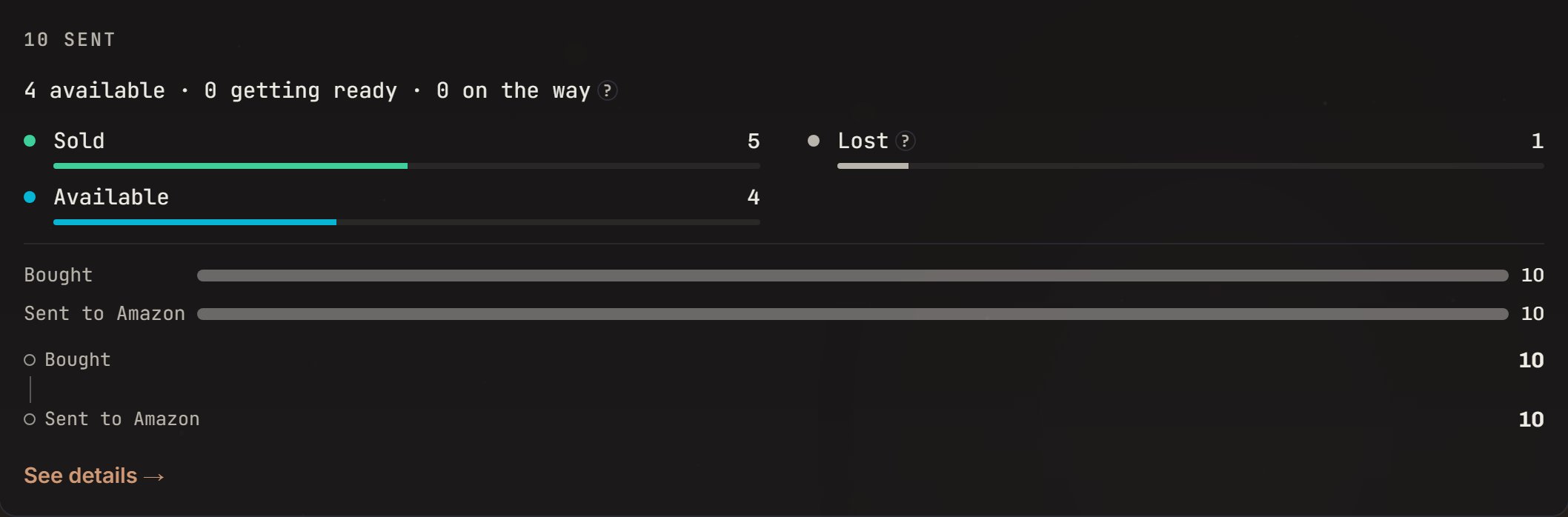
Espresso capsules: lost 8 days before the seed day, so not a claim yet. Notice the Lost 1 line: Amazon logged the loss, so the unit is counted there while Amazon looks.
- The card says: “Amazon has no record of 3 it checked in, and hasn’t paid.” The money is 3 × $10.00 = $30.00.
- When: 30 days after Amazon’s last check-in, once every box is closed. The bar says “Claimable since” that day. There’s no last day, but file soon.
- Where to look: compare Units at Amazon with the Inventory ledger link. The missing units have no line in either.
- Ask Jax: “Where do these numbers come from?” or “Which boxes did these units come in?”
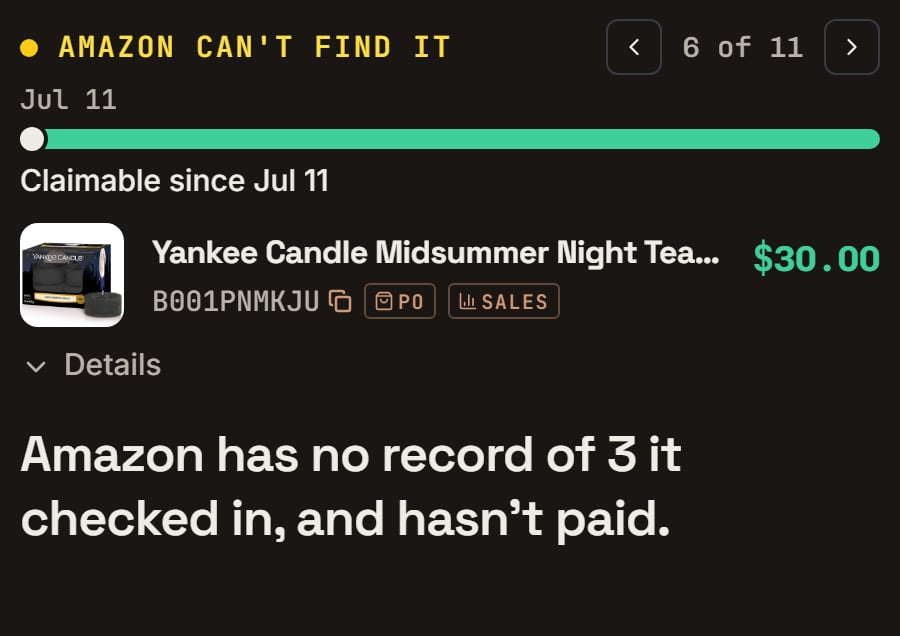
Tea lights: 3 gone from Amazon's count 60 days before the seed day. Notice Claimable since Jul 11: that counts 30 days from Amazon's last check-in, not from when the 3 went missing. There is no last day.
- Days 0 to 14: Units at Amazon shows them on a Moved between warehouses line. Its hover: “Amazon is moving these between its warehouses. Amazon’s stock count shows 0 while they travel. If they’re still moving after 15 days, SourceDock flags them as missing.” Nothing to do yet.
- Day 15, Oct 16: SourceDock counts them as missing from Amazon’s records. A card shows on the Issues tab, under Amazon can’t find it.
- Day 30, Oct 31, at the earliest: it’s a Missing from Amazon’s records claim on File claims. It has no last day, so file it soon.
- If the units land at the new warehouse, it all clears on its own.
- Where to look: the Inventory ledger link in Details shows the move out, and no move in.
- The card says: “A buyer’s return never came back and Amazon refunded them.” The bars read “Refunded 1” and “Came back 0”. The money is $28.00.
- Why the 60-day wait: the buyer has time to send it back. If it comes back, the claim goes away.
- A refund under 80% of what the buyer paid can’t be claimed this way.
- A Canada order Amazon hasn’t paid out in US dollars yet says “Amazon has not paid this refund out in US dollars yet, so it shows in Canadian dollars.” Its money shows in CA$ until then.
- Ask Jax: “Which order was this refund for?” or “Did Amazon pay anything back on this refund?”
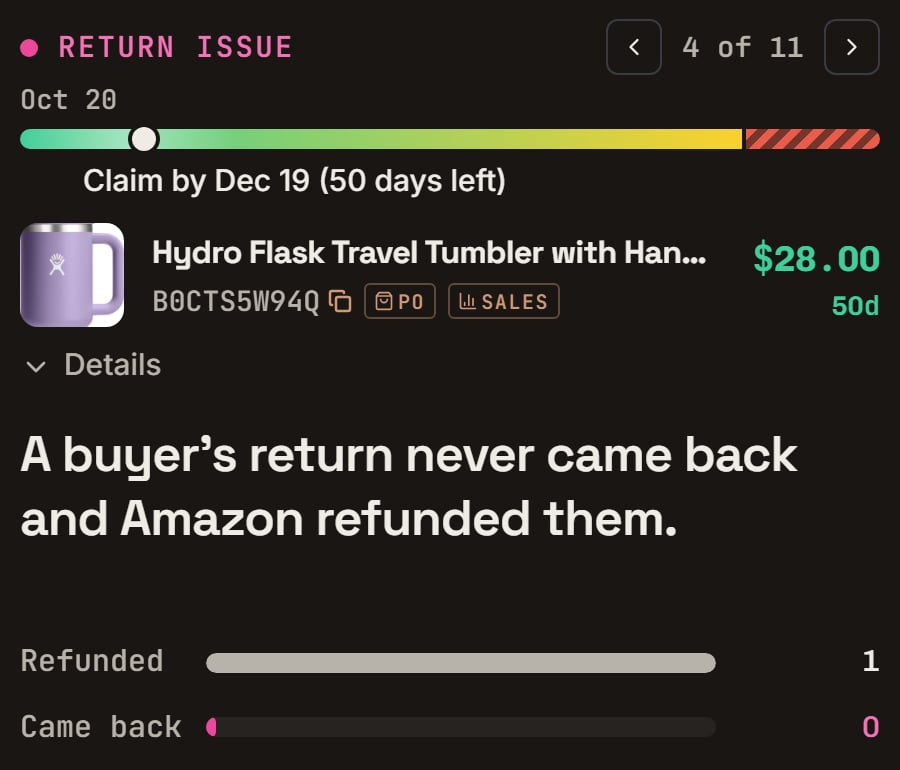
Tumbler: refunded 70 days before the seed day, never sent back. Notice the bars Refunded 1 and Came back 0, and 50 days left.
- The card says: “The buyer said it arrived damaged, but Amazon blamed them.”
- What to do: file it, and ask Amazon to look at the grade again.
- Ask Jax: “Why does this look like Amazon’s fault?” or “What should I check first?”
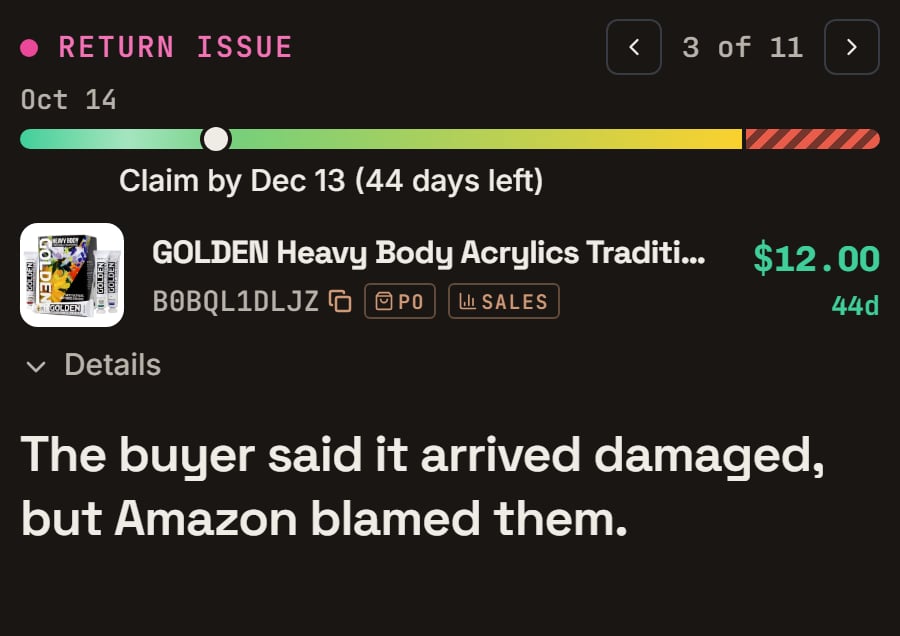
Paint set: the buyer said the carrier damaged it, and the return was graded buyer damaged. Notice 44 days left.
- The card says: “Amazon got 10 of the 12 you sent and hasn’t paid for 2.” The money is 2 × $10.00 = $20.00. If SourceDock doesn’t know a box’s counts, it says “A shipment came in 2 short, and Amazon hasn’t paid.” instead.
- When: Amazon keeps counting until it closes the box. The claim opens the day Amazon closes it, if it is still short.
- Proof: Amazon often asks for your receipt. If the card says Upload the receipt for this order, open the Documents tab and click Add receipt. Box photos you took in Purchases show as proof too.
- Where to look: SHIPMENTS under See details → shows what the box said and what Amazon got.
- Ask Jax: “How many did my shipment say, and how many did Amazon count?” or “What proof will Amazon ask for?”
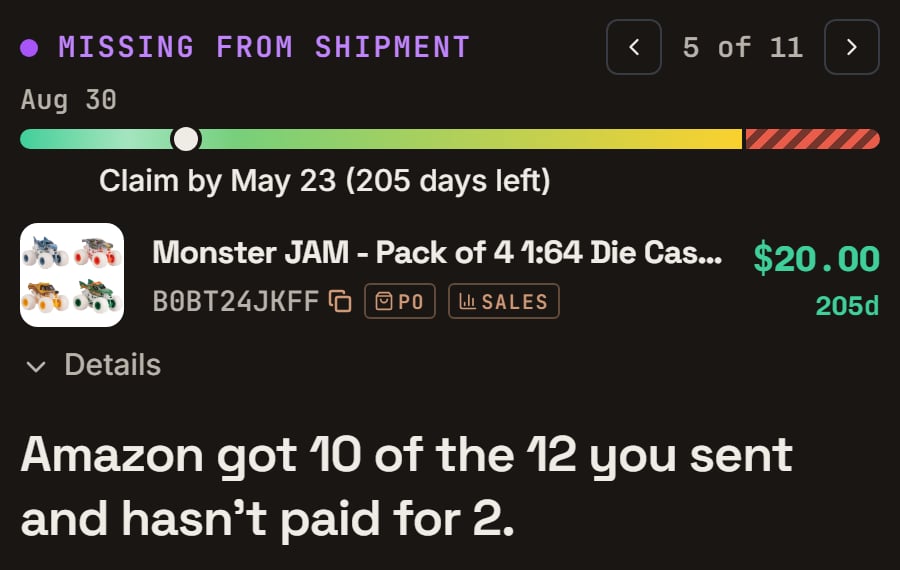
Toy trucks: a box of 12 that came up 2 short, 61 days before the seed day. Notice Claim by May 23 (205 days left), $20.00, and Amazon got 10 of the 12.
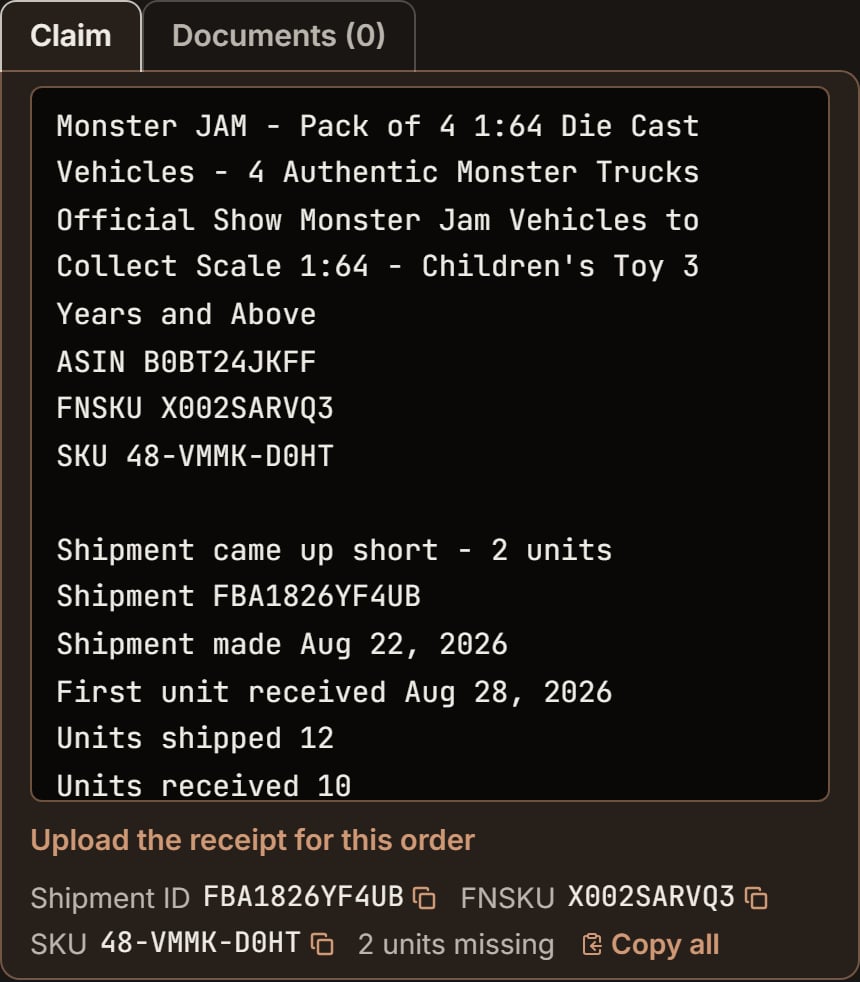
Toy trucks: the claim, ready to paste. Notice Units shipped 12 and Units received 10, and the Upload the receipt for this order link under it.
- Taken back within 14 days, at the warehouse that checked them in: it asks “Did you send them?” Click I sent them or I didn’t send them. Until you answer, it isn’t a claim.
- Taken back later: it’s a claim, with I didn’t send these beside it. Click it if those units were never in the box.
- If you say you didn’t send them, SourceDock puts them back as not sent on your purchases. Undo takes your answer back.
- What it means: the box reached Amazon, but nothing was counted in.
- For the first 45 days after SourceDock sees it delivered (90 on a Canada store), there’s no card: Amazon may still be checking it in.
- Then the card says: “Your shipment of 6 shows delivered, but Amazon got none.”
- What to do: add the receipt in Documents, then file.
- Ask Jax: “When did this shipment show as delivered?”
Needs a look: every reason, and how to file one
Needs a look: every reason, and how to file one
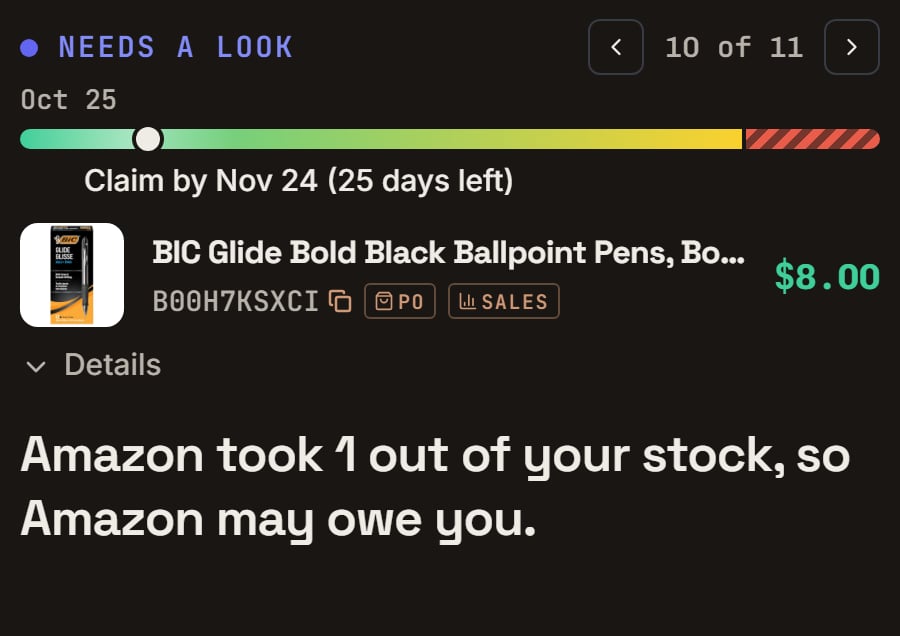
Pens: Amazon took 1 out of stock 35 days before the seed day and paid nothing. Notice Needs a look in blue, and the words may owe.
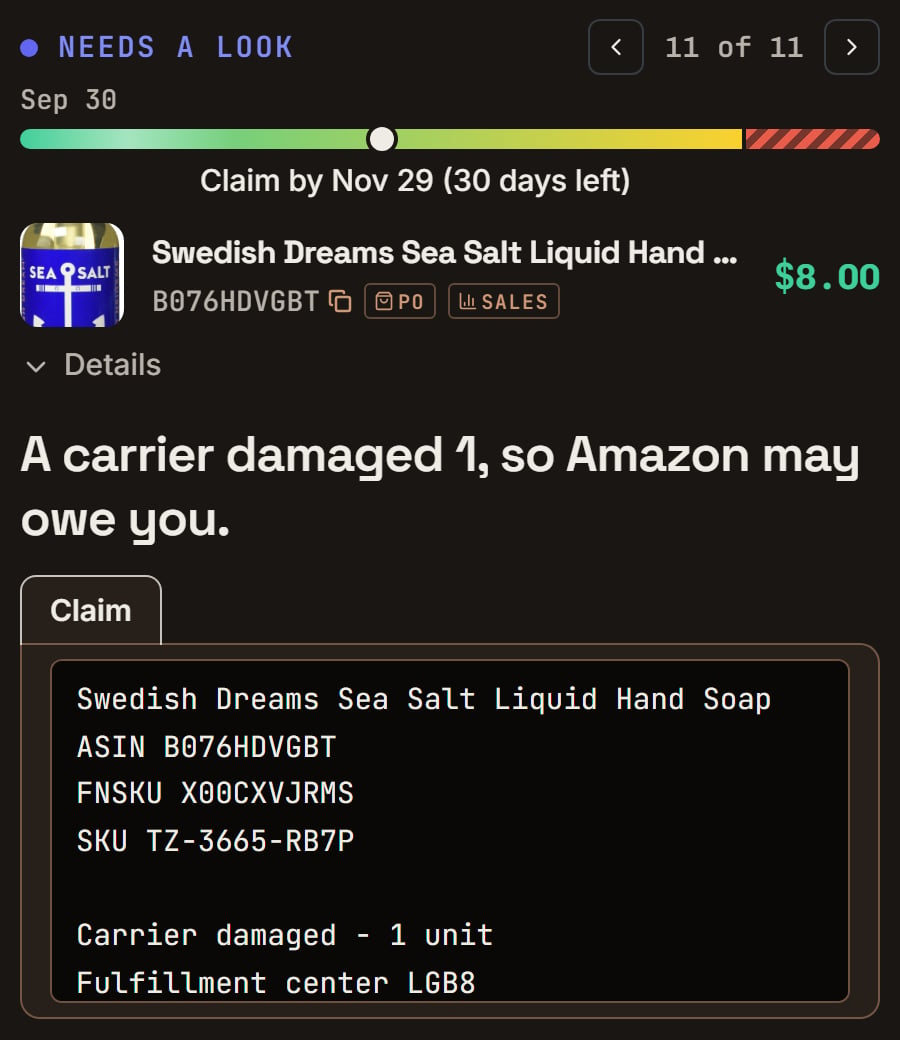
Swedish Dreams hand soap: a carrier damaged 1 unit 30 days before the seed day. Notice Needs a look, and A carrier damaged 1, so Amazon may owe you.
Late claims
Late claims
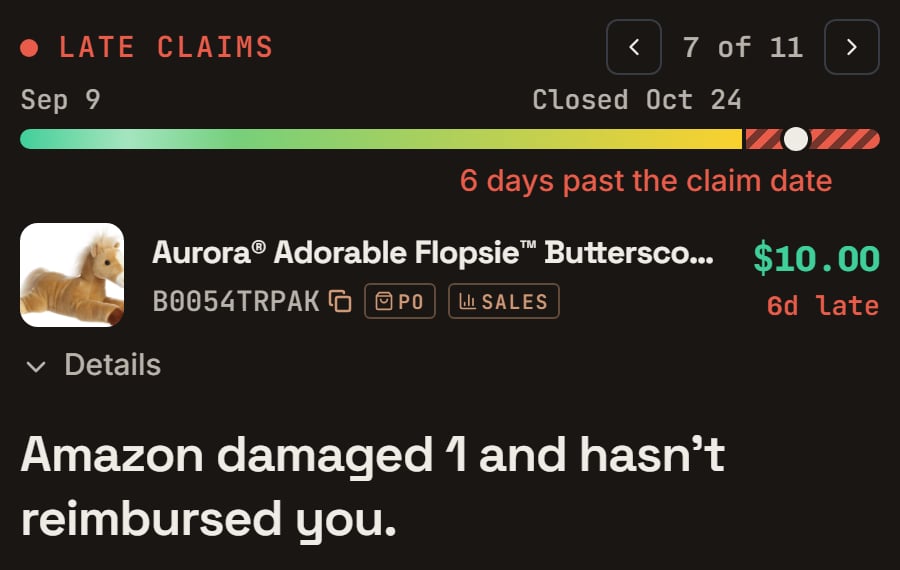
Plush rabbit: damaged 66 days before the seed day, so its last day passed 6 days before. Notice Closed Oct 24, 6 days past the claim date, and 6d late.
Worth a check
Worth a check
After you file
After you file
- Amazon pays: it moves to Paid out, like “Paid $28.00 on Oct 21”.
- No payment after 30 days: it comes back as Needs a look, with “Follow up with Amazon”.
- Amazon says no: click Mark as denied and pick Amazon’s reason. SourceDock shows how to fix it and a reply to copy.
The Filed claims tab: columns, statuses and the window line
The Filed claims tab: columns, statuses and the window line
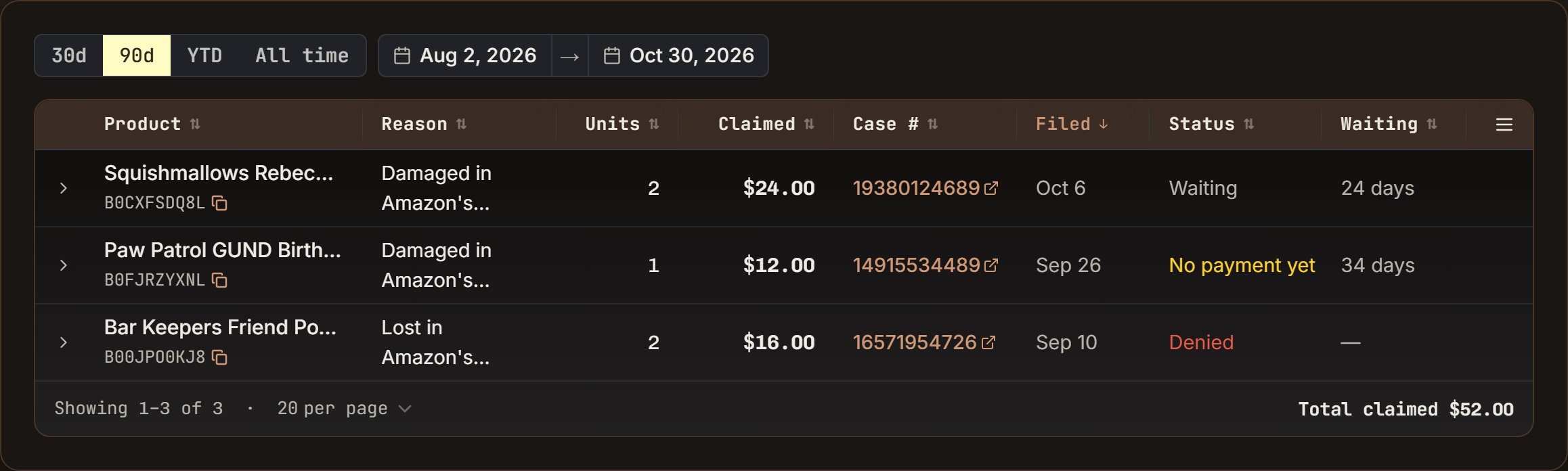
Filed claims in the demo store: Squishmallows Rebecca filed 24 days before the seed day, the Paw Patrol Chase plush filed 34 days before, and Bar Keepers Friend powder, which Amazon turned down. Notice Waiting, No payment yet and Denied.
- The columns are Product, Reason, Units, Claimed, Case #, Filed, Status and Waiting. Click a column’s name to sort by it, and again to flip it.
- The date box picks which filing days show. The search box above Reconcile finds a product by name or ASIN.
- The case number opens that case in Seller Central.
- At the bottom: the pages, like “20 per page”, and “Total claimed”, over every row the dates and search keep.
- Click a row to open the product’s Details. While the claim says Waiting, there’s also Undo, which puts it back on File claims.

Squishmallows Rebecca: filed 24 days before the seed day, no answer yet. Notice Waiting on Amazon · 24 days, and Claim window ends Nov 19 (20 days left) beside Mark as denied.
No payment after 30 days
No payment after 30 days
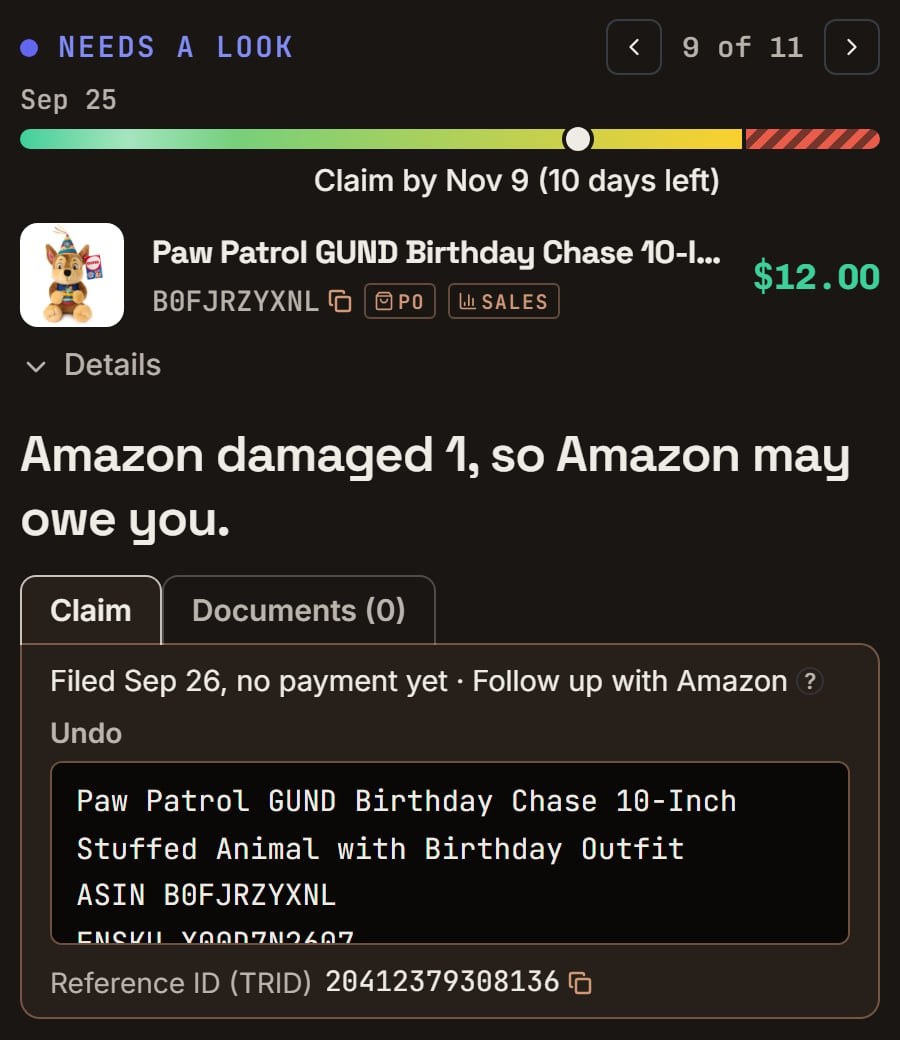
Paw Patrol Chase plush: damaged 50 days before the seed day, filed 34 days before, and no payment. Notice it is back on File claims as Needs a look, with Filed Sep 26, no payment yet · Follow up with Amazon.

Paw Patrol Chase plush: its line in Details. Notice No payment yet · 34 days · Follow up with Amazon.
Denied: the reasons, the fix, a new claim, and undo
Denied: the reasons, the fix, a new claim, and undo
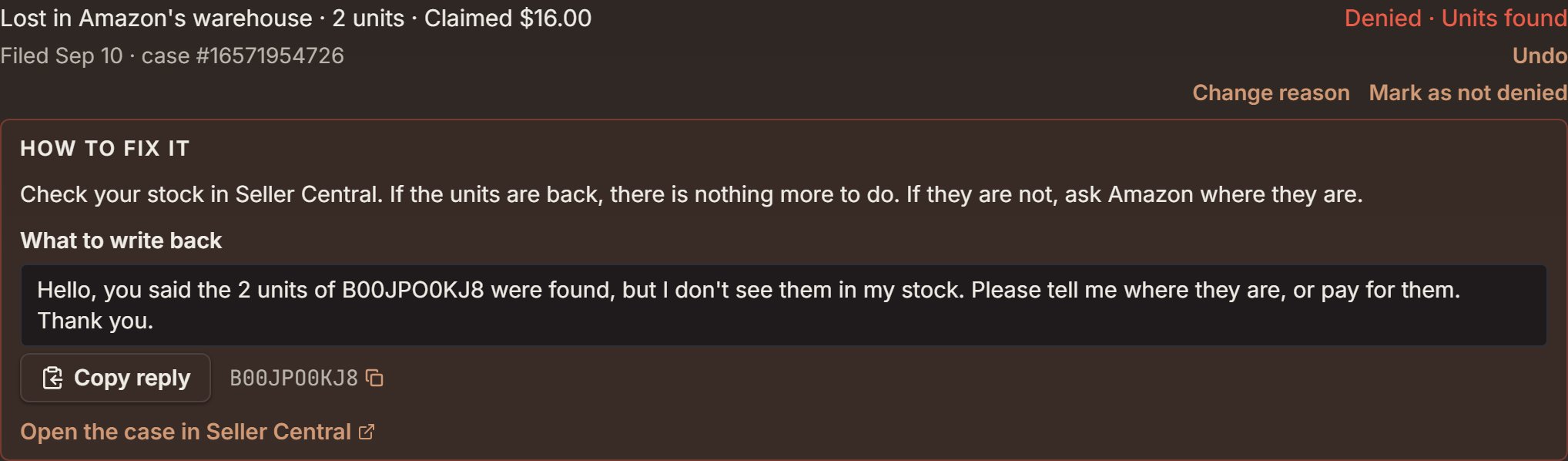
Bar Keepers Friend powder: filed 50 days before the seed day, and Amazon said it found the units. Notice Denied · Units found, Change reason and Mark as not denied, then How to fix it with the reply to copy.
Paid: Likely paid, paid in part, and other rows
Paid: Likely paid, paid in part, and other rows
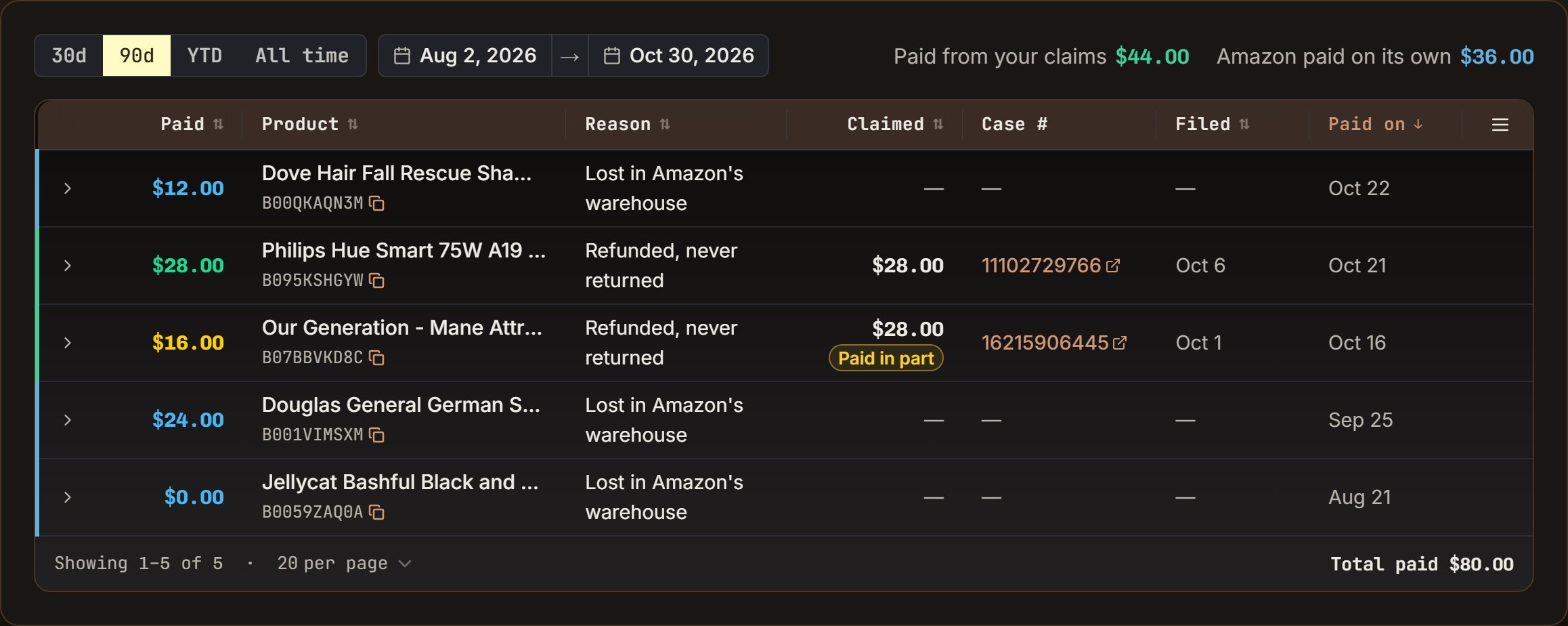
Paid out in the demo store: the Philips Hue bulb's refund claim paid in full, the horse trailer paid in part, and Dove, the German Shepherd plush and the Jellycat puppy, which Amazon paid on its own. The Jellycat shows $0.00 because Amazon took that payment back. Notice the two totals, $44.00 and $36.00.

Our Generation horse trailer: filed for $28.00, and Amazon paid $16.00 on the case 14 days before the seed day. Notice Paid in part and Paid $16.00 of $28.00 claimed.
- The columns are Paid, Product, Reason, Claimed, Case #, Filed and Paid on. Click a column’s name to sort by it. A green edge means a payment from your claims, a blue edge one Amazon made on its own.
- Under Claimed, a yellow Paid in part or Taken back tag marks a claim that didn’t pay in full.
- At the bottom is “Total paid”. Click a row to see its lines.
- “Amount not in Amazon’s report yet”: Amazon paid this claim, but its Reimbursements report doesn’t list it yet, so it isn’t in the totals.
- “This payment also covers another claim you filed.”: one payment for two of your claims. Both rows say so.
- Outside SourceDock, under Filed: a claim you filed in Seller Central without SourceDock. Amazon’s payment named a case, so it’s listed, with Amazon’s reason.
From a Wallet payout
From a Wallet payout
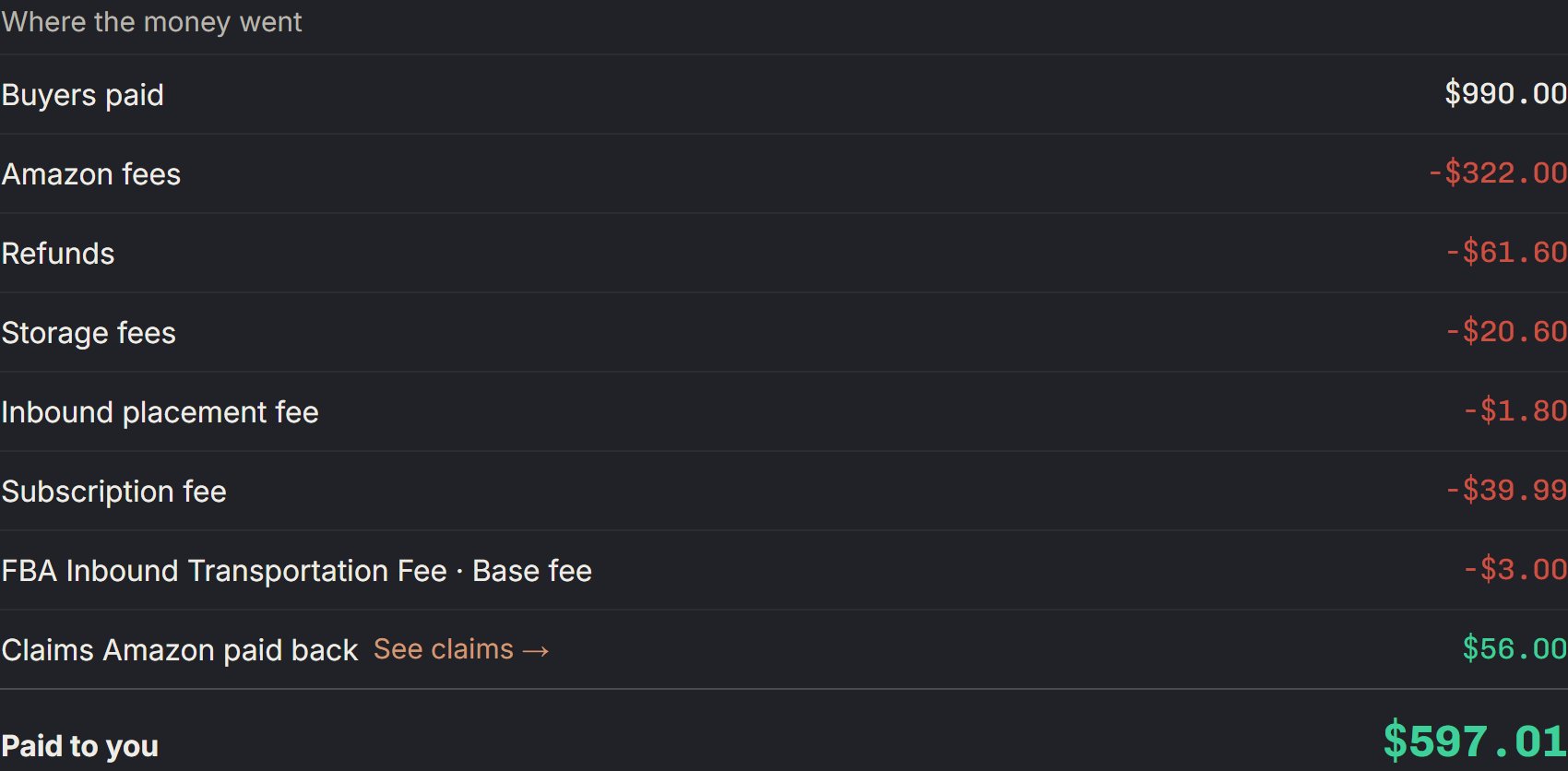
The demo store's Oct 29 payout: where the money went. Notice Claims Amazon paid back, $56.00, and See claims →.
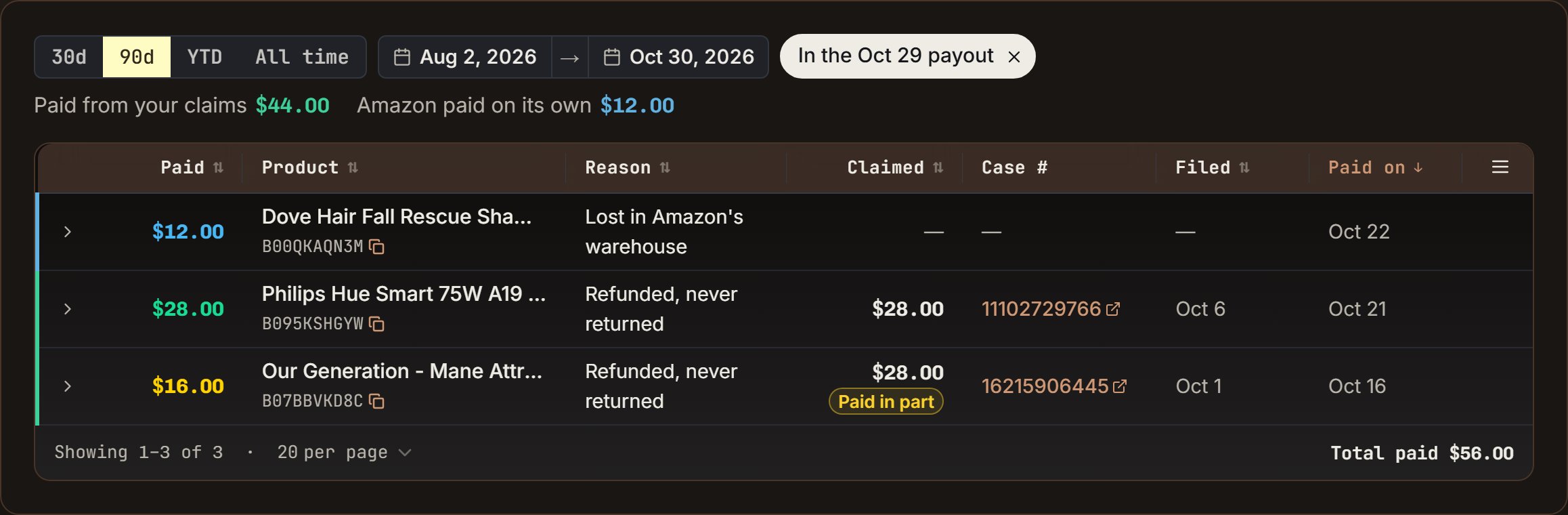
Paid out, opened from the Oct 29 payout. Notice the chip In the Oct 29 payout, and three payments that add up to the payout's $56.00.
Not a claim: every Can't claim line, and Amazon said no on a refund
Not a claim: every Can't claim line, and Amazon said no on a refund
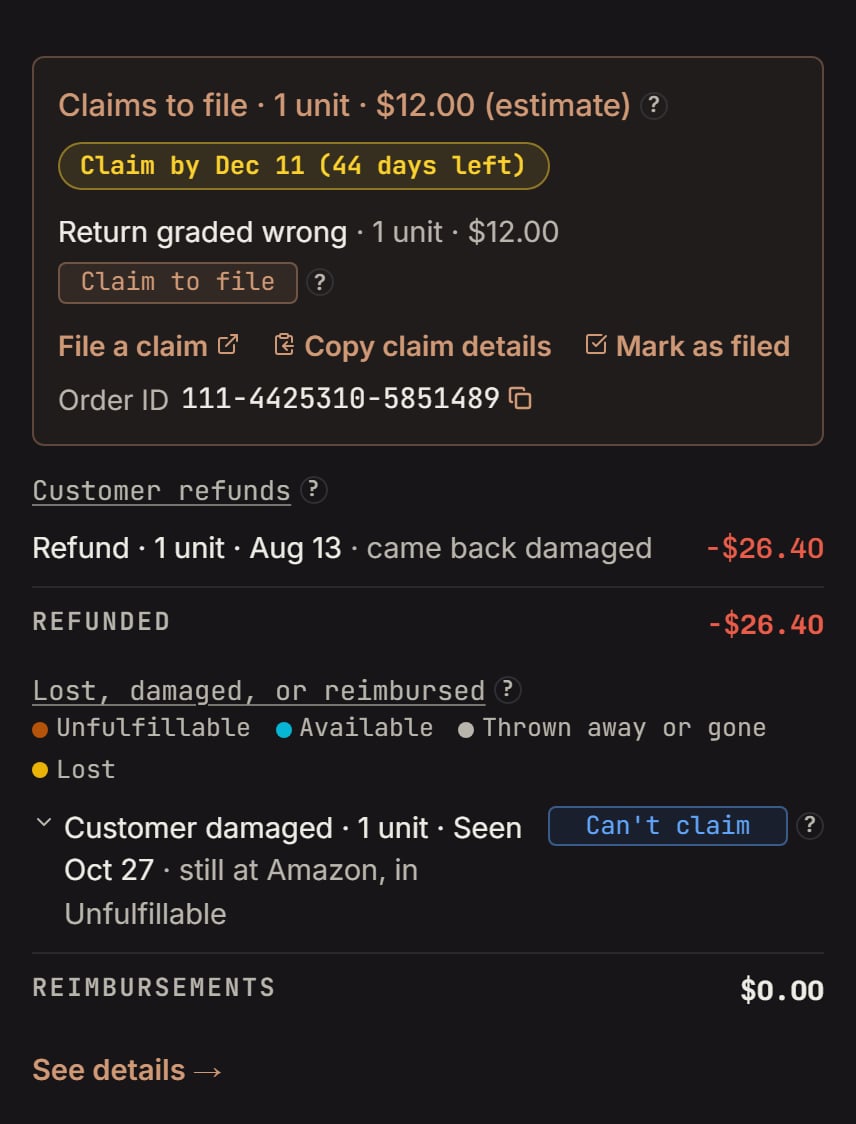
Paint set: Details under Issues and claims. Notice the claim you can file at the top, and the buyer-damaged unit under it tagged Can't claim.
- Carrier damage is a Needs a look, not Can’t claim, unless Amazon’s records give no day for it.
- Orders you shipped yourself: a refund on them isn’t Amazon’s to pay.
- Found at Amazon: units none of your purchases cover. That’s a purchase missing from your books, not a claim. Add it in Purchases.
- “Amazon’s fees used up all the money from this sale, so there’s nothing to get back.”: the sale made you nothing after fees, so a claim would get nothing.
- “never returned, Amazon gave you a unit back in stock”: Amazon paid with a unit instead of money. Its line says “Amazon gave you a unit back in your stock for this order, so there is nothing to claim.”
- “Amazon paid you for these, then put them back on sale. Amazon may take the money back.”: nothing to file.
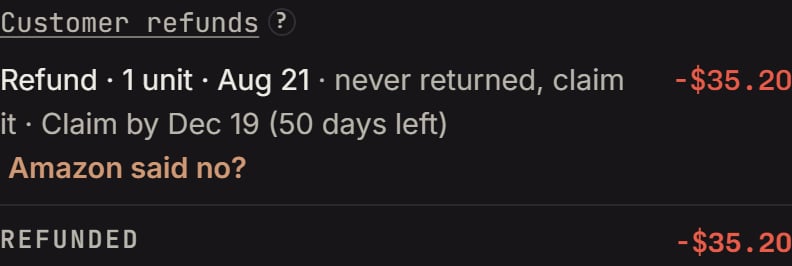
Hydro Flask tumbler: refunded 70 days before the seed day, never sent back. Notice never returned, claim it · Claim by Dec 19 (50 days left), and Amazon said no? under it.
When something looks wrong
When something looks wrong
- A claim you expected isn’t here. Its window may not be open yet: a lost unit waits 30 days, a damage 15. Amazon may have paid on its own: look under Paid claims in Details. Or it may be past its last day: look in CLAIMS under See details →.
- The numbers don’t match Seller Central. Open SHIPMENTS or EVENTS under See details →, then the Inventory ledger link, and compare line by line.
- The money says Cost needed. Add the cost in Purchases.
- You want a claim gone. You can’t hide a claim, the way you can hide a row on Alerts. Next moves you past it. It goes away once you file it, Amazon pays, or its time runs out.
- Amazon asked for an invoice. Open the Documents tab on the claim, add your receipt, then reply on the case.
- Still stuck? Ask Jax on the card.
Ask Jax
Ask Jax
- “Which shipment is this from?”
- “When did Amazon log this?”
- “Has Amazon paid anything for this product?”
- “What proof will Amazon ask for?”
- “Can you make the claim message shorter?”
Plans and stores
Plans and stores
- A Canada store’s claims cover the units its own Canadian warehouses handled. Its claim amounts show in CA$.
- Have a US store too? An amazon.ca order shipped from your US stock belongs to your US store. So any claim on it shows on your US store.
- If Amazon pays you back on that order, the payment counts once, on your US store.