

Scenario for this page: Arctic Fox blue hair dye, a product in the demo store’s Vault with a $6.91 buy cost. Find it in the demo store under Vault (search “Arctic Fox”), and look up B07QMZ5JKX in the Profit calculator.
Use the Profit calculator for a quick check
The Profit calculator works on one product at a time. You find it in two places:- The Chrome extension’s Profit tab, right on an Amazon product page.
- The phone app’s Profit calculator. Paste a link, Scan a barcode, or take a Photo of the box.
Use the Vault for products you might buy
The Vault is your list. Use it when you want to:- watch a product’s price and profit over days,
- get an alert when the price or profit changes,
- see your best products by profit or ROI,
- record a purchase when you buy.
One set of math
The calculator and the Vault work out profit the same way, with the same settings. Your costs and goals live in one place: Account > Features > Profit calculator, or the extension’s Settings. Change one, and every place uses the new number. Next to them, Used in: names Vault, Extension, and AlphaChaser. So both work out a product’s profit the same way, from the same costs. The demo store’s hair dye has a $6.91 cost in its Vault.
Arctic Fox hair dye: its Vault row. Notice the Cost, $6.91.
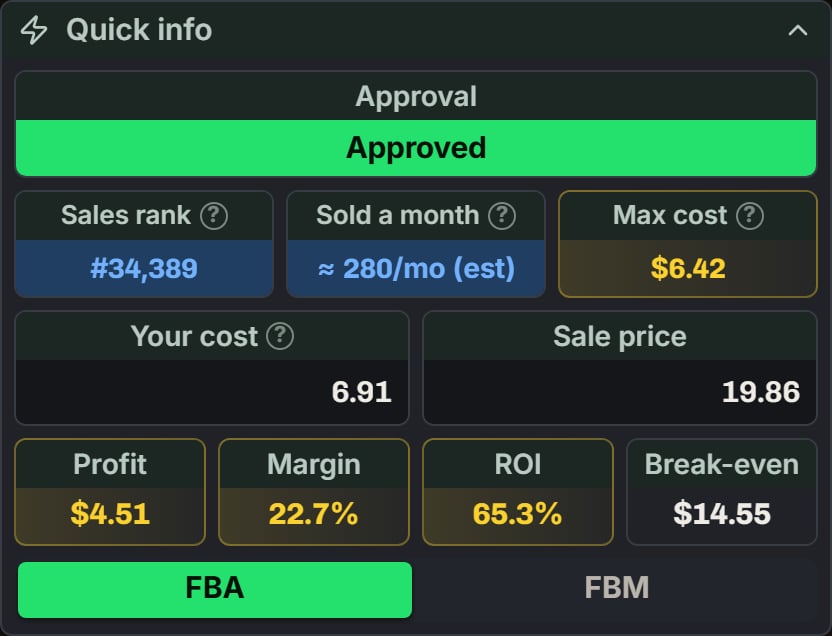
Arctic Fox hair dye: Quick info in the Profit calculator. Notice Your cost is 6.91, from the Vault.
How the math feeds each part
- Vault: each row’s Profit and ROI, and the most you can pay on Price History, use your settings and goals.
- AlphaChaser: grades your Vault products and Scout finds with the same costs and sale price. With a buy cost, it shows your ROI. Without one, it shows Buy at or under, from your goals.
- Chrome extension: its Profit tab is the calculator. The phone app’s calculator is the same panel.
Why two numbers can differ
- Time. The extension and the calculator ask Amazon for today’s price when you open a product. The Vault’s numbers come from its last check, made before they are 6 hours old. A price that moved in between shows up in one place first.
- One product’s own sale price. In Edit Prospect, Sale price used for profit can use another price for that product. The Vault and AlphaChaser use that pick. The extension and the calculator don’t.
- A typed price. A sale price you type in the calculator is used only there.