

In short
Profit calculator shows Quick info’s numbers as rows, and adds Total fees, You get, and Units. Say a toy truck sells for $25.00, and you pay $8.00. The fees and your other costs come to $10.23. Profit is $25.00 minus $10.23 minus $8.00, so $6.77. ROI is $6.77 divided by $8.00, so 84.6%.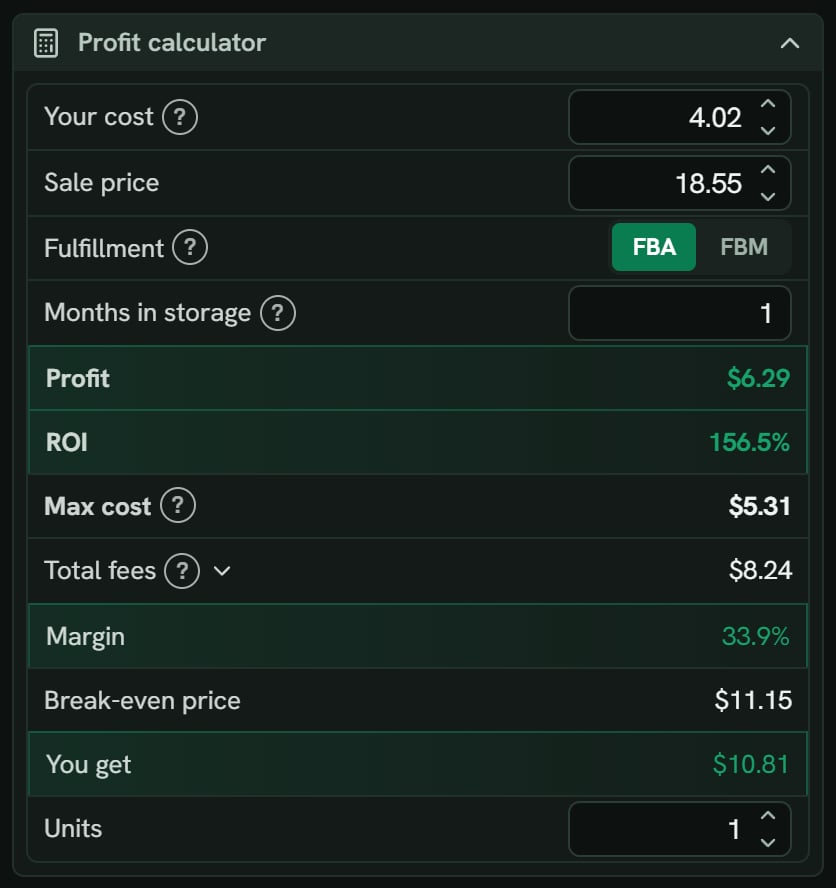
Hair dye: the Profit calculator section. Notice Profit $6.29, ROI 156.5%, Max cost $5.31, Total fees $8.24 and You get $10.81.
More details
The rows
The rows
Your cost, Sale price, Fulfillment (FBA or FBM), Months in storage, Profit, ROI, Max cost, Total fees, Margin, Break-even price, You get, and Units. On FBM, a Your shipping row comes after Fulfillment.Months in storage here saves back to your settings. It can be 0 to 36.
Units
Units
Units starts at 1. Type a number, or use its arrows. Over 1, three lines show under it: Total cost, Total sales and Total profit. Say you type 10 with a $4.02 cost: Total cost is $40.20. SourceDock keeps the number for each product until you close the tab. Back at 1, the three lines go away.
Profit, ROI and margin
Profit, ROI and margin
Profit is the sale price, minus Amazon’s fees, minus your cost, prep, placement, inbound shipping, and tax.ROI is profit divided by your cost. A product already in your Vault can use another rule saved on that row: profit divided by cost plus prep, placement, inbound shipping and tax, or profit divided by the sale price.Margin is profit divided by the sale price, always. $6.77 divided by $25.00 is 27.1%.
Max cost
Max cost
The most you can pay and still hit both goals. Say your goals are $5.00 profit and 30% ROI. Amazon leaves $17.01. Your prep, placement and inbound shipping come to $1.60. So $10.41 is left for the store price plus 8% tax. That gives a Max cost of $9.64. At $9.65, profit would be $4.99, which misses the goal.If no store price can hit both, it says Below your goals. The hover names your goals.
Break-even price
Break-even price
The lowest sale price where profit is $0.00 at your cost. Here it’s $17.03. The Break-even card in Quick info is the same price. Its hover also names the break-even cost, $14.26.If the category has no rate table, it uses the rate in Amazon’s fee quote, and the hover says Uses the referral rate from Amazon’s fee quote at this price. With neither, the price stays blank.
Exact fees and estimated fees
Exact fees and estimated fees
With your store connected, Amazon’s quote gives the referral and fulfillment fees.With no store, US products use SourceDock’s fee table. The line says Estimated fees, and the link says Connect your store for exact fees. If Amazon’s grant has ended, it says Reconnect Amazon for exact fees. On a site with no fee table and no quote, you see Connect your store to see fees for this Amazon site. A blank fee never shows as $0.00.Type a new sale price, and the referral fee is worked out again. The fulfillment fee stays at Amazon’s last quote until a new one comes. Meanwhile, the line says Updating…. If the new quote never comes, you see Amazon’s fees for this price didn’t load, so these use estimated fees. with Try again.
If you type something it can't read
If you type something it can't read
A bad money box says Type a number, like 24.99. A bad weight says Type a number. A sum that doesn’t work says “That math doesn’t work. Try one like 12.99*2.” The box keeps the last good value.