

In short
Full ledger → opens a side panel with two tabs, Ledger and Orders. From a tile, it covers the whole store. From a product row, it covers that product only.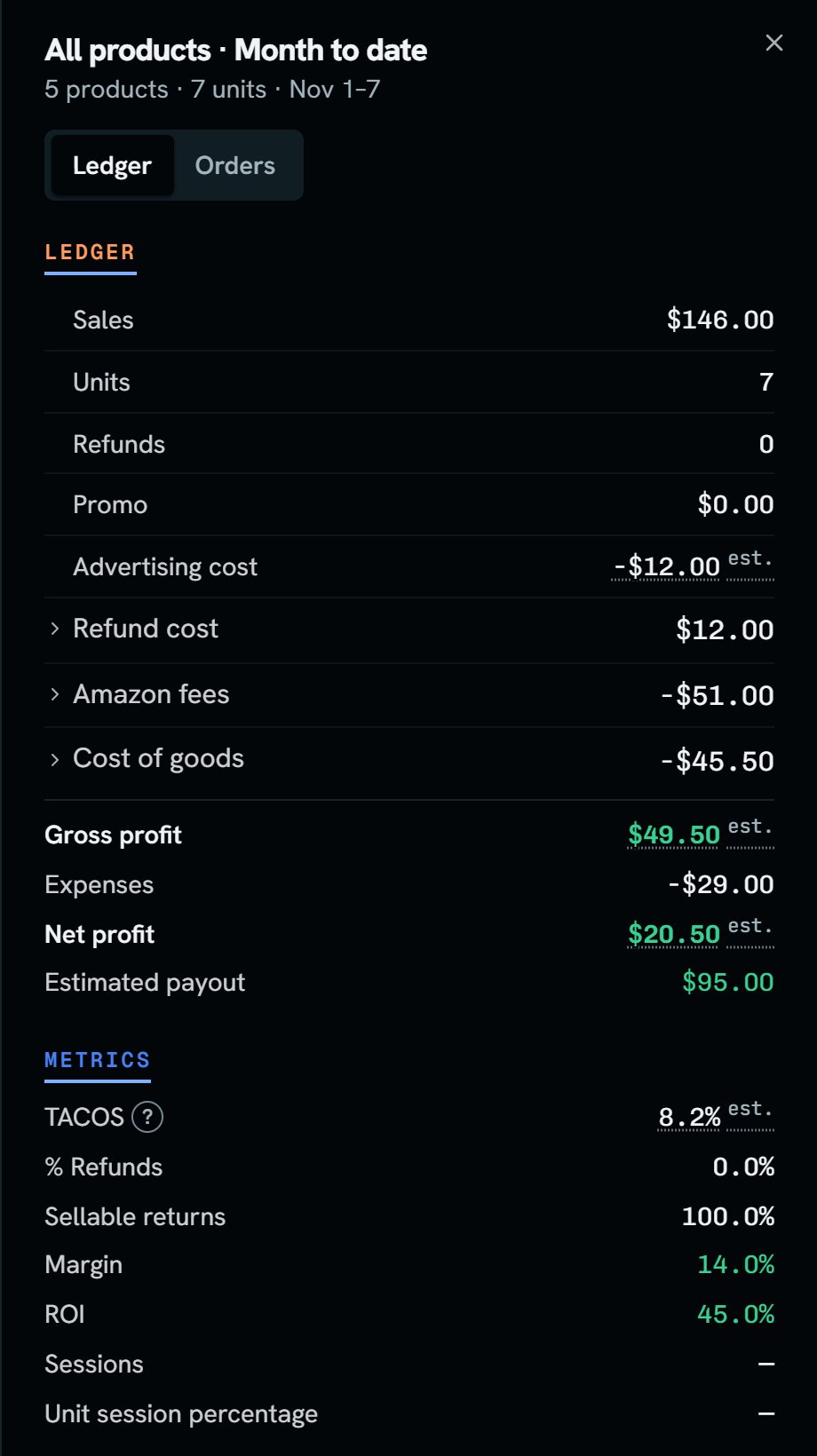
Whole demo store: the full ledger for Month to date. Notice the two tabs, Ledger and Orders, and the Metrics list under the ledger.
More details
The lines, in order
The lines, in order
Sales, Units, Refunds, Promo, Advertising cost, Refund cost, Amazon fees, Cost of goods, Gross profit, Expenses, Net profit, Estimated payout.Refunds here is the unit count. Refund cost is the money.On a product’s ledger, Expenses is $0.00, since expenses belong to the whole store.
Open Refund cost
Open Refund cost
Refunded amount, Refund commission, and Refunded referral fee always show. Other refund lines and Value of returned items show only when they aren’t $0.00. See One refund has four parts.
Open Amazon fees
Open Amazon fees
Each fee has its own line, and a fee shows only when it isn’t zero. See Amazon’s fee lines.
Open Cost of goods
Open Cost of goods
- Cost of goods sold: what the sold units cost.
- Item cost, Sales tax, Shipping, and Split unknown: these take its place once a sold unit’s purchase has its tax and shipping filled in. They add back up to the cent. The forecast keeps the one line.
- Lost/damaged by Amazon: what the units Amazon lost or damaged cost you. It’s added on the day Amazon recorded it.
- Inbound for units sold: each sold unit’s share of its box’s inbound shipping. The payout still takes the whole charge on the day Amazon billed it.
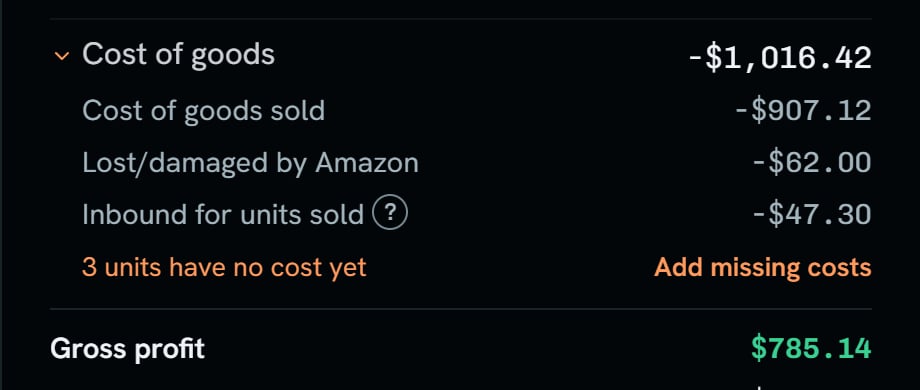
Whole demo store: Cost of goods, opened in Last month's ledger. Notice the three lines under it add up: $907.12 + $62.00 + $47.30 = $1,016.42.
Estimated payout
Estimated payout
It’s what Amazon pays you for this period: sales, less promo, refund cost, and Amazon fees. It also counts inbound charges, ads Amazon took from your balance, and reserve or balance moves. Open it to see those lines.Returned units’ cost isn’t in it, since no money moves for that. Cost of goods, ads paid by card, and your own expenses aren’t in it either.
Metrics
Metrics
- TACOS: ad spend divided by all sales.
- % Refunds: units refunded divided by units sold.
- Sellable returns: returned units in sellable shape, as a share of all returned units.
- % of units taxed: of the sold units whose purchase has its tax filled in, how many paid sales tax. It shows only when one does, and never on the forecast.
- Margin and ROI.
- Sessions and Unit session percentage are dashes. Amazon doesn’t give SourceDock sessions for a period.
The Orders tab
The Orders tab
It lists order lines, 25 to a page. On a product, it’s titled Last orders. Each line says Sale, Replacement, or Refund, the unit count, the Pacific time, and the order number.
- A sale amount is what the buyer paid. A refund amount is what Amazon gave back.
- Replacement is a free unit Amazon sent a buyer in place of another order. It has no sale money, but its cost still counts.
- estimated means Amazon hasn’t paid out this sale, so it uses the order price.
- pending means Amazon hasn’t paid it or changed it in over 30 days. No money counts for it until Amazon pays.