3 min read · Check a claim yourself: where the units are, everything Amazon may owe, and the unit’s whole timeline.
In short
Want to check a claim before you file it? On a card, click Details. Its tabs are Units at Amazon, Shipments, Issues and claims and Activity. See details → opens the product’s full record.Say Amazon damaged a plush whale. Issues and claims shows it as a claim to file. CLAIMS under See details → shows that unit going from Sellable to damaged on Oct 10, at warehouse FTW1, with Amazon’s Reference ID (TRID).
Plush whale: CLAIMS in See details. Notice the unit's timeline, and the buttons under it.
Where every unit you sent is now. The lines add up to what you sent, like “10 sent” with Sold 5, Available 4, Unfulfillable 1. Being looked for means Amazon misplaced these and is searching. When found, they go back on the shelf. Written off is units you wrote off that Amazon’s count still holds. The other lines are on Units at Amazon.
Shipments
Every box you sent for the product, even on a card about one claim.
Issues and claims
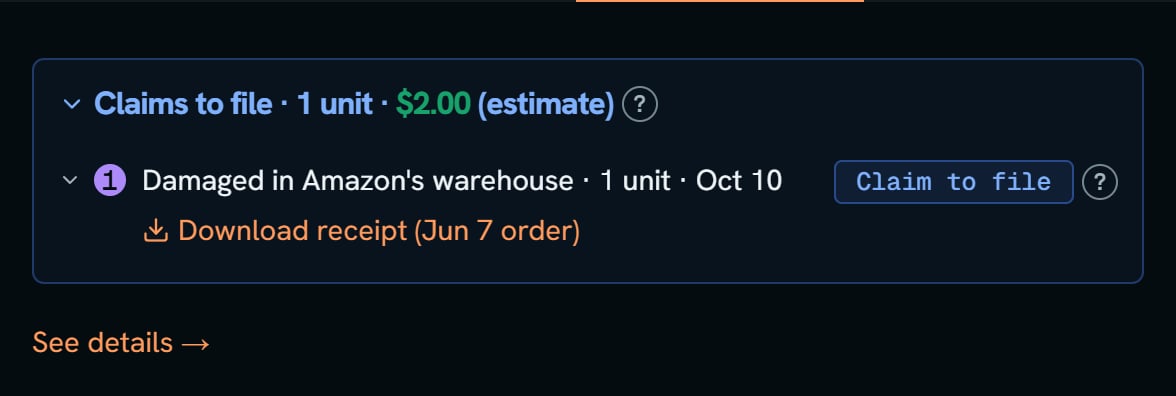
Opened from a File claims card, it shows only that claim. A grouped card opens on its group.Everything Amazon may owe you for this product:
Claims to file: like “Claims to file · 1 unit · $2.00 (estimate)”, with the days left, a Claim to file tag, and the links File a claim, Copy claim details and Mark as filed.
Late claims: past their last day, by less than 14 days. Each says May be too late to claim.
Needs a look: claims Amazon’s reports can’t prove either way.
Issues: units you can’t claim yet, like a box Amazon hasn’t closed.
Shipment issues: boxes that came up short, one row each.
Customer refunds: refunds Amazon gave buyers. Each line says if the item came back.
Lost, damaged, or reimbursed: every unit Amazon lost or damaged, tagged Claim to file, Needs a look, Filed or Can’t claim.
Other payments: payments and take-backs Amazon tied to no unit line.
Resolved: units Amazon found again or put back on sale.
A small number on a line matches the row with that number in the boxes on top. A line with no number has no open claim.At the bottom, Reimbursements is the total. When part of it is for something else, it splits into Amazon paid for lost units, Amazon paid: buyer kept the item, and Amazon paid, then found it.Under the tabs are links to Seller Central: your inventory, the Inventory ledger and your reimbursements.
Plush whale: Issues and claims. Notice Claims to file, 1 unit, $2.00, and the numbered line under it.
Activity
The product’s recent Amazon events: sales, refunds, losses, payments.
See details →
CLAIMS lists each claim by kind, with the unit’s timeline, File a claim, Copy claim details and the Reference ID (TRID). Claims past their last day and the 14 extra days show as Too late to claim. With nothing to file, it says “No claims you can file right now.” Under them are the product’s boxes, then the Ledger events: Amazon’s own ledger lines, grouped, like “Damaged 1 line”.
EVENTS is every Amazon event by date. Filter it with Sales, Fees, Refunds, Returns, Losses, Damages and Reimb.
SHIPMENTS lists your boxes: what each said, what Amazon got, and whether it’s closed.
{"docsConfig":{"theme":"mint","$schema":"https://mintlify.com/docs.json","name":"SourceDock","colors":{"primary":"#EA580C","light":"#FF9A5A","dark":"#EA580C"},"logo":{"light":"https://mintcdn.com/sourcedock/qOyT6VleObj7HrsZ/logo/light.svg?fit=max\u0026auto=format\u0026n=qOyT6VleObj7HrsZ\u0026q=85\u0026s=fac497db707183ccf027093f15f21cd7","dark":"https://mintcdn.com/sourcedock/qOyT6VleObj7HrsZ/logo/dark.svg?fit=max\u0026auto=format\u0026n=qOyT6VleObj7HrsZ\u0026q=85\u0026s=7c4a164f66e528a64c1d35bc9596867e","href":"https://sourcedock.io"},"favicon":"https://mintcdn.com/sourcedock/PvFEadQJVbcHct-s/favicon.png?fit=max\u0026auto=format\u0026n=PvFEadQJVbcHct-s\u0026q=85\u0026s=b2a8ed72213fc5eb8082f24866be78d9","appearance":{"default":"dark"},"background":{"color":{"dark":"#020609"}},"navbar":{"links":[{"href":"https://discord.gg/ssWsu5jHe","label":"Community"}],"primary":{"type":"button","label":"Open SourceDock","href":"https://app.sourcedock.io"}},"footer":{"socials":{"website":"https://sourcedock.io","discord":"https://discord.gg/ssWsu5jHe"}},"icons":{"library":"lucide"},"styling":{"latex":false},"navigation":{"pages":[]}},"deployment":{"deploymentMetadataValue":{"subdomain":"sourcedock","hasAudioNarration":false,"actualSubdomain":"sourcedock","customDomains":["docs.sourcedock.io"],"gitSource":{"type":"github","owner":"source-dock","repo":"sourcedock-docs","deployBranch":"main","contentDirectory":"","isPrivate":true,"mountPath":"","label":""},"entitlements":{"AI_CHAT":{"status":"DISABLED"}},"buildId":"6b010c47965586a741a14e90","clientVersion":"0.0.4270","searchFilterCounts":[{"language":"default","tag":"Docs","count":190},{"language":"default","tag":"Operate","count":62},{"language":"default","tag":"Get started","count":52},{"language":"default","tag":"Academy","count":29},{"language":"default","tag":"Source","count":27},{"language":"default","tag":"The desk","count":26},{"language":"default","tag":"Reference","count":19},{"language":"default","tag":"Chrome extension","count":16},{"language":"default","tag":"Claims","count":12},{"language":"default","tag":"Capital Recovery","count":11}]},"assistantConfig":{"enableAskAiButton":false,"enableStarterQuestions":false,"enableContextualStarterQuestions":false,"enableAskAiSearchBar":true},"basePath":"","hasChatPermissions":false,"hasWebMcpPermissions":false,"toggles":[{"name":"kill-isr","enabled":true,"variant":{"name":"disabled","enabled":false,"feature_enabled":true},"impressionData":false},{"name":"custom-rbac-roles","enabled":true,"variant":{"name":"disabled","enabled":false,"feature_enabled":true},"impressionData":false},{"name":"agent-mintlify-slack","enabled":true,"variant":{"name":"disabled","enabled":false,"feature_enabled":true},"impressionData":false},{"name":"agent-integrations-settings","enabled":true,"variant":{"name":"disabled","enabled":false,"feature_enabled":true},"impressionData":false},{"name":"rbac-expansion","enabled":true,"variant":{"name":"disabled","enabled":false,"feature_enabled":true},"impressionData":false},{"name":"automations-pr-grouping","enabled":true,"variant":{"name":"disabled","enabled":false,"feature_enabled":true},"impressionData":false},{"name":"custom-prefix","enabled":true,"variant":{"name":"disabled","enabled":false,"feature_enabled":true},"impressionData":false},{"name":"analytics-v7","enabled":true,"variant":{"name":"disabled","enabled":false,"feature_enabled":true},"impressionData":false},{"name":"user-flows-analytics","enabled":true,"variant":{"name":"disabled","enabled":false,"feature_enabled":true},"impressionData":false},{"name":"no-publish-flow","enabled":true,"variant":{"name":"disabled","enabled":false,"feature_enabled":true},"impressionData":false},{"name":"workos-onboarding","enabled":true,"variant":{"name":"disabled","enabled":false,"feature_enabled":true},"impressionData":false},{"name":"snapshot-serving-live","enabled":true,"variant":{"name":"disabled","enabled":false,"feature_enabled":true},"impressionData":false},{"name":"stripTemperatureMiddleware","enabled":true,"variant":{"name":"disabled","enabled":false,"feature_enabled":true},"impressionData":false},{"name":"support-platform-pylon-zendesk","enabled":true,"variant":{"name":"disabled","enabled":false,"feature_enabled":true},"impressionData":false},{"name":"snapshot-serving","enabled":true,"variant":{"name":"disabled","enabled":false,"feature_enabled":true},"impressionData":false},{"name":"instant-rollback","enabled":true,"variant":{"name":"disabled","enabled":false,"feature_enabled":true},"impressionData":false},{"name":"granular-notifications-server","enabled":true,"variant":{"name":"disabled","enabled":false,"feature_enabled":true},"impressionData":false},{"name":"granular-notifications","enabled":true,"variant":{"name":"disabled","enabled":false,"feature_enabled":true},"impressionData":false},{"name":"automations-fable","enabled":true,"variant":{"name":"disabled","enabled":false,"feature_enabled":true},"impressionData":false},{"name":"fixed-ai-action-pricing","enabled":true,"variant":{"name":"disabled","enabled":false,"feature_enabled":true},"impressionData":false},{"name":"site-roles","enabled":true,"variant":{"name":"disabled","enabled":false,"feature_enabled":true},"impressionData":false},{"name":"automation-resolve-merge-conflict","enabled":true,"variant":{"name":"disabled","enabled":false,"feature_enabled":true},"impressionData":false},{"name":"scoped-publishing","enabled":true,"variant":{"name":"disabled","enabled":false,"feature_enabled":true},"impressionData":false},{"name":"mintql","enabled":true,"variant":{"name":"disabled","enabled":false,"feature_enabled":true},"impressionData":false},{"name":"page-level-analytics","enabled":true,"variant":{"name":"disabled","enabled":false,"feature_enabled":true},"impressionData":false},{"name":"editor-version-history-v2","enabled":true,"variant":{"name":"disabled","enabled":false,"feature_enabled":true},"impressionData":false},{"name":"billing-page-v2","enabled":true,"variant":{"name":"disabled","enabled":false,"feature_enabled":true},"impressionData":false},{"name":"full-page-search","enabled":true,"variant":{"name":"disabled","enabled":false,"feature_enabled":true},"impressionData":false},{"name":"workspace-projects","enabled":true,"variant":{"name":"disabled","enabled":false,"feature_enabled":true},"impressionData":false},{"name":"assistant-v5","enabled":true,"variant":{"name":"disabled","enabled":false,"feature_enabled":true},"impressionData":false},{"name":"fork-pr-previews","enabled":true,"variant":{"name":"disabled","enabled":false,"feature_enabled":true},"impressionData":false},{"name":"revalidation-jwt","enabled":true,"variant":{"name":"disabled","enabled":false,"feature_enabled":true},"impressionData":false},{"name":"workos-sso-scim","enabled":true,"variant":{"name":"disabled","enabled":false,"feature_enabled":true},"impressionData":false},{"name":"hobby-abuse-scan","enabled":true,"variant":{"name":"disabled","enabled":false,"feature_enabled":true},"impressionData":false},{"name":"dashboard-inbox","enabled":true,"variant":{"name":"disabled","enabled":false,"feature_enabled":true},"impressionData":false},{"name":"workos-signup","enabled":true,"variant":{"name":"disabled","enabled":false,"feature_enabled":true},"impressionData":false},{"name":"turbopuffer-dual-write","enabled":true,"variant":{"name":"disabled","enabled":false,"feature_enabled":true},"impressionData":false},{"name":"workos-enabled","enabled":true,"variant":{"name":"disabled","enabled":false,"feature_enabled":true},"impressionData":false},{"name":"approve-review-flow","enabled":true,"variant":{"name":"disabled","enabled":false,"feature_enabled":true},"impressionData":false},{"name":"editor-metadata","enabled":true,"variant":{"name":"disabled","enabled":false,"feature_enabled":true},"impressionData":false},{"name":"sso-setup-deadline-banner","enabled":true,"variant":{"name":"disabled","enabled":false,"feature_enabled":true},"impressionData":false},{"name":"turbopuffer-serve","enabled":true,"variant":{"name":"disabled","enabled":false,"feature_enabled":true},"impressionData":false},{"name":"live-agents","enabled":true,"variant":{"name":"disabled","enabled":false,"feature_enabled":true},"impressionData":false},{"name":"starter-pricing","enabled":true,"variant":{"name":"treatment","enabled":true,"payload":{"type":"string","value":"treatment"},"feature_enabled":true},"impressionData":false},{"name":"llms-txt-v2","enabled":true,"variant":{"name":"disabled","enabled":false,"feature_enabled":true},"impressionData":false},{"name":"wildcard-email-auth","enabled":true,"variant":{"name":"disabled","enabled":false,"feature_enabled":true},"impressionData":false}],"googleFontsInlined":false},"customCss":[{"filePath":"academy.css","content":".sd-orange-text{color:#C2410C}.dark .sd-orange-text{color:#FF9A5A}"}]}
{"page":{"pagePath":"operate/claims-details","slug":"/operate/claims-details","pageMetadata":{"title":"A claim's Details and See details","sidebarTitle":"Details and See details","description":"3 min read · Check a claim yourself: where the units are, everything Amazon may owe, and the unit's whole timeline.","icon":"file-search","href":"/operate/claims-details"},"description":{"compiledSource":"\"use strict\";\nconst {jsx: _jsx} = arguments[0];\nconst {useMDXComponents: _provideComponents} = arguments[0];\nfunction _createMdxContent(props) {\n const _components = {\n p: \"p\",\n ..._provideComponents(),\n ...props.components\n };\n return _jsx(_components.p, {\n children: \"3 min read · Check a claim yourself: where the units are, everything Amazon may owe, and the unit’s whole timeline.\"\n });\n}\nfunction MDXContent(props = {}) {\n const {wrapper: MDXLayout} = {\n ..._provideComponents(),\n ...props.components\n };\n return MDXLayout ? _jsx(MDXLayout, {\n ...props,\n children: _jsx(_createMdxContent, {\n ...props\n })\n }) : _createMdxContent(props);\n}\nreturn {\n default: MDXContent\n};\n","frontmatter":{},"scope":{}},"pageType":"default","mdx":{"mdxSource":{"compiledSource":"\"use strict\";const{Fragment:_Fragment,jsx:_jsx,jsxs:_jsxs}=arguments[0];const{useMDXComponents:_provideComponents}=arguments[0];function _createMdxContent(props){const _components={a:`a`,li:`li`,p:`p`,strong:`strong`,ul:`ul`,..._provideComponents(),...props.components},{Accordion,AccordionGroup,Frame,Heading,OptimizedImage}=_components;if(!Accordion)_missingMdxReference(`Accordion`,true);if(!AccordionGroup)_missingMdxReference(`AccordionGroup`,true);if(!Frame)_missingMdxReference(`Frame`,true);if(!Heading)_missingMdxReference(`Heading`,true);if(!OptimizedImage)_missingMdxReference(`OptimizedImage`,true);return _jsxs(_Fragment,{children:[_jsx(Heading,{level:`2`,id:`in-short`,children:`In short`}),`\n`,_jsxs(_components.p,{children:[`Want to check a claim before you file it? On a card, click `,_jsx(_components.strong,{children:`Details`}),`. Its tabs are `,_jsx(_components.strong,{children:`Units at Amazon`}),`, `,_jsx(_components.strong,{children:`Shipments`}),`, `,_jsx(_components.strong,{children:`Issues and claims`}),` and `,_jsx(_components.strong,{children:`Activity`}),`. `,_jsx(_components.strong,{children:`See details →`}),` opens the product’s full record.`]}),`\n`,_jsxs(_components.p,{children:[`Say Amazon damaged a plush whale. `,_jsx(_components.strong,{children:`Issues and claims`}),` shows it as a claim to file. `,_jsx(_components.strong,{children:`CLAIMS`}),` under `,_jsx(_components.strong,{children:`See details →`}),` shows that unit going from Sellable to damaged on Oct 10, at warehouse FTW1, with Amazon’s `,_jsx(_components.strong,{children:`Reference ID (TRID)`}),`.`]}),`\n`,_jsx(Frame,{caption:`Plush whale: CLAIMS in See details. Notice the unit's timeline, and the buttons under it.`,children:_jsx(OptimizedImage,{src:`https://mintcdn.com/sourcedock/TInpBhmsblhO-C_6/images/deep-dives/claims-walkthrough/14-whale-see-details-claims.png?fit=max\u0026auto=format\u0026n=TInpBhmsblhO-C_6\u0026q=85\u0026s=74d3a57128fe8a11c7e7c8d22322d087`,alt:`The CLAIMS tab: Claims you can file, Damaged in Amazon's warehouse 1, 1 unit $2.00 (estimate) tagged Claim to file, File by Dec 9, 2026, Claim by Dec 9 (33 days left), the timeline Sellable to Damaged in Amazon's warehouse Oct 10 FTW1, then File a claim, Copy claim details, Mark as filed and the Reference ID.`,\"data-og-width\":`920`,width:`920`,\"data-og-height\":`1180`,height:`1180`,\"data-path\":`images/deep-dives/claims-walkthrough/14-whale-see-details-claims.png`,\"data-optimize\":`true`,\"data-opv\":`3`,srcset:`https://mintcdn.com/sourcedock/TInpBhmsblhO-C_6/images/deep-dives/claims-walkthrough/14-whale-see-details-claims.png?w=280\u0026fit=max\u0026auto=format\u0026n=TInpBhmsblhO-C_6\u0026q=85\u0026s=819ae2fabe099186d0c0a95189add819 280w, https://mintcdn.com/sourcedock/TInpBhmsblhO-C_6/images/deep-dives/claims-walkthrough/14-whale-see-details-claims.png?w=560\u0026fit=max\u0026auto=format\u0026n=TInpBhmsblhO-C_6\u0026q=85\u0026s=e1a1335857755cfcf22659e76e6677a5 560w, https://mintcdn.com/sourcedock/TInpBhmsblhO-C_6/images/deep-dives/claims-walkthrough/14-whale-see-details-claims.png?w=840\u0026fit=max\u0026auto=format\u0026n=TInpBhmsblhO-C_6\u0026q=85\u0026s=41c71dd8e9cbbc074c2e84bb209c08d4 840w, https://mintcdn.com/sourcedock/TInpBhmsblhO-C_6/images/deep-dives/claims-walkthrough/14-whale-see-details-claims.png?w=1100\u0026fit=max\u0026auto=format\u0026n=TInpBhmsblhO-C_6\u0026q=85\u0026s=f3b83232ddb5e5e3a29e7e157332d322 1100w, https://mintcdn.com/sourcedock/TInpBhmsblhO-C_6/images/deep-dives/claims-walkthrough/14-whale-see-details-claims.png?w=1650\u0026fit=max\u0026auto=format\u0026n=TInpBhmsblhO-C_6\u0026q=85\u0026s=81d66b6da4a5cf57ca68fe28f73f8f00 1650w, https://mintcdn.com/sourcedock/TInpBhmsblhO-C_6/images/deep-dives/claims-walkthrough/14-whale-see-details-claims.png?w=2500\u0026fit=max\u0026auto=format\u0026n=TInpBhmsblhO-C_6\u0026q=85\u0026s=1f17f0a7aadba0aa9ed1cc3e269e2642 2500w`})}),`\n`,_jsxs(_components.p,{children:[`Watch it: `,_jsx(_components.a,{href:`/academy/investigate-a-product`,children:`One product’s full history`}),`.`]}),`\n`,_jsx(Heading,{level:`2`,id:`more-details`,children:`More details`}),`\n`,_jsxs(AccordionGroup,{children:[_jsx(Accordion,{title:`Units at Amazon`,id:`units-at-amazon`,children:_jsxs(_components.p,{children:[`Where every unit you sent is now. The lines add up to what you sent, like “10 sent” with Sold 5, Available 4, Unfulfillable 1. `,_jsx(_components.strong,{children:`Being looked for`}),` means Amazon misplaced these and is searching. When found, they go back on the shelf. `,_jsx(_components.strong,{children:`Written off`}),` is units you wrote off that Amazon’s count still holds. The other lines are on `,_jsx(_components.a,{href:`/operate/capital-recovery-units`,children:`Units at Amazon`}),`.`]})}),_jsx(Accordion,{title:`Shipments`,id:`shipments`,children:_jsx(_components.p,{children:`Every box you sent for the product, even on a card about one claim.`})}),_jsxs(Accordion,{title:`Issues and claims`,id:`issues-and-claims`,children:[_jsxs(_components.p,{children:[`Opened from a `,_jsx(_components.strong,{children:`File claims`}),` card, it shows only that claim. A grouped card opens on its group.`]}),_jsx(_components.p,{children:`Everything Amazon may owe you for this product:`}),_jsxs(_components.ul,{children:[`\n`,_jsxs(_components.li,{children:[_jsx(_components.strong,{children:`Claims to file`}),`: like “Claims to file · 1 unit · $2.00 (estimate)”, with the days left, a `,_jsx(_components.strong,{children:`Claim to file`}),` tag, and the links `,_jsx(_components.strong,{children:`File a claim`}),`, `,_jsx(_components.strong,{children:`Copy claim details`}),` and `,_jsx(_components.strong,{children:`Mark as filed`}),`.`]}),`\n`,_jsxs(_components.li,{children:[_jsx(_components.strong,{children:`Late claims`}),`: past their last day, by less than 14 days. Each says `,_jsx(_components.strong,{children:`May be too late to claim`}),`.`]}),`\n`,_jsxs(_components.li,{children:[_jsx(_components.strong,{children:`Needs a look`}),`: claims Amazon’s reports can’t prove either way.`]}),`\n`,_jsxs(_components.li,{children:[_jsx(_components.strong,{children:`Issues`}),`: units you can’t claim yet, like a box Amazon hasn’t closed.`]}),`\n`,_jsxs(_components.li,{children:[_jsx(_components.strong,{children:`Shipment issues`}),`: boxes that came up short, one row each.`]}),`\n`,_jsxs(_components.li,{children:[_jsx(_components.strong,{children:`Customer refunds`}),`: refunds Amazon gave buyers. Each line says if the item came back.`]}),`\n`,_jsxs(_components.li,{children:[_jsx(_components.strong,{children:`Lost, damaged, or reimbursed`}),`: every unit Amazon lost or damaged, tagged `,_jsx(_components.strong,{children:`Claim to file`}),`, `,_jsx(_components.strong,{children:`Needs a look`}),`, `,_jsx(_components.strong,{children:`Filed`}),` or `,_jsx(_components.strong,{children:`Can’t claim`}),`.`]}),`\n`,_jsxs(_components.li,{children:[_jsx(_components.strong,{children:`Other payments`}),`: payments and take-backs Amazon tied to no unit line.`]}),`\n`,_jsxs(_components.li,{children:[_jsx(_components.strong,{children:`Resolved`}),`: units Amazon found again or put back on sale.`]}),`\n`]}),_jsx(_components.p,{children:`A small number on a line matches the row with that number in the boxes on top. A line with no number has no open claim.`}),_jsxs(_components.p,{children:[`At the bottom, `,_jsx(_components.strong,{children:`Reimbursements`}),` is the total. When part of it is for something else, it splits into `,_jsx(_components.strong,{children:`Amazon paid for lost units`}),`, `,_jsx(_components.strong,{children:`Amazon paid: buyer kept the item`}),`, and `,_jsx(_components.strong,{children:`Amazon paid, then found it`}),`.`]}),_jsxs(_components.p,{children:[`Under the tabs are links to Seller Central: your inventory, the `,_jsx(_components.strong,{children:`Inventory ledger`}),` and your reimbursements.`]}),_jsx(Frame,{caption:`Plush whale: Issues and claims. Notice Claims to file, 1 unit, $2.00, and the numbered line under it.`,children:_jsx(OptimizedImage,{src:`https://mintcdn.com/sourcedock/TInpBhmsblhO-C_6/images/deep-dives/claims-walkthrough/12-whale-details-issues-and-claims.png?fit=max\u0026auto=format\u0026n=TInpBhmsblhO-C_6\u0026q=85\u0026s=0d915d886ccd6f3714d738a99f3f0a55`,alt:`The Issues and claims panel: Claims to file, 1 unit, $2.00 (estimate), line 1 Damaged in Amazon's warehouse, 1 unit, Oct 10, tagged Claim to file, Download receipt (Jun 7 order), and See details.`,\"data-og-width\":`1176`,width:`1176`,\"data-og-height\":`396`,height:`396`,\"data-path\":`images/deep-dives/claims-walkthrough/12-whale-details-issues-and-claims.png`,\"data-optimize\":`true`,\"data-opv\":`3`,srcset:`https://mintcdn.com/sourcedock/TInpBhmsblhO-C_6/images/deep-dives/claims-walkthrough/12-whale-details-issues-and-claims.png?w=280\u0026fit=max\u0026auto=format\u0026n=TInpBhmsblhO-C_6\u0026q=85\u0026s=d751a0268b7be635a73b721dfcd1092e 280w, https://mintcdn.com/sourcedock/TInpBhmsblhO-C_6/images/deep-dives/claims-walkthrough/12-whale-details-issues-and-claims.png?w=560\u0026fit=max\u0026auto=format\u0026n=TInpBhmsblhO-C_6\u0026q=85\u0026s=a191af615b6e1c3d833bad164d9f1540 560w, https://mintcdn.com/sourcedock/TInpBhmsblhO-C_6/images/deep-dives/claims-walkthrough/12-whale-details-issues-and-claims.png?w=840\u0026fit=max\u0026auto=format\u0026n=TInpBhmsblhO-C_6\u0026q=85\u0026s=d2f47821c0985a8555c3ed62d676d8c9 840w, https://mintcdn.com/sourcedock/TInpBhmsblhO-C_6/images/deep-dives/claims-walkthrough/12-whale-details-issues-and-claims.png?w=1100\u0026fit=max\u0026auto=format\u0026n=TInpBhmsblhO-C_6\u0026q=85\u0026s=178c594c2e77af01f0c1a4e7bb252628 1100w, https://mintcdn.com/sourcedock/TInpBhmsblhO-C_6/images/deep-dives/claims-walkthrough/12-whale-details-issues-and-claims.png?w=1650\u0026fit=max\u0026auto=format\u0026n=TInpBhmsblhO-C_6\u0026q=85\u0026s=a48cc35e026371468c1e231b5506cf18 1650w, https://mintcdn.com/sourcedock/TInpBhmsblhO-C_6/images/deep-dives/claims-walkthrough/12-whale-details-issues-and-claims.png?w=2500\u0026fit=max\u0026auto=format\u0026n=TInpBhmsblhO-C_6\u0026q=85\u0026s=5c10e915f0b5d8f34f513ed1ed092d9b 2500w`})})]}),_jsx(Accordion,{title:`Activity`,id:`activity`,children:_jsx(_components.p,{children:`The product’s recent Amazon events: sales, refunds, losses, payments.`})}),_jsx(Accordion,{title:`See details →`,id:`see-details`,children:_jsxs(_components.ul,{children:[`\n`,_jsxs(_components.li,{children:[_jsx(_components.strong,{children:`CLAIMS`}),` lists each claim by kind, with the unit’s timeline, `,_jsx(_components.strong,{children:`File a claim`}),`, `,_jsx(_components.strong,{children:`Copy claim details`}),` and the `,_jsx(_components.strong,{children:`Reference ID (TRID)`}),`. Claims past their last day and the 14 extra days show as `,_jsx(_components.strong,{children:`Too late to claim`}),`. With nothing to file, it says “No claims you can file right now.” Under them are the product’s boxes, then the `,_jsx(_components.strong,{children:`Ledger events`}),`: Amazon’s own ledger lines, grouped, like “Damaged 1 line”.`]}),`\n`,_jsxs(_components.li,{children:[_jsx(_components.strong,{children:`LEDGER`}),` is the product’s money. See `,_jsx(_components.a,{href:`/operate/capital-recovery-ledger`,children:`the ledger`}),`.`]}),`\n`,_jsxs(_components.li,{children:[_jsx(_components.strong,{children:`EVENTS`}),` is every Amazon event by date. Filter it with `,_jsx(_components.strong,{children:`Sales`}),`, `,_jsx(_components.strong,{children:`Fees`}),`, `,_jsx(_components.strong,{children:`Refunds`}),`, `,_jsx(_components.strong,{children:`Returns`}),`, `,_jsx(_components.strong,{children:`Losses`}),`, `,_jsx(_components.strong,{children:`Damages`}),` and `,_jsx(_components.strong,{children:`Reimb.`})]}),`\n`,_jsxs(_components.li,{children:[_jsx(_components.strong,{children:`SHIPMENTS`}),` lists your boxes: what each said, what Amazon got, and whether it’s closed.`]}),`\n`]})})]})]})}function MDXContent(props={}){const{wrapper:MDXLayout}={..._provideComponents(),...props.components};return MDXLayout?_jsx(MDXLayout,{...props,children:_jsx(_createMdxContent,{...props})}):_createMdxContent(props)}return{default:MDXContent};function _missingMdxReference(id,component){throw new Error(`Expected `+(component?`component`:`object`)+\" `\"+id+\"` to be defined: you likely forgot to import, pass, or provide it.\")}","frontmatter":{},"scope":{"config":{},"pageMetadata":{"title":"A claim's Details and See details","sidebarTitle":"Details and See details","description":"3 min read · Check a claim yourself: where the units are, everything Amazon may owe, and the unit's whole timeline.","icon":"file-search","href":"/operate/claims-details"}}},"mdxSourceWithNoJs":null},"mdxExtracts":{"tableOfContents":[{"title":"In short","slug":"in-short","depth":2,"children":[]},{"title":"More details","slug":"more-details","depth":2,"children":[]}],"codeExamples":{}},"jsLinks":[],"subdomain":"sourcedock","siteName":"SourceDock","title":"A claim's Details and See details - SourceDock","navMaps":{"firstHrefInVersion":{},"firstHrefInLanguage":{}},"lastModified":"2026-11-11T14:07:53.221Z","originalFileLocation":"operate/claims-details.mdx"},"headHtml":"\u003cscript data-mint-head>(function(){var d=document.documentElement,p=null;if(!p){try{p=localStorage.getItem(\"isDarkMode\")}catch(e){}if(p==='true')p='dark';else if(p==='false')p='light';if(p!=='light'\u0026\u0026p!=='dark'\u0026\u0026p!=='system')p=\"dark\"}var r=p==='system'?(matchMedia(\"(prefers-color-scheme: dark)\").matches?'dark':'light'):p;d.classList.remove(r==='dark'?'light':'dark');d.classList.add(r);d.setAttribute(\"data-theme-preference\",p)})();\u003c/script>\u003cmeta data-mint-head name=\"description\" content=\"3 min read · Check a claim yourself: where the units are, everything Amazon may owe, and the unit\u0026#x27;s whole timeline.\">\u003cmeta data-mint-head name=\"application-name\" content=\"SourceDock\">\u003cmeta data-mint-head name=\"generator\" content=\"Mintlify\">\u003clink data-mint-head rel=\"apple-touch-icon\" type=\"image/png\" sizes=\"180x180\" href=\"https://mintcdn.com/sourcedock/PvFEadQJVbcHct-s/favicon.png?fit=max\u0026amp;auto=format\u0026amp;n=PvFEadQJVbcHct-s\u0026amp;q=85\u0026amp;s=b2a8ed72213fc5eb8082f24866be78d9\">\u003clink data-mint-head rel=\"icon\" type=\"image/png\" sizes=\"32x32\" href=\"https://mintcdn.com/sourcedock/PvFEadQJVbcHct-s/favicon.png?fit=max\u0026amp;auto=format\u0026amp;n=PvFEadQJVbcHct-s\u0026amp;q=85\u0026amp;s=b2a8ed72213fc5eb8082f24866be78d9\">\u003clink data-mint-head rel=\"icon\" type=\"image/png\" sizes=\"16x16\" href=\"https://mintcdn.com/sourcedock/PvFEadQJVbcHct-s/favicon.png?fit=max\u0026amp;auto=format\u0026amp;n=PvFEadQJVbcHct-s\u0026amp;q=85\u0026amp;s=b2a8ed72213fc5eb8082f24866be78d9\">\u003clink data-mint-head rel=\"shortcut icon\" type=\"image/png\" href=\"https://mintcdn.com/sourcedock/PvFEadQJVbcHct-s/favicon.png?fit=max\u0026amp;auto=format\u0026amp;n=PvFEadQJVbcHct-s\u0026amp;q=85\u0026amp;s=b2a8ed72213fc5eb8082f24866be78d9\">\u003cmeta data-mint-head property=\"og:title\" content=\"A claim\u0026#x27;s Details and See details - SourceDock\">\u003cmeta data-mint-head property=\"og:description\" content=\"3 min read · Check a claim yourself: where the units are, everything Amazon may owe, and the unit\u0026#x27;s whole timeline.\">\u003cmeta data-mint-head property=\"og:site_name\" content=\"SourceDock\">\u003cmeta data-mint-head property=\"og:url\" content=\"https://docs.sourcedock.io/operate/claims-details\">\u003cmeta data-mint-head property=\"og:type\" content=\"website\">\u003cmeta data-mint-head property=\"og:image\" content=\"https://sourcedock.mintlify.site/_mintlify/api/og/v2?division=Claims\u0026amp;title=A+claim%27s+Details+and+See+details\u0026amp;description=3+min+read+%C2%B7+Check+a+claim+yourself%3A+where+the+units+are%2C+everything+Amazon+may+owe%2C+and+the+unit%27s+whole+timeline.\u0026amp;theme=a9389db1756ac6faaddb7eff\u0026amp;signature=0730444a9292a1d4f7cfdf405f292206f2987537fbe8a1740d7b24b95411ec90\">\u003cmeta data-mint-head property=\"og:image:width\" content=\"1200\">\u003cmeta data-mint-head property=\"og:image:height\" content=\"630\">\u003cmeta data-mint-head name=\"twitter:card\" content=\"summary_large_image\">\u003cmeta data-mint-head name=\"twitter:title\" content=\"A claim\u0026#x27;s Details and See details - SourceDock\">\u003cmeta data-mint-head name=\"twitter:description\" content=\"3 min read · Check a claim yourself: where the units are, everything Amazon may owe, and the unit\u0026#x27;s whole timeline.\">\u003cmeta data-mint-head name=\"twitter:image\" content=\"https://sourcedock.mintlify.site/_mintlify/api/og/v2?division=Claims\u0026amp;title=A+claim%27s+Details+and+See+details\u0026amp;description=3+min+read+%C2%B7+Check+a+claim+yourself%3A+where+the+units+are%2C+everything+Amazon+may+owe%2C+and+the+unit%27s+whole+timeline.\u0026amp;theme=a9389db1756ac6faaddb7eff\u0026amp;signature=0730444a9292a1d4f7cfdf405f292206f2987537fbe8a1740d7b24b95411ec90\">\u003cmeta data-mint-head name=\"twitter:image:width\" content=\"1200\">\u003cmeta data-mint-head name=\"twitter:image:height\" content=\"630\">\u003cmeta data-mint-head name=\"msapplication-config\" content=\"https://mintlify.s3.us-west-1.amazonaws.com/sourcedock/_generated/favicon/browserconfig.xml?v=3\">\u003cmeta data-mint-head name=\"apple-mobile-web-app-title\" content=\"SourceDock\">\u003cmeta data-mint-head name=\"msapplication-TileColor\" content=\"#EA580C\">\u003clink data-mint-head rel=\"canonical\" href=\"https://docs.sourcedock.io/operate/claims-details\">\u003clink data-mint-head rel=\"alternate\" type=\"application/xml\" href=\"/sitemap.xml\">\u003clink data-mint-head rel=\"alternate\" type=\"text/markdown\" href=\"/operate/claims-details.md\">\u003cscript data-mint-head type=\"application/ld+json\">{\"@context\":\"https://schema.org\",\"@graph\":[{\"@type\":\"Organization\",\"@id\":\"https://docs.sourcedock.io/#organization\",\"name\":\"SourceDock\",\"url\":\"https://docs.sourcedock.io\",\"logo\":{\"@type\":\"ImageObject\",\"url\":\"https://mintcdn.com/sourcedock/qOyT6VleObj7HrsZ/logo/light.svg?fit=max\u0026auto=format\u0026n=qOyT6VleObj7HrsZ\u0026q=85\u0026s=fac497db707183ccf027093f15f21cd7\"}},{\"@type\":\"WebSite\",\"@id\":\"https://docs.sourcedock.io#website\",\"name\":\"SourceDock\",\"url\":\"https://docs.sourcedock.io\",\"publisher\":{\"@id\":\"https://docs.sourcedock.io/#organization\"}},{\"@type\":\"WebPage\",\"@id\":\"https://docs.sourcedock.io/operate/claims-details#webpage\",\"url\":\"https://docs.sourcedock.io/operate/claims-details\",\"name\":\"A claim's Details and See details\",\"description\":\"3 min read · Check a claim yourself: where the units are, everything Amazon may owe, and the unit's whole timeline.\",\"dateModified\":\"2026-11-11T14:07:53.221Z\",\"isPartOf\":{\"@id\":\"https://docs.sourcedock.io#website\"},\"breadcrumb\":{\"@id\":\"https://docs.sourcedock.io/operate/claims-details#breadcrumb\"}},{\"@type\":\"BreadcrumbList\",\"@id\":\"https://docs.sourcedock.io/operate/claims-details#breadcrumb\",\"itemListElement\":[{\"@type\":\"ListItem\",\"position\":1,\"name\":\"Operate\",\"item\":\"https://docs.sourcedock.io/operate/record-a-purchase\"},{\"@type\":\"ListItem\",\"position\":2,\"name\":\"Claims\",\"item\":\"https://docs.sourcedock.io/operate/claims\"},{\"@type\":\"ListItem\",\"position\":3,\"name\":\"A claim's Details and See details\",\"item\":\"https://docs.sourcedock.io/operate/claims-details\"}]},{\"@type\":[\"Article\",\"TechArticle\"],\"@id\":\"https://docs.sourcedock.io/operate/claims-details#article\",\"headline\":\"A claim's Details and See details\",\"name\":\"A claim's Details and See details\",\"description\":\"3 min read · Check a claim yourself: where the units are, everything Amazon may owe, and the unit's whole timeline.\",\"url\":\"https://docs.sourcedock.io/operate/claims-details\",\"mainEntityOfPage\":{\"@id\":\"https://docs.sourcedock.io/operate/claims-details#webpage\"},\"dateModified\":\"2026-11-11T14:07:53.221Z\",\"publisher\":{\"@id\":\"https://docs.sourcedock.io/#organization\"},\"isPartOf\":{\"@id\":\"https://docs.sourcedock.io#website\"}}]}\u003c/script>\u003cscript data-mint-head type=\"application/ld+json\">{\"@context\":\"https://schema.org\",\"@type\":\"WebSite\",\"name\":\"SourceDock\",\"publisher\":{\"@type\":\"Organization\",\"name\":\"SourceDock\"},\"provider\":{\"@type\":\"Organization\",\"name\":\"Mintlify\",\"url\":\"https://mintlify.com\"}}\u003c/script>","agentPointerHref":"/operate/claims-details.md","siteName":"SourceDock","nav":{"global":null,"tabs":[{"tab":"Docs","groups":[{"group":"Get started","pages":[{"title":"Welcome to SourceDock","icon":"house","href":""},{"title":"Quickstart","icon":"rocket","href":"/get-started/quickstart"},{"group":"Setup","pages":[{"title":"Setup: your first day","icon":"list-checks","href":"/get-started/setup"},{"title":"Make your SourceDock account","sidebarTitle":"Make your account","icon":"user-plus","href":"/get-started/setup-sign-up"},{"title":"Start your 14-day trial","sidebarTitle":"Start your trial","icon":"play","href":"/get-started/setup-trial"},{"title":"Setup: connect Amazon","sidebarTitle":"Connect Amazon","icon":"link","href":"/get-started/setup-connect-amazon"},{"title":"Setup: import your history","sidebarTitle":"Import your history","icon":"history","href":"/get-started/setup-import-history"},{"title":"Setup: add your buy costs","sidebarTitle":"Add your buy costs","icon":"file-spreadsheet","href":"/get-started/setup-costs"},{"title":"Setup: review and import","sidebarTitle":"Review and import","icon":"circle-check","href":"/get-started/setup-review"},{"title":"Setup: units you shipped yourself","sidebarTitle":"Units you shipped yourself","icon":"truck","href":"/get-started/setup-shipped-yourself"},{"title":"Leave setup and come back","sidebarTitle":"Leave and come back","icon":"corner-up-left","href":"/get-started/setup-leave-and-return"},{"title":"Setup problems","icon":"triangle-alert","href":"/get-started/setup-problems"}]},{"title":"Connections","icon":"cable","href":"/get-started/connections"},{"title":"Google Sheets","icon":"sheet","href":"/get-started/google-sheets"},{"group":"Account","pages":[{"title":"Account","icon":"user","href":"/get-started/account"},{"title":"Account security","sidebarTitle":"Security","icon":"shield","href":"/get-started/account-security"},{"title":"Yearly reports for your accountant","sidebarTitle":"Reports","icon":"file-spreadsheet","href":"/get-started/account-reports"},{"title":"What's in a Capital Recovery Report","sidebarTitle":"What's in a report","icon":"table","href":"/get-started/account-report-details"},{"title":"Start your import over, or delete your account","sidebarTitle":"Danger","icon":"triangle-alert","href":"/get-started/account-danger"}]},{"group":"Team members","pages":[{"title":"Team members","icon":"users","href":"/get-started/team"},{"title":"Invite someone to your team","sidebarTitle":"Invite someone","icon":"user-plus","href":"/get-started/team-invite"},{"title":"Accept a team invite","sidebarTitle":"Accept an invite","icon":"mail-check","href":"/get-started/team-accept"},{"title":"What each team role sees","sidebarTitle":"What each role sees","icon":"shield","href":"/get-started/team-roles"},{"title":"Which pages you can share with your team","sidebarTitle":"Which pages you can share","icon":"toggle-right","href":"/get-started/team-pages"},{"title":"Change or remove a team member","sidebarTitle":"Change or remove someone","icon":"user-cog","href":"/get-started/team-change-or-remove"},{"title":"When your plan gets smaller","icon":"user-minus","href":"/get-started/team-plan-changes"}]},{"title":"Turn features on and off","icon":"sliders-horizontal","href":"/get-started/features"},{"group":"Profit and settings","pages":[{"title":"The profit calculator and every setting","sidebarTitle":"Profit and settings","icon":"calculator","href":"/get-started/profit-calculator-and-settings"},{"title":"The bar and the Desk settings","sidebarTitle":"The bar and the Desk","icon":"panel-top","href":"/get-started/settings-bar-and-desk"},{"title":"The Restock reminders card","sidebarTitle":"Restock reminders","icon":"bell-ring","href":"/get-started/settings-restock-reminders"},{"title":"Auto-cancel purchases that never arrive","sidebarTitle":"Purchases that never arrive","icon":"calendar-x","href":"/get-started/settings-auto-cancel"},{"title":"How profit adds up","icon":"calculator","href":"/get-started/profit-how-it-adds-up"},{"title":"Cost settings for profit","sidebarTitle":"Cost settings","icon":"sliders-horizontal","href":"/get-started/profit-cost-settings"},{"title":"Sale price and goals","icon":"target","href":"/get-started/profit-price-and-goals"},{"title":"FBM profit, and what the Vault does differently","sidebarTitle":"FBM and the Vault","icon":"truck","href":"/get-started/profit-fbm-and-vault"}]},{"group":"Phone app","pages":[{"title":"Phone app","icon":"smartphone","href":"/get-started/phone-app"},{"title":"The phone app's bars and shortcuts","sidebarTitle":"Bars and shortcuts","icon":"layout-panel-top","href":"/get-started/phone-app-bars"},{"title":"The Desk on your phone","sidebarTitle":"The Desk","icon":"layout-dashboard","href":"/get-started/phone-app-desk"},{"title":"Look up a product on your phone","sidebarTitle":"Look up a product","icon":"scan-barcode","href":"/get-started/phone-app-look-up"},{"title":"Read a product's profit on your phone","sidebarTitle":"Read a product's profit","icon":"calculator","href":"/get-started/phone-app-profit"},{"title":"Photos and receipts on your phone","sidebarTitle":"Photos and receipts","icon":"camera","href":"/get-started/phone-app-photos"},{"title":"Lists and detail sheets on your phone","sidebarTitle":"Lists and detail sheets","icon":"list","href":"/get-started/phone-app-lists"},{"title":"Alerts on your phone","icon":"bell-ring","href":"/get-started/phone-app-alerts"}]},{"group":"Plans and billing","pages":[{"title":"Plans and billing","icon":"credit-card","href":"/get-started/billing"},{"title":"What each SourceDock plan has","sidebarTitle":"What each plan has","icon":"layers","href":"/get-started/billing-plans"},{"title":"Your 14-day free trial","sidebarTitle":"Your free trial","icon":"calendar-clock","href":"/get-started/billing-trial"},{"title":"Trial checks and Start my plan","sidebarTitle":"Trial checks and Start my plan","icon":"gauge","href":"/get-started/billing-start-my-plan"},{"title":"Codes on your SourceDock plan","sidebarTitle":"Codes","icon":"ticket","href":"/get-started/billing-codes"},{"title":"The Billing page","icon":"receipt","href":"/get-started/billing-page"},{"title":"Switch plans or cancel","sidebarTitle":"Switch or cancel","icon":"repeat","href":"/get-started/billing-switch-or-cancel"},{"title":"When a payment fails","sidebarTitle":"A failed payment","icon":"credit-card","href":"/get-started/billing-failed-payment"},{"title":"What happens to your data","icon":"database","href":"/get-started/billing-your-data"}]}]},{"group":"Source","pages":[{"group":"Gate Scanner","pages":[{"title":"Gate Scanner","icon":"scan-line","href":"/source/gate-scanner"},{"title":"Add your ASINs to the Gate Scanner","sidebarTitle":"Add your ASINs","icon":"list-plus","href":"/source/gate-scanner-add-asins"},{"title":"Run a Gate Scanner scan","sidebarTitle":"Run a scan","icon":"play","href":"/source/gate-scanner-run"},{"title":"What each Gate Scanner verdict means","sidebarTitle":"What each verdict means","icon":"shield-check","href":"/source/gate-scanner-verdicts"},{"title":"Read the Gate Scanner results","sidebarTitle":"Read the results","icon":"table","href":"/source/gate-scanner-results"},{"title":"Save Gate Scanner results to your Vault","sidebarTitle":"Save to your Vault","icon":"archive","href":"/source/gate-scanner-save"},{"title":"Verify a product with the extension","sidebarTitle":"Verify with the extension","icon":"badge-check","href":"/source/gate-scanner-verify"},{"title":"Export a scan, or open it in Keepa","sidebarTitle":"Export and Open in Keepa","icon":"download","href":"/source/gate-scanner-export"},{"title":"Recent scans in the Gate Scanner","sidebarTitle":"Recent scans","icon":"history","href":"/source/gate-scanner-recent"},{"title":"Gate Scanner free checks and plans","sidebarTitle":"Free checks and plans","icon":"gauge","href":"/source/gate-scanner-limits"},{"title":"When a Gate Scanner scan stops or fails","sidebarTitle":"When a scan stops or fails","icon":"triangle-alert","href":"/source/gate-scanner-problems"}]},{"group":"Vault","pages":[{"title":"Vault","icon":"vault","href":"/source/prospect-vault"},{"title":"Add a product to your Vault","sidebarTitle":"Add a product","icon":"plus","href":"/source/vault-add"},{"title":"Read your Vault list","sidebarTitle":"Read the list","icon":"table","href":"/source/vault-list"},{"title":"How the Vault works out profit","sidebarTitle":"How profit is worked out","icon":"calculator","href":"/source/vault-profit"},{"title":"FBM in the Vault","sidebarTitle":"FBM and Compare","icon":"truck","href":"/source/vault-fbm"},{"title":"One product in your Vault","sidebarTitle":"One product","icon":"package","href":"/source/vault-one-product"},{"title":"Set an alert on a Vault product","sidebarTitle":"Set an alert","icon":"bell","href":"/source/vault-alerts"},{"title":"Act on many Vault products","sidebarTitle":"Actions and many products","icon":"list-checks","href":"/source/vault-actions"}]},{"group":"Scout","pages":[{"title":"Scout","icon":"telescope","href":"/source/scout"},{"title":"Watch a storefront with Scout","sidebarTitle":"Watch a storefront","icon":"plus","href":"/source/scout-watch"},{"title":"How often Scout checks","sidebarTitle":"How often it checks","icon":"clock","href":"/source/scout-checks"},{"title":"Scout's tiles and storefront cards","sidebarTitle":"Tiles and storefront cards","icon":"layout-grid","href":"/source/scout-tiles-and-cards"},{"title":"Read a Scout find","sidebarTitle":"Read a find","icon":"search","href":"/source/scout-read-a-find"},{"title":"Save or acknowledge Scout finds","sidebarTitle":"Save or acknowledge","icon":"archive","href":"/source/scout-save-and-acknowledge"},{"title":"Search, sort, and filter Scout finds","sidebarTitle":"Search, sort, and filter","icon":"list-filter","href":"/source/scout-filters"},{"title":"Scout notices, export, and plans","sidebarTitle":"Notices, export, and plans","icon":"bell","href":"/source/scout-notify-export-plans"}]}]},{"group":"Operate","pages":[{"title":"Record what you buy, each way","icon":"shopping-cart","href":"/operate/record-a-purchase"},{"title":"Import from Amazon","icon":"import","href":"/operate/import-from-amazon"},{"title":"Your buy sheet","icon":"file-spreadsheet","href":"/operate/buy-sheets"},{"group":"Purchases","pages":[{"title":"Purchases","icon":"shopping-bag","href":"/operate/purchases"},{"title":"The Record purchase sheet","sidebarTitle":"Record a purchase","icon":"clipboard-pen","href":"/operate/purchases-record-sheet"},{"title":"Receipts and box photos","icon":"paperclip","href":"/operate/purchases-receipts"},{"title":"Cost, Expected Profit and Current Profit","sidebarTitle":"Cost and profit","icon":"calculator","href":"/operate/purchases-profit"},{"title":"Move an order along","icon":"route","href":"/operate/purchases-stages"},{"title":"Cancel an order","icon":"circle-x","href":"/operate/purchases-cancel"},{"title":"Write off units that won't sell","sidebarTitle":"Write-offs","icon":"file-x","href":"/operate/purchases-write-offs"},{"title":"Gift cards and split payments","icon":"gift","href":"/operate/gift-cards"},{"title":"Find the right orders","icon":"search","href":"/operate/purchases-find"},{"title":"One order's row","icon":"rows-3","href":"/operate/purchases-rows"},{"title":"Reconcile on Purchases, card by card","sidebarTitle":"Reconcile cards","icon":"list-checks","href":"/operate/purchases-reconcile"}]},{"title":"FBA vs FBM, and orders split across the two","icon":"split","href":"/operate/fba-vs-fbm"},{"group":"Capital Recovery","pages":[{"title":"Capital Recovery","icon":"chart-line","href":"/operate/capital-recovery"},{"title":"The top of Capital Recovery","sidebarTitle":"The top of the page","icon":"gauge","href":"/operate/capital-recovery-top-cards"},{"title":"Where your money sits","icon":"chart-pie","href":"/operate/capital-recovery-breakdown"},{"title":"The Capital Recovery product list","sidebarTitle":"The product list","icon":"list","href":"/operate/capital-recovery-product-list"},{"title":"The Capital Recovery chips","sidebarTitle":"The chips","icon":"list-filter","href":"/operate/capital-recovery-chips"},{"title":"Open a product on Capital Recovery","sidebarTitle":"Open a product","icon":"panel-top-open","href":"/operate/capital-recovery-open-a-product"},{"title":"Units at Amazon","icon":"warehouse","href":"/operate/capital-recovery-units"},{"title":"The side panel and the ledger","icon":"receipt-text","href":"/operate/capital-recovery-ledger"},{"title":"One product, every number","icon":"calculator","href":"/operate/capital-recovery-numbers"},{"title":"A product you bought more than once","sidebarTitle":"Batches","icon":"layers","href":"/operate/capital-recovery-batches"},{"title":"Wallet: your Amazon payouts","sidebarTitle":"Wallet","icon":"wallet","href":"/operate/capital-recovery-wallet"}]},{"title":"Capital Recovery vs Sales","icon":"scale","href":"/operate/capital-recovery-vs-sales"},{"title":"Replans: when a shipment doesn't match the plan","icon":"route","href":"/operate/replans"},{"group":"Sales","pages":[{"title":"Sales","icon":"chart-column","href":"/operate/sales"},{"title":"The Sales tiles","sidebarTitle":"The tiles","icon":"layout-grid","href":"/operate/sales-tiles"},{"title":"How the Sales numbers add up","sidebarTitle":"How the numbers add up","icon":"calculator","href":"/operate/sales-how-numbers-add-up"},{"title":"est., dashes and missing costs on Sales","sidebarTitle":"est., dashes and missing costs","icon":"circle-help","href":"/operate/sales-est-and-dashes"},{"title":"The Sales forecast","sidebarTitle":"The forecast","icon":"trending-up","href":"/operate/sales-forecast"},{"title":"The Sales chart and products","sidebarTitle":"The chart and the products","icon":"table","href":"/operate/sales-products"},{"title":"The Sales full ledger","sidebarTitle":"The full ledger","icon":"receipt-text","href":"/operate/sales-ledger"},{"title":"Amazon's fee lines on Sales","sidebarTitle":"Amazon's fee lines","icon":"percent","href":"/operate/sales-fees"},{"title":"Stores on Sales: Canada, Mexico, and All stores","sidebarTitle":"Stores","icon":"globe","href":"/operate/sales-stores"},{"title":"Write-offs and expenses on Sales","sidebarTitle":"Write-offs and expenses","icon":"file-minus","href":"/operate/sales-write-offs"}]},{"group":"Claims","pages":[{"title":"Claims: money Amazon owes you","icon":"scale","href":"/operate/claims"},{"title":"Read a claim card and file it","sidebarTitle":"File a claim","description":"3 min read · What each line on a claim card means, and the three buttons that file it.","icon":"send","href":"/operate/claims-file"},{"title":"A claim's Details and See details","sidebarTitle":"Details and See details","icon":"file-search","href":"/operate/claims-details"},{"title":"The Issues box: not a claim yet","sidebarTitle":"The Issues box","description":"3 min read · Counts that look off but aren't a claim yet, and the day each one becomes one.","icon":"hourglass","href":"/operate/claims-issues"},{"title":"How long you have to claim","sidebarTitle":"How long you have","icon":"timer","href":"/operate/claims-time"},{"title":"Every kind of claim: at Amazon and on returns","sidebarTitle":"Claims at Amazon","icon":"package-x","href":"/operate/claims-kinds"},{"title":"Claims on shipments","icon":"package-open","href":"/operate/claims-shipments"},{"title":"Needs a look: claims Amazon's reports can't prove","sidebarTitle":"Needs a look","icon":"eye","href":"/operate/claims-needs-a-look"},{"title":"After you file: Filed claims","sidebarTitle":"After you file","icon":"clock","href":"/operate/claims-filed"},{"title":"When Amazon says no","sidebarTitle":"Denied","icon":"ban","href":"/operate/claims-denied"},{"title":"Paid out: what Amazon paid","sidebarTitle":"Paid out","icon":"badge-dollar-sign","href":"/operate/claims-paid"},{"title":"Not a claim, and a claim you can't find","sidebarTitle":"Not a claim","icon":"circle-help","href":"/operate/claims-not-a-claim"}]},{"group":"Reviews","pages":[{"title":"Reviews","icon":"message-square-quote","href":"/operate/reviews"},{"title":"Start a Reviews campaign","sidebarTitle":"Start a campaign","icon":"play","href":"/operate/reviews-start"},{"title":"Who Reviews asks","sidebarTitle":"Who gets asked","icon":"users","href":"/operate/reviews-who"},{"title":"The Reviews order list","sidebarTitle":"The order list","icon":"list","href":"/operate/reviews-orders"},{"title":"Change a Reviews campaign","sidebarTitle":"Change a campaign","icon":"pencil","href":"/operate/reviews-change"}]},{"group":"Expenses","pages":[{"title":"Expenses","icon":"receipt","href":"/operate/expenses"},{"title":"Add an expense","icon":"plus","href":"/operate/expenses-add"},{"title":"Which day an expense counts","sidebarTitle":"Which day a charge counts","icon":"calendar-days","href":"/operate/expenses-charges"},{"title":"Read the Expenses page","sidebarTitle":"Read the page","icon":"table","href":"/operate/expenses-page"},{"title":"Change, stop, or delete an expense","sidebarTitle":"Change, stop, or delete","icon":"pencil","href":"/operate/expenses-change"},{"title":"Import and export expenses","sidebarTitle":"Import and export","icon":"file-up","href":"/operate/expenses-import-export"},{"title":"Where expenses show up","sidebarTitle":"Where the money shows up","icon":"git-compare","href":"/operate/expenses-on-your-profit"}]}]},{"group":"The desk","pages":[{"group":"Command desk","pages":[{"title":"Command desk","icon":"layout-dashboard","href":"/desk/command-desk"},{"title":"The top of the Desk and its days","sidebarTitle":"The top and the days","icon":"calendar-days","href":"/desk/desk-top"},{"title":"Sales and profit on the Desk","sidebarTitle":"Sales and profit","icon":"chart-column","href":"/desk/desk-sales"},{"title":"Amazon owes you and Capital at work","icon":"wallet","href":"/desk/desk-money"},{"title":"Open alerts and Reorder now","icon":"list-todo","href":"/desk/desk-alerts-and-reorder"},{"title":"The bars across the top","sidebarTitle":"Bars across the top","icon":"panel-top","href":"/desk/desk-bars"},{"title":"Moving around SourceDock","sidebarTitle":"Moving around","icon":"compass","href":"/desk/desk-moving-around"}]},{"group":"Alerts","pages":[{"title":"Alerts","icon":"bell","href":"/desk/alerts"},{"title":"Alerts: Money to claim","sidebarTitle":"Money to claim","icon":"badge-dollar-sign","href":"/desk/alerts-money-to-claim"},{"title":"Alerts: Fix counts","sidebarTitle":"Fix counts","icon":"wrench","href":"/desk/alerts-fix-counts"},{"title":"Alerts: Sell faster","sidebarTitle":"Sell faster","icon":"gauge","href":"/desk/alerts-sell-faster"},{"title":"Alerts: Buy next","sidebarTitle":"Buy next","icon":"shopping-cart","href":"/desk/alerts-buy-next"},{"title":"Alerts: Account health, Early warnings and Feedback","sidebarTitle":"Health, warnings, feedback","icon":"triangle-alert","href":"/desk/alerts-account-and-warnings"},{"title":"Sounds, pop-ups and phone alerts","icon":"bell-ring","href":"/desk/alerts-sounds"},{"title":"Hide an alert, and what the counts mean","sidebarTitle":"Hide and counts","icon":"eye-off","href":"/desk/alerts-hide"}]},{"group":"Account health","pages":[{"title":"Account health","icon":"heart-pulse","href":"/desk/account-health"},{"title":"Account Health Rating and status","sidebarTitle":"Rating and status","icon":"gauge","href":"/desk/health-rating"},{"title":"IP complaints and policy issues","sidebarTitle":"Complaints and policy issues","icon":"shield-alert","href":"/desk/health-complaints"},{"title":"Order rates on Account health","sidebarTitle":"Order rates","icon":"package-check","href":"/desk/health-orders"},{"title":"Account health warnings and alerts","sidebarTitle":"Warnings and alerts","icon":"triangle-alert","href":"/desk/health-warnings"},{"title":"Account health plans and missing numbers","sidebarTitle":"Plans and missing numbers","icon":"circle-help","href":"/desk/health-plans"}]},{"group":"Restock reminders","pages":[{"title":"Restock reminders","icon":"package","href":"/desk/restock-reminders"},{"title":"The Restock reminders card","sidebarTitle":"The settings card","icon":"sliders-horizontal","href":"/desk/restock-settings"},{"title":"When a restock reminder comes","sidebarTitle":"When a reminder comes","icon":"calendar-clock","href":"/desk/restock-when"},{"title":"Where you see restock reminders","sidebarTitle":"Where you see it","icon":"map-pin","href":"/desk/restock-where"},{"title":"Restock emails and phone notices","sidebarTitle":"The email and the phone","icon":"mail","href":"/desk/restock-email-phone"}]}]},{"group":"Reference","pages":[{"title":"Reconcile and Jax","icon":"scale","href":"/reference/reconcile"},{"group":"Chrome extension","pages":[{"title":"Chrome extension","icon":"puzzle","href":"/reference/chrome-extension"},{"title":"Where the panel sits","icon":"panel-right","href":"/reference/chrome-extension-panel"},{"title":"The product row and Alerts","icon":"package","href":"/reference/chrome-extension-product"},{"title":"Quick info","icon":"zap","href":"/reference/chrome-extension-quick-info"},{"title":"Where the sale price comes from","sidebarTitle":"The sale price","icon":"tag","href":"/reference/chrome-extension-sale-price"},{"title":"The profit calculator","icon":"calculator","href":"/reference/chrome-extension-calculator"},{"title":"Each fee, line by line","sidebarTitle":"Each fee","icon":"receipt","href":"/reference/chrome-extension-fees"},{"title":"Switch to FBM","icon":"truck","href":"/reference/chrome-extension-fbm"},{"title":"Offers and Show stock","icon":"users","href":"/reference/chrome-extension-offers"},{"title":"The Buy Box pie and Variations","sidebarTitle":"Buy Box pie and Variations","icon":"chart-pie","href":"/reference/chrome-extension-buy-box-pie"},{"title":"Seller Lookup","icon":"user-search","href":"/reference/chrome-extension-seller-lookup"},{"title":"Find on Amazon","icon":"search","href":"/reference/chrome-extension-find"},{"title":"The extension's Vault tab","sidebarTitle":"Vault tab","icon":"vault","href":"/reference/chrome-extension-vault"},{"title":"The extension's Purchase tab","sidebarTitle":"Purchase tab","icon":"shopping-cart","href":"/reference/chrome-extension-purchase"},{"title":"The Account tab and Settings","sidebarTitle":"Account and Settings","icon":"settings","href":"/reference/chrome-extension-settings"},{"title":"Verify and Check now","icon":"shield-check","href":"/reference/chrome-extension-verify"}]},{"title":"Glossary, A to L","sidebarTitle":"Glossary, A to L","icon":"book-open","href":"/reference/glossary"},{"title":"Glossary, M to Z","sidebarTitle":"Glossary, M to Z","icon":"book-open","href":"/reference/glossary-m-z"}]},{"group":"Guides","pages":[{"title":"How SourceDock fits together","icon":"route","href":"/guides/how-sourcedock-fits-together"},{"title":"Where each setting lives","icon":"sliders-horizontal","href":"/guides/settings-map"},{"title":"A regular day in SourceDock","icon":"sun","href":"/guides/a-regular-day"},{"title":"Vault or Profit calculator?","icon":"calculator","href":"/guides/vault-vs-profit-calculator"}]}]},{"tab":"Academy","icon":"graduation-cap","pages":[{"title":"Academy","href":"/academy"}]}]},"basePath":"","title":"A claim's Details and See details - SourceDock","deploymentId":"dpl_DyXGnKeCjZyA3sUdfMJ7FjkdBefg","buildId":"dpl_DyXGnKeCjZyA3sUdfMJ7FjkdBefg","dynamics":["07c022d89b","a74be98ba7","a9bb46feb3"],"chunks":["Frame-D0FT0qQs.js","DynamicMarkdown-CQM9Bhbv.js","zoom-image-lightbox-BQ4tbj_9.js","lightbox-handle-r17bVUz3.js","Markdown-CX2QY19L.js","AssistantPageLink-CY3bFglh.js","dist-Dl6_zDnT.js","lib-DMeTj1gb.js","lib-B8HbPgcC.js","katex-Dbtb6Wk7.js","html-void-elements-mCSPHezU.js","marked.esm-CZWythHk.js"]}