

In short
Amazon doesn’t tell apps how it answered, so you tell SourceDock. Open the claim from its row in Filed claims, click Mark as denied, and pick Amazon’s reason. Say Amazon asks for an invoice on a $10.00 claim. Pick Amazon needs an invoice or proof of purchase. SourceDock shows the receipt it has, and a reply to copy. Click Copy reply, then Open the case in Seller Central, and paste it.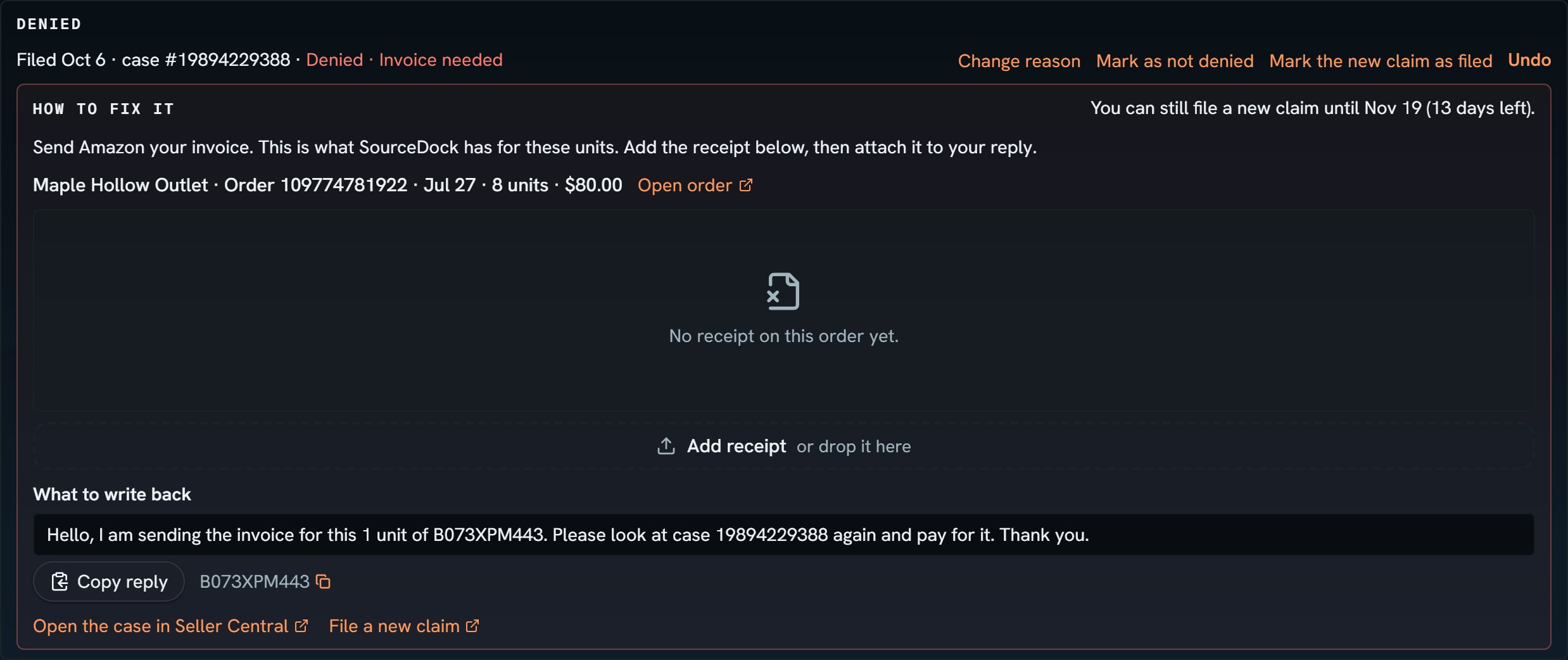
Nalgene bottle: Amazon said it needs an invoice. Notice Denied · Invoice needed, then How to fix it with the order, the receipt box and the reply to copy.
More details
Pick a reason
Pick a reason
With Something else, a box asks “What did Amazon say?” In Filed claims, the Status says Denied, and Waiting shows a dash. Hover Denied to see the whole reason.
How to fix it
How to fix it
Then What to write back has a reply with your units, ASIN and case number.
File a new claim
File a new claim
One line says if a new claim still fits: “You can still file a new claim until Nov 3 (12 days left).” with File a new claim. Once it closes: “Amazon’s window closed Nov 3, so a new claim is too late. You can still reply on this case.”Filed a new claim with Amazon? Click Mark the new claim as filed and add its case number. SourceDock follows the new claim, and keeps this one as denied.
Change your answer
Change your answer
Wrong reason? Click Change reason. Wrong claim, or Amazon changed its mind? Click Mark as not denied, and it’s back to waiting on Amazon.If Amazon pays after all, the payment wins: the claim moves to Paid out and reads Paid.
A refund claim Amazon turned down
A refund claim Amazon turned down
It works like every other claim. To find it later, pick Denied in the Status box. A refund you marked denied the old way, on its Customer refunds line, can still read “never returned, Amazon denied”, with Undo. Its claim line says “You said Amazon turned this claim down.” tagged Can’t claim. Undo brings the claim back.