

In short
Click the scan button, like “Scan 12 ASINs”. A card takes over the page and counts the answers as Amazon sends them. When the last one is in, the card says Scan complete, and the full table shows.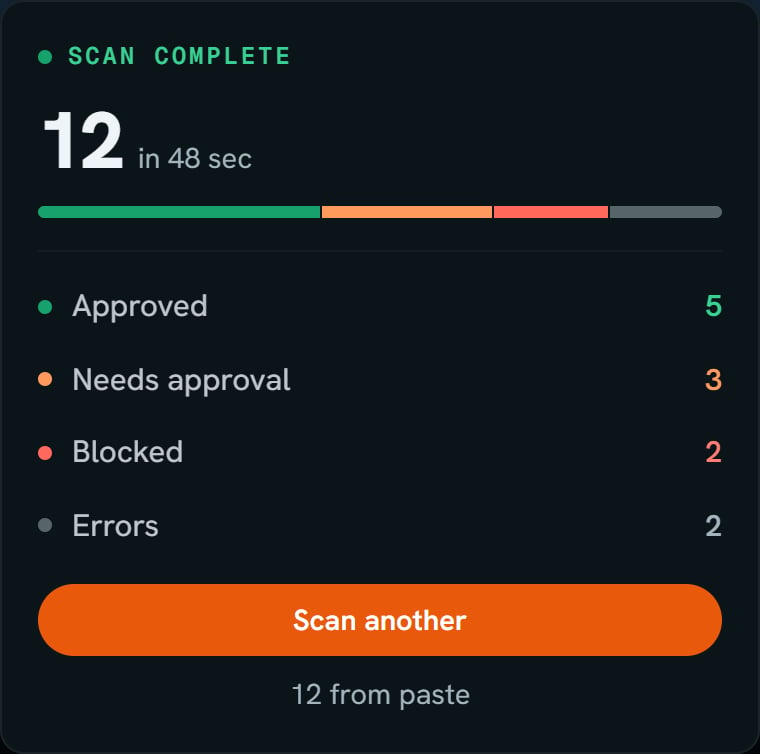
The demo store's scan of 12, finished. Notice the bar in four parts, Approved 5, Needs approval 3, Blocked 2, Errors 2, and 12 from paste.
More details
Run it, step by step
Run it, step by step
1
Fill the box
Paste your list or pick from the Vault. See Add your ASINs.
2
Click the scan button
The button says how many, like “Scan 12 ASINs”.
3
Watch the card
It shows Scanning, how many are done, and four counts: Approved, Needs approval, Blocked, and Errors.
Waiting in line
Waiting in line
If another scan of yours is running or waiting, this one waits its turn. The card says Queued - starting, or how many are ahead, like “Queued - 2 ahead”. That number counts only scans that are waiting, not one that is running.The big number can sit at 0 for a few seconds before the first answer lands.
Live verdicts
Live verdicts
Live verdicts lists the answers while the scan runs, with the newest first. The dots say approved, gated, and blocked. gated is the same group as Needs approval. There’s no dot for an error, but error rows still show.Only the newest 40 rows show. The filter and the table wait until the scan ends. The foot of the list says Full table after this run, then Finishing up once the last answer is in.A row can show a code before its name. The name fills in after. It doesn’t change the verdict.
Leave it or stop it
Leave it or stop it
Scan another takes you back to the box. The scan keeps going. The page says Keeps running. Open it again from Recent scans.Cancel scan stops it. On a trial, checks that never got an answer come back to you. See Free checks and plans.If you switch Amazon accounts, the card clears. The scan keeps running on the account that started it.
When it ends
When it ends
A message says Scan Complete with the counts, like “Scanned 12 ASINs. 5 approved, 3 need approval, 2 blocked.” That message leaves out errors. The Errors count on the card shows them.The line under the buttons says where the list came from: “12 from paste”, “12 from CSV”, or “12 from Vault”. A scan sent from Keepa says when it ran, like “50 from Keepa · 2:31 PM”.If a scan ends early, see When a scan stops or fails.
Every paste asks Amazon
Every paste asks Amazon
Say you scan a toy at 9 AM, and Amazon says Approved. At noon you paste it again. SourceDock asks Amazon again, so you see Amazon’s answer from noon. That second look uses one more check.Each ASIN in a paste is one check, every time. An old answer is never shown in place of a new one.Each scan asks Amazon about the store you have picked. Your US store’s answer is never used for your Canada store.To ask Amazon again, paste the list again, or click the rerun icon on the scan under Recent scans.