

In short
Click a row to open it. You see where the units are, what needs you, and how close the product is to paying you back. Say you sent Amazon 10 plush whales. The bar shows 5 sold, 4 available, and 1 unfulfillable, and the Needs you card says you can claim the damaged one by Dec 9.
Plush whale: Where your units are. Notice the 10 units in one bar: 5 Sold, 4 Available, 1 Unfulfillable.
More details
On Default: Where your units are
On Default: Where your units are
One bar holds every unit. Point at a piece to see how many units it holds, like “4 of 10”. Click a piece to zoom in and read what it means. Click All units to go back. View details swaps in the Advanced open row.Say you had Amazon send 4 units back to you. The bar has a piece named Sent back to you. Zoom in and click Record what happened →. It opens Purchases so you can say what you did with them. If you took them back to the store, the store’s refund counts as money back. If you threw them away, what you paid counts as a loss.
On Default: Selling pace
On Default: Selling pace
It uses the last 30 days. Say buyers bought 3 trucks in that time, and you have 3 left. It says “About 3 units sold a month” and “3 left · sells out in ~1 month”.While you still need sales to get your money back, it also says “At this pace, your money is back in ~1 week.” and “Sell 1 more at about $30.00 to break even”.
The Needs you card
The Needs you card
- A claim to file, with its last day. Click Reconcile, or open See details → and its CLAIMS tab: File a claim, Copy claim details and Mark as filed are there.
- A line like “1 to look at” with a Reconcile button, when the product has something to check. Under a date range, it reads “1 to look at on this product”, since it names the whole product.
- Write off on Purchases →, when a shipment came in short or Amazon can’t find units it checked in.
- Nothing to reconcile, when all is well.
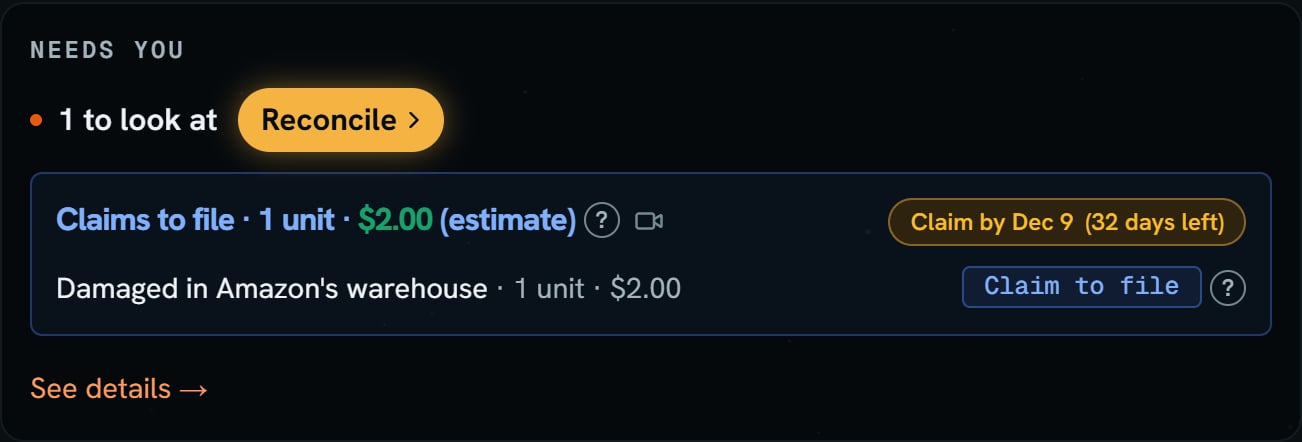
Plush whale: the Needs you card. Notice Claim by Dec 9 (32 days left) and the Reconcile button.
On Advanced: the money and the bar
On Advanced: the money and the bar
Three tiles sit on top: Invested, Recovered, and a third tile. It reads Profit when the money is back, Broke even at exactly $0.00, Still out while units are left, and Lost when every unit is gone and the money never came back.Above the bar, one line says what’s next, like “Sell 1 more at $30.00 to break even”. The price is your average sale price. Once the money is back, that line is gone. It can also read Nothing left to sell, No sales yet, No selling price yet, Selling more loses money, or Add what you paid.Under the bar you see “5 sold”, “3 left to sell” and “break-even at 6 of 10”. Left to sell is the units Amazon has available. The ? after “left to sell” says which batch sells now. Each sale uses its own batch’s cost, oldest batch first. A product you bought more than once lists its batches.
The tabs
The tabs
The tabs are Units at Amazon, Shipments, Issues and claims, and Activity. Under every tab, the Seller Central line opens Inventory, Inventory ledger, and Reimbursements for the product. See details → opens the side panel.Shipments: the number on the tab is how many boxes it lists. Each box shows how many you sent and how many Amazon got. Open in Seller Central opens it on Amazon. With no boxes yet, it says “No shipments for this product yet.”Activity shows the newest 3 events. A damaged or lost unit’s line says what Amazon paid, like “Paid Oct 13” or “1 of 2 paid”, and shows no $0.00. The all link opens every event. Full ledger → opens the side panel.