2 min read · Send an invite, what it takes from your seats, and what the email says.
In short
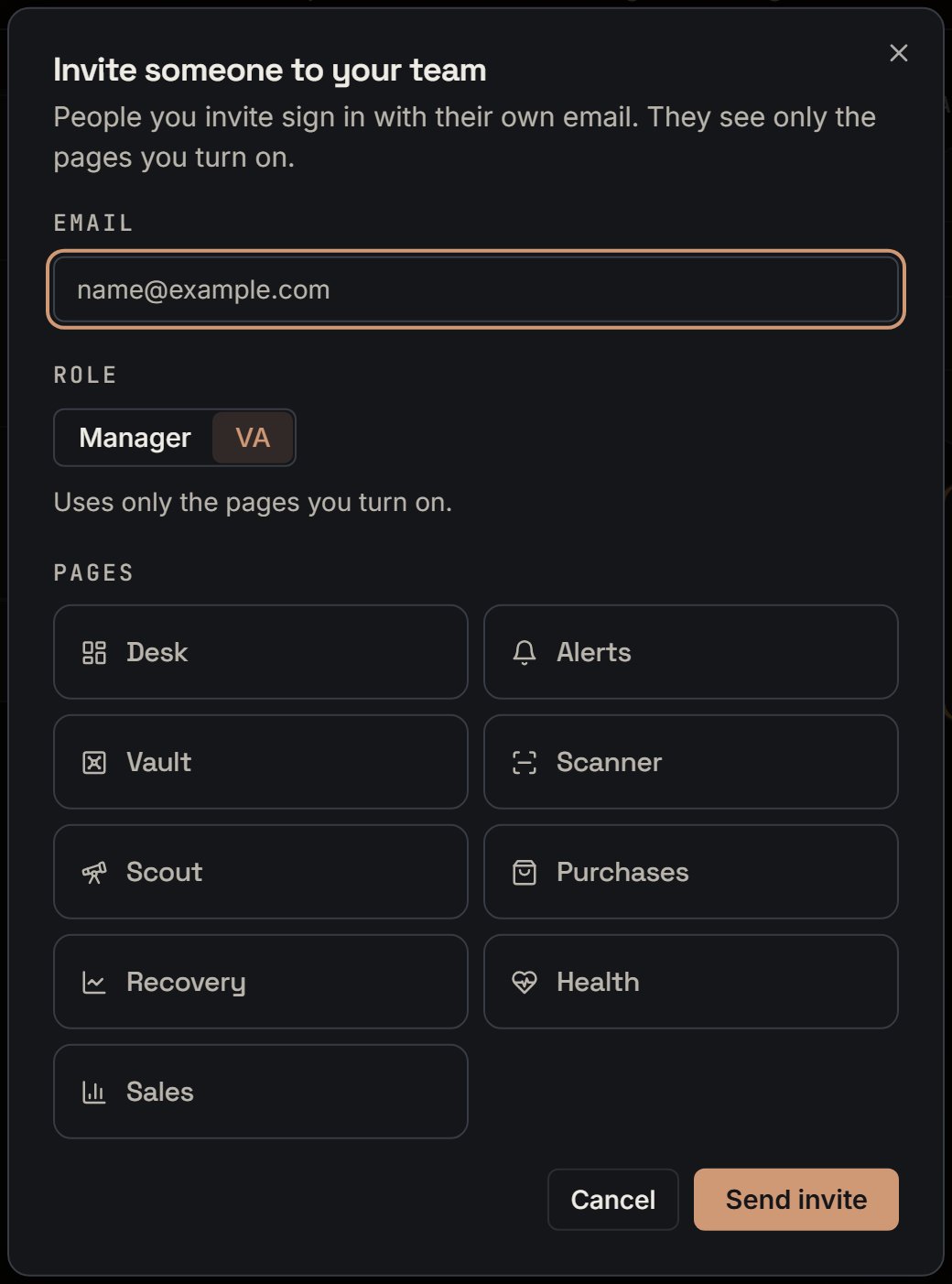
On Account > Team, click Invite someone. Type their email, pick a role, turn on their pages, and click Send invite. SourceDock emails them a link that works for 7 days.Say you invite a helper to log purchase orders. Pick VA, turn on Purchases, and send it. A note says the link works for 7 days.
The invite box as it opens. Notice it starts on VA, with every page off.
More details
Fill in the box
1
Type the email
Use the address they’ll sign in with.
2
Pick a role
Manager or VA. It starts on VA, with every page off. Pick Manager, and every page turns on.
3
Set the pages
Turn each page on or off. Only pages you can open yourself are in the list. See Which pages you can share.
4
Send it
Send invite sends it. With every page off, it says Turn on at least one page.
How seats are counted
1 for you, plus each person on the team, plus each open invite. A paused person still counts. The Team tab says something like “3 of 5 seats used”.When an invite is accepted, it stops counting and the person starts counting, so the number stays the same.With every seat used, Invite someone turns off, and it says Every seat is taken. Remove someone or cancel an invite to free a seat.On Premier, it says “Your plan has no team seats. Pro has 5 seats, and you count as one.” See plans opens Billing.
An open invite
Its row shows the email, the role, the pages, and “Invite sent. It works until Nov 4.” The date uses your computer’s time zone.Cancel invite frees the seat at once. An invite past its end stops counting by itself.Send a new invite to an address with an open one, and SourceDock cancels the old one first.
An open invite row. Notice the email is the name, and the line Invite sent. It works until Nov 4.
If it doesn't go out
This person is already on the team. Nothing is sent. Capital letters and spaces at the ends don’t matter.
If the email fails, the invite still holds its seat. It says to cancel the invite and send a new one.
Too many invites. Try again later. You can send 20 invite requests in an hour.
Too many invites to this address. Try again tomorrow. You can send 5 invite emails to one address in 24 hours.
Your account is set to be deleted, so you can’t invite anyone. Cancel the deletion first.
The email
The title is You’re invited to a team. It names who sent it, the role, and the end date. The button says Accept the invite. See Accept an invite.
{"docsConfig":{"theme":"mint","$schema":"https://mintlify.com/docs.json","name":"SourceDock","colors":{"primary":"#EA580C","light":"#FF9A5A","dark":"#EA580C"},"logo":{"light":"https://mintcdn.com/sourcedock/qOyT6VleObj7HrsZ/logo/light.svg?fit=max\u0026auto=format\u0026n=qOyT6VleObj7HrsZ\u0026q=85\u0026s=fac497db707183ccf027093f15f21cd7","dark":"https://mintcdn.com/sourcedock/qOyT6VleObj7HrsZ/logo/dark.svg?fit=max\u0026auto=format\u0026n=qOyT6VleObj7HrsZ\u0026q=85\u0026s=7c4a164f66e528a64c1d35bc9596867e","href":"https://sourcedock.io"},"favicon":"https://mintcdn.com/sourcedock/PvFEadQJVbcHct-s/favicon.png?fit=max\u0026auto=format\u0026n=PvFEadQJVbcHct-s\u0026q=85\u0026s=b2a8ed72213fc5eb8082f24866be78d9","appearance":{"default":"dark"},"background":{"color":{"dark":"#020609"}},"navbar":{"links":[{"href":"https://discord.gg/ssWsu5jHe","label":"Community"}],"primary":{"type":"button","label":"Open SourceDock","href":"https://app.sourcedock.io"}},"footer":{"socials":{"website":"https://sourcedock.io","discord":"https://discord.gg/ssWsu5jHe"}},"icons":{"library":"lucide"},"styling":{"latex":false},"navigation":{"pages":[]}},"deployment":{"deploymentMetadataValue":{"subdomain":"sourcedock","hasAudioNarration":false,"actualSubdomain":"sourcedock","customDomains":["docs.sourcedock.io"],"gitSource":{"type":"github","owner":"source-dock","repo":"sourcedock-docs","deployBranch":"main","contentDirectory":"","isPrivate":true,"mountPath":"","label":""},"entitlements":{"AI_CHAT":{"status":"DISABLED"}},"buildId":"6b010c47965586a741a14e90","clientVersion":"0.0.4270","searchFilterCounts":[{"language":"default","tag":"Docs","count":190},{"language":"default","tag":"Operate","count":62},{"language":"default","tag":"Get started","count":52},{"language":"default","tag":"Academy","count":29},{"language":"default","tag":"Source","count":27},{"language":"default","tag":"The desk","count":26},{"language":"default","tag":"Reference","count":19},{"language":"default","tag":"Chrome extension","count":16},{"language":"default","tag":"Claims","count":12},{"language":"default","tag":"Capital Recovery","count":11}]},"assistantConfig":{"enableAskAiButton":false,"enableStarterQuestions":false,"enableContextualStarterQuestions":false,"enableAskAiSearchBar":true},"basePath":"","hasChatPermissions":false,"hasWebMcpPermissions":false,"toggles":[{"name":"kill-isr","enabled":true,"variant":{"name":"disabled","enabled":false,"feature_enabled":true},"impressionData":false},{"name":"custom-rbac-roles","enabled":true,"variant":{"name":"disabled","enabled":false,"feature_enabled":true},"impressionData":false},{"name":"agent-mintlify-slack","enabled":true,"variant":{"name":"disabled","enabled":false,"feature_enabled":true},"impressionData":false},{"name":"agent-integrations-settings","enabled":true,"variant":{"name":"disabled","enabled":false,"feature_enabled":true},"impressionData":false},{"name":"rbac-expansion","enabled":true,"variant":{"name":"disabled","enabled":false,"feature_enabled":true},"impressionData":false},{"name":"automations-pr-grouping","enabled":true,"variant":{"name":"disabled","enabled":false,"feature_enabled":true},"impressionData":false},{"name":"custom-prefix","enabled":true,"variant":{"name":"disabled","enabled":false,"feature_enabled":true},"impressionData":false},{"name":"analytics-v7","enabled":true,"variant":{"name":"disabled","enabled":false,"feature_enabled":true},"impressionData":false},{"name":"user-flows-analytics","enabled":true,"variant":{"name":"disabled","enabled":false,"feature_enabled":true},"impressionData":false},{"name":"no-publish-flow","enabled":true,"variant":{"name":"disabled","enabled":false,"feature_enabled":true},"impressionData":false},{"name":"workos-onboarding","enabled":true,"variant":{"name":"disabled","enabled":false,"feature_enabled":true},"impressionData":false},{"name":"snapshot-serving-live","enabled":true,"variant":{"name":"disabled","enabled":false,"feature_enabled":true},"impressionData":false},{"name":"stripTemperatureMiddleware","enabled":true,"variant":{"name":"disabled","enabled":false,"feature_enabled":true},"impressionData":false},{"name":"support-platform-pylon-zendesk","enabled":true,"variant":{"name":"disabled","enabled":false,"feature_enabled":true},"impressionData":false},{"name":"snapshot-serving","enabled":true,"variant":{"name":"disabled","enabled":false,"feature_enabled":true},"impressionData":false},{"name":"instant-rollback","enabled":true,"variant":{"name":"disabled","enabled":false,"feature_enabled":true},"impressionData":false},{"name":"granular-notifications-server","enabled":true,"variant":{"name":"disabled","enabled":false,"feature_enabled":true},"impressionData":false},{"name":"granular-notifications","enabled":true,"variant":{"name":"disabled","enabled":false,"feature_enabled":true},"impressionData":false},{"name":"automations-fable","enabled":true,"variant":{"name":"disabled","enabled":false,"feature_enabled":true},"impressionData":false},{"name":"fixed-ai-action-pricing","enabled":true,"variant":{"name":"disabled","enabled":false,"feature_enabled":true},"impressionData":false},{"name":"site-roles","enabled":true,"variant":{"name":"disabled","enabled":false,"feature_enabled":true},"impressionData":false},{"name":"automation-resolve-merge-conflict","enabled":true,"variant":{"name":"disabled","enabled":false,"feature_enabled":true},"impressionData":false},{"name":"scoped-publishing","enabled":true,"variant":{"name":"disabled","enabled":false,"feature_enabled":true},"impressionData":false},{"name":"mintql","enabled":true,"variant":{"name":"disabled","enabled":false,"feature_enabled":true},"impressionData":false},{"name":"page-level-analytics","enabled":true,"variant":{"name":"disabled","enabled":false,"feature_enabled":true},"impressionData":false},{"name":"editor-version-history-v2","enabled":true,"variant":{"name":"disabled","enabled":false,"feature_enabled":true},"impressionData":false},{"name":"billing-page-v2","enabled":true,"variant":{"name":"disabled","enabled":false,"feature_enabled":true},"impressionData":false},{"name":"full-page-search","enabled":true,"variant":{"name":"disabled","enabled":false,"feature_enabled":true},"impressionData":false},{"name":"workspace-projects","enabled":true,"variant":{"name":"disabled","enabled":false,"feature_enabled":true},"impressionData":false},{"name":"assistant-v5","enabled":true,"variant":{"name":"disabled","enabled":false,"feature_enabled":true},"impressionData":false},{"name":"fork-pr-previews","enabled":true,"variant":{"name":"disabled","enabled":false,"feature_enabled":true},"impressionData":false},{"name":"revalidation-jwt","enabled":true,"variant":{"name":"disabled","enabled":false,"feature_enabled":true},"impressionData":false},{"name":"workos-sso-scim","enabled":true,"variant":{"name":"disabled","enabled":false,"feature_enabled":true},"impressionData":false},{"name":"hobby-abuse-scan","enabled":true,"variant":{"name":"disabled","enabled":false,"feature_enabled":true},"impressionData":false},{"name":"dashboard-inbox","enabled":true,"variant":{"name":"disabled","enabled":false,"feature_enabled":true},"impressionData":false},{"name":"workos-signup","enabled":true,"variant":{"name":"disabled","enabled":false,"feature_enabled":true},"impressionData":false},{"name":"turbopuffer-dual-write","enabled":true,"variant":{"name":"disabled","enabled":false,"feature_enabled":true},"impressionData":false},{"name":"workos-enabled","enabled":true,"variant":{"name":"disabled","enabled":false,"feature_enabled":true},"impressionData":false},{"name":"approve-review-flow","enabled":true,"variant":{"name":"disabled","enabled":false,"feature_enabled":true},"impressionData":false},{"name":"editor-metadata","enabled":true,"variant":{"name":"disabled","enabled":false,"feature_enabled":true},"impressionData":false},{"name":"sso-setup-deadline-banner","enabled":true,"variant":{"name":"disabled","enabled":false,"feature_enabled":true},"impressionData":false},{"name":"turbopuffer-serve","enabled":true,"variant":{"name":"disabled","enabled":false,"feature_enabled":true},"impressionData":false},{"name":"live-agents","enabled":true,"variant":{"name":"disabled","enabled":false,"feature_enabled":true},"impressionData":false},{"name":"starter-pricing","enabled":true,"variant":{"name":"control","enabled":true,"payload":{"type":"string","value":"control"},"feature_enabled":true},"impressionData":false},{"name":"llms-txt-v2","enabled":true,"variant":{"name":"disabled","enabled":false,"feature_enabled":true},"impressionData":false},{"name":"wildcard-email-auth","enabled":true,"variant":{"name":"disabled","enabled":false,"feature_enabled":true},"impressionData":false}],"googleFontsInlined":false},"customCss":[{"filePath":"academy.css","content":".sd-orange-text{color:#C2410C}.dark .sd-orange-text{color:#FF9A5A}"}]}
{"page":{"pagePath":"get-started/team-invite","slug":"/get-started/team-invite","pageMetadata":{"title":"Invite someone to your team","sidebarTitle":"Invite someone","description":"2 min read · Send an invite, what it takes from your seats, and what the email says.","icon":"user-plus","href":"/get-started/team-invite"},"description":{"compiledSource":"\"use strict\";\nconst {jsx: _jsx} = arguments[0];\nconst {useMDXComponents: _provideComponents} = arguments[0];\nfunction _createMdxContent(props) {\n const _components = {\n p: \"p\",\n ..._provideComponents(),\n ...props.components\n };\n return _jsx(_components.p, {\n children: \"2 min read · Send an invite, what it takes from your seats, and what the email says.\"\n });\n}\nfunction MDXContent(props = {}) {\n const {wrapper: MDXLayout} = {\n ..._provideComponents(),\n ...props.components\n };\n return MDXLayout ? _jsx(MDXLayout, {\n ...props,\n children: _jsx(_createMdxContent, {\n ...props\n })\n }) : _createMdxContent(props);\n}\nreturn {\n default: MDXContent\n};\n","frontmatter":{},"scope":{}},"pageType":"default","mdx":{"mdxSource":{"compiledSource":"\"use strict\";const{Fragment:_Fragment,jsx:_jsx,jsxs:_jsxs}=arguments[0];const{useMDXComponents:_provideComponents}=arguments[0];function _createMdxContent(props){const _components={a:`a`,li:`li`,p:`p`,strong:`strong`,ul:`ul`,..._provideComponents(),...props.components},{Accordion,AccordionGroup,Frame,Heading,OptimizedImage,Step,Steps}=_components;if(!Accordion)_missingMdxReference(`Accordion`,true);if(!AccordionGroup)_missingMdxReference(`AccordionGroup`,true);if(!Frame)_missingMdxReference(`Frame`,true);if(!Heading)_missingMdxReference(`Heading`,true);if(!OptimizedImage)_missingMdxReference(`OptimizedImage`,true);if(!Step)_missingMdxReference(`Step`,true);if(!Steps)_missingMdxReference(`Steps`,true);return _jsxs(_Fragment,{children:[_jsx(Heading,{level:`2`,id:`in-short`,children:`In short`}),`\n`,_jsxs(_components.p,{children:[`On `,_jsx(_components.strong,{children:`Account`}),` > `,_jsx(_components.strong,{children:`Team`}),`, click `,_jsx(_components.strong,{children:`Invite someone`}),`. Type their email, pick a role, turn on their pages, and click `,_jsx(_components.strong,{children:`Send invite`}),`. SourceDock emails them a link that works for 7 days.`]}),`\n`,_jsxs(_components.p,{children:[`Say you invite a helper to log purchase orders. Pick `,_jsx(_components.strong,{children:`VA`}),`, turn on `,_jsx(_components.strong,{children:`Purchases`}),`, and send it. A note says the link works for 7 days.`]}),`\n`,_jsx(Frame,{caption:`The invite box as it opens. Notice it starts on VA, with every page off.`,children:_jsx(OptimizedImage,{src:`https://mintcdn.com/sourcedock/hBQ-HhjlmlJM4ba4/images/deep-dives/team-in-depth/03-maya-invite-box-va.png?fit=max\u0026auto=format\u0026n=hBQ-HhjlmlJM4ba4\u0026q=85\u0026s=c1d386b3c275fe838448e6281395f483`,alt:`The Invite someone to your team box: an Email box showing name@example.com, Role with Manager and VA (VA picked), the line Uses only the pages you turn on., nine page switches all off, and Cancel and Send invite.`,\"data-og-width\":`1040`,width:`1040`,\"data-og-height\":`1402`,height:`1402`,\"data-path\":`images/deep-dives/team-in-depth/03-maya-invite-box-va.png`,\"data-optimize\":`true`,\"data-opv\":`3`,srcset:`https://mintcdn.com/sourcedock/hBQ-HhjlmlJM4ba4/images/deep-dives/team-in-depth/03-maya-invite-box-va.png?w=280\u0026fit=max\u0026auto=format\u0026n=hBQ-HhjlmlJM4ba4\u0026q=85\u0026s=c7e05652ea68ed2eb14b0794a532c7ae 280w, https://mintcdn.com/sourcedock/hBQ-HhjlmlJM4ba4/images/deep-dives/team-in-depth/03-maya-invite-box-va.png?w=560\u0026fit=max\u0026auto=format\u0026n=hBQ-HhjlmlJM4ba4\u0026q=85\u0026s=419ed474a6d94089e1386660fc554e47 560w, https://mintcdn.com/sourcedock/hBQ-HhjlmlJM4ba4/images/deep-dives/team-in-depth/03-maya-invite-box-va.png?w=840\u0026fit=max\u0026auto=format\u0026n=hBQ-HhjlmlJM4ba4\u0026q=85\u0026s=0c392d15bcfae72f7bf5d241f8a4e605 840w, https://mintcdn.com/sourcedock/hBQ-HhjlmlJM4ba4/images/deep-dives/team-in-depth/03-maya-invite-box-va.png?w=1100\u0026fit=max\u0026auto=format\u0026n=hBQ-HhjlmlJM4ba4\u0026q=85\u0026s=fce197bf21224958adaf543a0a090b64 1100w, https://mintcdn.com/sourcedock/hBQ-HhjlmlJM4ba4/images/deep-dives/team-in-depth/03-maya-invite-box-va.png?w=1650\u0026fit=max\u0026auto=format\u0026n=hBQ-HhjlmlJM4ba4\u0026q=85\u0026s=ff5357aaa779c16f94bea4fae32e98b0 1650w, https://mintcdn.com/sourcedock/hBQ-HhjlmlJM4ba4/images/deep-dives/team-in-depth/03-maya-invite-box-va.png?w=2500\u0026fit=max\u0026auto=format\u0026n=hBQ-HhjlmlJM4ba4\u0026q=85\u0026s=b99c975ea5bb3eca3b2793987c5f6424 2500w`})}),`\n`,_jsx(Heading,{level:`2`,id:`more-details`,children:`More details`}),`\n`,_jsxs(AccordionGroup,{children:[_jsx(Accordion,{title:`Fill in the box`,id:`fill-in-the-box`,children:_jsxs(Steps,{children:[_jsx(Step,{title:`Type the email`,children:_jsx(_components.p,{children:`Use the address they’ll sign in with.`})}),_jsx(Step,{title:`Pick a role`,children:_jsxs(_components.p,{children:[_jsx(_components.strong,{children:`Manager`}),` or `,_jsx(_components.strong,{children:`VA`}),`. It starts on `,_jsx(_components.strong,{children:`VA`}),`, with every page off. Pick `,_jsx(_components.strong,{children:`Manager`}),`, and every page turns on.`]})}),_jsx(Step,{title:`Set the pages`,children:_jsxs(_components.p,{children:[`Turn each page on or off. Only pages you can open yourself are in the list. See `,_jsx(_components.a,{href:`/get-started/team-pages`,children:`Which pages you can share`}),`.`]})}),_jsx(Step,{title:`Send it`,children:_jsxs(_components.p,{children:[_jsx(_components.strong,{children:`Send invite`}),` sends it. With every page off, it says `,_jsx(_components.strong,{children:`Turn on at least one page.`})]})})]})}),_jsxs(Accordion,{title:`How seats are counted`,id:`how-seats-are-counted`,children:[_jsx(_components.p,{children:`1 for you, plus each person on the team, plus each open invite. A paused person still counts. The Team tab says something like “3 of 5 seats used”.`}),_jsx(_components.p,{children:`When an invite is accepted, it stops counting and the person starts counting, so the number stays the same.`}),_jsxs(_components.p,{children:[`With every seat used, `,_jsx(_components.strong,{children:`Invite someone`}),` turns off, and it says `,_jsx(_components.strong,{children:`Every seat is taken. Remove someone or cancel an invite to free a seat.`})]}),_jsxs(_components.p,{children:[`On Premier, it says “Your plan has no team seats. Pro has 5 seats, and you count as one.” `,_jsx(_components.strong,{children:`See plans`}),` opens `,_jsx(_components.strong,{children:`Billing`}),`.`]})]}),_jsxs(Accordion,{title:`An open invite`,id:`an-open-invite`,children:[_jsx(_components.p,{children:`Its row shows the email, the role, the pages, and “Invite sent. It works until Nov 4.” The date uses your computer’s time zone.`}),_jsxs(_components.p,{children:[_jsx(_components.strong,{children:`Cancel invite`}),` frees the seat at once. An invite past its end stops counting by itself.`]}),_jsx(_components.p,{children:`Send a new invite to an address with an open one, and SourceDock cancels the old one first.`}),_jsx(Frame,{caption:`An open invite row. Notice the email is the name, and the line Invite sent. It works until Nov 4.`,children:_jsx(OptimizedImage,{src:`https://mintcdn.com/sourcedock/hBQ-HhjlmlJM4ba4/images/deep-dives/team-in-depth/01-maya-invite-row.png?fit=max\u0026auto=format\u0026n=hBQ-HhjlmlJM4ba4\u0026q=85\u0026s=880363c1ab94907869cc8f83a93dec8e`,alt:`A row with lee@brightblend.example and a VA badge, the line Vault, Purchases, the line Invite sent. It works until Nov 4., and a Cancel invite button.`,\"data-og-width\":`1660`,width:`1660`,\"data-og-height\":`220`,height:`220`,\"data-path\":`images/deep-dives/team-in-depth/01-maya-invite-row.png`,\"data-optimize\":`true`,\"data-opv\":`3`,srcset:`https://mintcdn.com/sourcedock/hBQ-HhjlmlJM4ba4/images/deep-dives/team-in-depth/01-maya-invite-row.png?w=280\u0026fit=max\u0026auto=format\u0026n=hBQ-HhjlmlJM4ba4\u0026q=85\u0026s=7183327d478f428b51f4503ca0b692fa 280w, https://mintcdn.com/sourcedock/hBQ-HhjlmlJM4ba4/images/deep-dives/team-in-depth/01-maya-invite-row.png?w=560\u0026fit=max\u0026auto=format\u0026n=hBQ-HhjlmlJM4ba4\u0026q=85\u0026s=91a12f714751d6dbc3c6d0e277375a04 560w, https://mintcdn.com/sourcedock/hBQ-HhjlmlJM4ba4/images/deep-dives/team-in-depth/01-maya-invite-row.png?w=840\u0026fit=max\u0026auto=format\u0026n=hBQ-HhjlmlJM4ba4\u0026q=85\u0026s=c5f4b30b768d45bbfb10036c645e2436 840w, https://mintcdn.com/sourcedock/hBQ-HhjlmlJM4ba4/images/deep-dives/team-in-depth/01-maya-invite-row.png?w=1100\u0026fit=max\u0026auto=format\u0026n=hBQ-HhjlmlJM4ba4\u0026q=85\u0026s=c20f312642297e0e88c7c484276ded44 1100w, https://mintcdn.com/sourcedock/hBQ-HhjlmlJM4ba4/images/deep-dives/team-in-depth/01-maya-invite-row.png?w=1650\u0026fit=max\u0026auto=format\u0026n=hBQ-HhjlmlJM4ba4\u0026q=85\u0026s=7799fddc88bdf5d64ed727702a5172eb 1650w, https://mintcdn.com/sourcedock/hBQ-HhjlmlJM4ba4/images/deep-dives/team-in-depth/01-maya-invite-row.png?w=2500\u0026fit=max\u0026auto=format\u0026n=hBQ-HhjlmlJM4ba4\u0026q=85\u0026s=276e797ce984662ede6feb66a834f14b 2500w`})})]}),_jsx(Accordion,{title:`If it doesn't go out`,id:`if-it-doesnt-go-out`,children:_jsxs(_components.ul,{children:[`\n`,_jsxs(_components.li,{children:[_jsx(_components.strong,{children:`This person is already on the team.`}),` Nothing is sent. Capital letters and spaces at the ends don’t matter.`]}),`\n`,_jsx(_components.li,{children:`If the email fails, the invite still holds its seat. It says to cancel the invite and send a new one.`}),`\n`,_jsxs(_components.li,{children:[_jsx(_components.strong,{children:`Too many invites. Try again later.`}),` You can send 20 invite requests in an hour.`]}),`\n`,_jsxs(_components.li,{children:[_jsx(_components.strong,{children:`Too many invites to this address. Try again tomorrow.`}),` You can send 5 invite emails to one address in 24 hours.`]}),`\n`,_jsx(_components.li,{children:_jsx(_components.strong,{children:`Your account is set to be deleted, so you can’t invite anyone. Cancel the deletion first.`})}),`\n`]})}),_jsx(Accordion,{title:`The email`,id:`the-email`,children:_jsxs(_components.p,{children:[`The title is `,_jsx(_components.strong,{children:`You’re invited to a team`}),`. It names who sent it, the role, and the end date. The button says `,_jsx(_components.strong,{children:`Accept the invite`}),`. See `,_jsx(_components.a,{href:`/get-started/team-accept`,children:`Accept an invite`}),`.`]})})]})]})}function MDXContent(props={}){const{wrapper:MDXLayout}={..._provideComponents(),...props.components};return MDXLayout?_jsx(MDXLayout,{...props,children:_jsx(_createMdxContent,{...props})}):_createMdxContent(props)}return{default:MDXContent};function _missingMdxReference(id,component){throw new Error(`Expected `+(component?`component`:`object`)+\" `\"+id+\"` to be defined: you likely forgot to import, pass, or provide it.\")}","frontmatter":{},"scope":{"config":{},"pageMetadata":{"title":"Invite someone to your team","sidebarTitle":"Invite someone","description":"2 min read · Send an invite, what it takes from your seats, and what the email says.","icon":"user-plus","href":"/get-started/team-invite"}}},"mdxSourceWithNoJs":null},"mdxExtracts":{"tableOfContents":[{"title":"In short","slug":"in-short","depth":2,"children":[]},{"title":"More details","slug":"more-details","depth":2,"children":[]}],"codeExamples":{}},"jsLinks":[],"subdomain":"sourcedock","siteName":"SourceDock","title":"Invite someone to your team - SourceDock","navMaps":{"firstHrefInVersion":{},"firstHrefInLanguage":{}},"lastModified":"2026-11-07T18:04:48.825Z","originalFileLocation":"get-started/team-invite.mdx"},"headHtml":"\u003cscript data-mint-head>(function(){var d=document.documentElement,p=null;if(!p){try{p=localStorage.getItem(\"isDarkMode\")}catch(e){}if(p==='true')p='dark';else if(p==='false')p='light';if(p!=='light'\u0026\u0026p!=='dark'\u0026\u0026p!=='system')p=\"dark\"}var r=p==='system'?(matchMedia(\"(prefers-color-scheme: dark)\").matches?'dark':'light'):p;d.classList.remove(r==='dark'?'light':'dark');d.classList.add(r);d.setAttribute(\"data-theme-preference\",p)})();\u003c/script>\u003cmeta data-mint-head name=\"description\" content=\"2 min read · Send an invite, what it takes from your seats, and what the email says.\">\u003cmeta data-mint-head name=\"application-name\" content=\"SourceDock\">\u003cmeta data-mint-head name=\"generator\" content=\"Mintlify\">\u003clink data-mint-head rel=\"apple-touch-icon\" type=\"image/png\" sizes=\"180x180\" href=\"https://mintcdn.com/sourcedock/PvFEadQJVbcHct-s/favicon.png?fit=max\u0026amp;auto=format\u0026amp;n=PvFEadQJVbcHct-s\u0026amp;q=85\u0026amp;s=b2a8ed72213fc5eb8082f24866be78d9\">\u003clink data-mint-head rel=\"icon\" type=\"image/png\" sizes=\"32x32\" href=\"https://mintcdn.com/sourcedock/PvFEadQJVbcHct-s/favicon.png?fit=max\u0026amp;auto=format\u0026amp;n=PvFEadQJVbcHct-s\u0026amp;q=85\u0026amp;s=b2a8ed72213fc5eb8082f24866be78d9\">\u003clink data-mint-head rel=\"icon\" type=\"image/png\" sizes=\"16x16\" href=\"https://mintcdn.com/sourcedock/PvFEadQJVbcHct-s/favicon.png?fit=max\u0026amp;auto=format\u0026amp;n=PvFEadQJVbcHct-s\u0026amp;q=85\u0026amp;s=b2a8ed72213fc5eb8082f24866be78d9\">\u003clink data-mint-head rel=\"shortcut icon\" type=\"image/png\" href=\"https://mintcdn.com/sourcedock/PvFEadQJVbcHct-s/favicon.png?fit=max\u0026amp;auto=format\u0026amp;n=PvFEadQJVbcHct-s\u0026amp;q=85\u0026amp;s=b2a8ed72213fc5eb8082f24866be78d9\">\u003cmeta data-mint-head property=\"og:title\" content=\"Invite someone to your team - SourceDock\">\u003cmeta data-mint-head property=\"og:description\" content=\"2 min read · Send an invite, what it takes from your seats, and what the email says.\">\u003cmeta data-mint-head property=\"og:site_name\" content=\"SourceDock\">\u003cmeta data-mint-head property=\"og:url\" content=\"https://docs.sourcedock.io/get-started/team-invite\">\u003cmeta data-mint-head property=\"og:type\" content=\"website\">\u003cmeta data-mint-head property=\"og:image\" content=\"https://sourcedock.mintlify.site/_mintlify/api/og/v2?division=Team+members\u0026amp;title=Invite+someone+to+your+team\u0026amp;description=2+min+read+%C2%B7+Send+an+invite%2C+what+it+takes+from+your+seats%2C+and+what+the+email+says.\u0026amp;theme=a9389db1756ac6faaddb7eff\u0026amp;signature=6fe82b82e66aa83518db8f465ba6b0a8d4043c1a4b082427efb8903fc201cc5a\">\u003cmeta data-mint-head property=\"og:image:width\" content=\"1200\">\u003cmeta data-mint-head property=\"og:image:height\" content=\"630\">\u003cmeta data-mint-head name=\"twitter:card\" content=\"summary_large_image\">\u003cmeta data-mint-head name=\"twitter:title\" content=\"Invite someone to your team - SourceDock\">\u003cmeta data-mint-head name=\"twitter:description\" content=\"2 min read · Send an invite, what it takes from your seats, and what the email says.\">\u003cmeta data-mint-head name=\"twitter:image\" content=\"https://sourcedock.mintlify.site/_mintlify/api/og/v2?division=Team+members\u0026amp;title=Invite+someone+to+your+team\u0026amp;description=2+min+read+%C2%B7+Send+an+invite%2C+what+it+takes+from+your+seats%2C+and+what+the+email+says.\u0026amp;theme=a9389db1756ac6faaddb7eff\u0026amp;signature=6fe82b82e66aa83518db8f465ba6b0a8d4043c1a4b082427efb8903fc201cc5a\">\u003cmeta data-mint-head name=\"twitter:image:width\" content=\"1200\">\u003cmeta data-mint-head name=\"twitter:image:height\" content=\"630\">\u003cmeta data-mint-head name=\"msapplication-config\" content=\"https://mintlify.s3.us-west-1.amazonaws.com/sourcedock/_generated/favicon/browserconfig.xml?v=3\">\u003cmeta data-mint-head name=\"apple-mobile-web-app-title\" content=\"SourceDock\">\u003cmeta data-mint-head name=\"msapplication-TileColor\" content=\"#EA580C\">\u003clink data-mint-head rel=\"canonical\" href=\"https://docs.sourcedock.io/get-started/team-invite\">\u003clink data-mint-head rel=\"alternate\" type=\"application/xml\" href=\"/sitemap.xml\">\u003clink data-mint-head rel=\"alternate\" type=\"text/markdown\" href=\"/get-started/team-invite.md\">\u003cscript data-mint-head type=\"application/ld+json\">{\"@context\":\"https://schema.org\",\"@graph\":[{\"@type\":\"Organization\",\"@id\":\"https://docs.sourcedock.io/#organization\",\"name\":\"SourceDock\",\"url\":\"https://docs.sourcedock.io\",\"logo\":{\"@type\":\"ImageObject\",\"url\":\"https://mintcdn.com/sourcedock/qOyT6VleObj7HrsZ/logo/light.svg?fit=max\u0026auto=format\u0026n=qOyT6VleObj7HrsZ\u0026q=85\u0026s=fac497db707183ccf027093f15f21cd7\"}},{\"@type\":\"WebSite\",\"@id\":\"https://docs.sourcedock.io#website\",\"name\":\"SourceDock\",\"url\":\"https://docs.sourcedock.io\",\"publisher\":{\"@id\":\"https://docs.sourcedock.io/#organization\"}},{\"@type\":\"WebPage\",\"@id\":\"https://docs.sourcedock.io/get-started/team-invite#webpage\",\"url\":\"https://docs.sourcedock.io/get-started/team-invite\",\"name\":\"Invite someone to your team\",\"description\":\"2 min read · Send an invite, what it takes from your seats, and what the email says.\",\"dateModified\":\"2026-11-07T18:04:48.825Z\",\"isPartOf\":{\"@id\":\"https://docs.sourcedock.io#website\"},\"breadcrumb\":{\"@id\":\"https://docs.sourcedock.io/get-started/team-invite#breadcrumb\"}},{\"@type\":\"BreadcrumbList\",\"@id\":\"https://docs.sourcedock.io/get-started/team-invite#breadcrumb\",\"itemListElement\":[{\"@type\":\"ListItem\",\"position\":1,\"name\":\"Get started\",\"item\":\"https://docs.sourcedock.io\"},{\"@type\":\"ListItem\",\"position\":2,\"name\":\"Team members\",\"item\":\"https://docs.sourcedock.io/get-started/team\"},{\"@type\":\"ListItem\",\"position\":3,\"name\":\"Invite someone to your team\",\"item\":\"https://docs.sourcedock.io/get-started/team-invite\"}]},{\"@type\":[\"Article\",\"TechArticle\"],\"@id\":\"https://docs.sourcedock.io/get-started/team-invite#article\",\"headline\":\"Invite someone to your team\",\"name\":\"Invite someone to your team\",\"description\":\"2 min read · Send an invite, what it takes from your seats, and what the email says.\",\"url\":\"https://docs.sourcedock.io/get-started/team-invite\",\"mainEntityOfPage\":{\"@id\":\"https://docs.sourcedock.io/get-started/team-invite#webpage\"},\"dateModified\":\"2026-11-07T18:04:48.825Z\",\"publisher\":{\"@id\":\"https://docs.sourcedock.io/#organization\"},\"isPartOf\":{\"@id\":\"https://docs.sourcedock.io#website\"}}]}\u003c/script>\u003cscript data-mint-head type=\"application/ld+json\">{\"@context\":\"https://schema.org\",\"@type\":\"WebSite\",\"name\":\"SourceDock\",\"publisher\":{\"@type\":\"Organization\",\"name\":\"SourceDock\"},\"provider\":{\"@type\":\"Organization\",\"name\":\"Mintlify\",\"url\":\"https://mintlify.com\"}}\u003c/script>","agentPointerHref":"/get-started/team-invite.md","siteName":"SourceDock","nav":{"global":null,"tabs":[{"tab":"Docs","groups":[{"group":"Get started","pages":[{"title":"Welcome to SourceDock","icon":"house","href":""},{"title":"Quickstart","icon":"rocket","href":"/get-started/quickstart"},{"group":"Setup","pages":[{"title":"Setup: your first day","icon":"list-checks","href":"/get-started/setup"},{"title":"Make your SourceDock account","sidebarTitle":"Make your account","icon":"user-plus","href":"/get-started/setup-sign-up"},{"title":"Start your 14-day trial","sidebarTitle":"Start your trial","icon":"play","href":"/get-started/setup-trial"},{"title":"Setup: connect Amazon","sidebarTitle":"Connect Amazon","icon":"link","href":"/get-started/setup-connect-amazon"},{"title":"Setup: import your history","sidebarTitle":"Import your history","icon":"history","href":"/get-started/setup-import-history"},{"title":"Setup: add your buy costs","sidebarTitle":"Add your buy costs","icon":"file-spreadsheet","href":"/get-started/setup-costs"},{"title":"Setup: review and import","sidebarTitle":"Review and import","icon":"circle-check","href":"/get-started/setup-review"},{"title":"Setup: units you shipped yourself","sidebarTitle":"Units you shipped yourself","icon":"truck","href":"/get-started/setup-shipped-yourself"},{"title":"Leave setup and come back","sidebarTitle":"Leave and come back","icon":"corner-up-left","href":"/get-started/setup-leave-and-return"},{"title":"Setup problems","icon":"triangle-alert","href":"/get-started/setup-problems"}]},{"title":"Connections","icon":"cable","href":"/get-started/connections"},{"title":"Google Sheets","icon":"sheet","href":"/get-started/google-sheets"},{"group":"Account","pages":[{"title":"Account","icon":"user","href":"/get-started/account"},{"title":"Account security","sidebarTitle":"Security","icon":"shield","href":"/get-started/account-security"},{"title":"Yearly reports for your accountant","sidebarTitle":"Reports","icon":"file-spreadsheet","href":"/get-started/account-reports"},{"title":"What's in a Capital Recovery Report","sidebarTitle":"What's in a report","icon":"table","href":"/get-started/account-report-details"},{"title":"Start your import over, or delete your account","sidebarTitle":"Danger","icon":"triangle-alert","href":"/get-started/account-danger"}]},{"group":"Team members","pages":[{"title":"Team members","description":"1 min read · Invite a manager or a VA to your account, pick the pages they can open, and change or remove their access.","icon":"users","href":"/get-started/team"},{"title":"Invite someone to your team","sidebarTitle":"Invite someone","icon":"user-plus","href":"/get-started/team-invite"},{"title":"Accept a team invite","sidebarTitle":"Accept an invite","description":"2 min read · What to do with the email, and what each message on the join page means.","icon":"mail-check","href":"/get-started/team-accept"},{"title":"What each team role sees","sidebarTitle":"What each role sees","icon":"shield","href":"/get-started/team-roles"},{"title":"Which pages you can share with your team","sidebarTitle":"Which pages you can share","icon":"toggle-right","href":"/get-started/team-pages"},{"title":"Change or remove a team member","sidebarTitle":"Change or remove someone","icon":"user-cog","href":"/get-started/team-change-or-remove"},{"title":"When your plan gets smaller","icon":"user-minus","href":"/get-started/team-plan-changes"}]},{"title":"Turn features on and off","icon":"sliders-horizontal","href":"/get-started/features"},{"group":"Profit and settings","pages":[{"title":"The profit calculator and every setting","sidebarTitle":"Profit and settings","icon":"calculator","href":"/get-started/profit-calculator-and-settings"},{"title":"The bar and the Desk settings","sidebarTitle":"The bar and the Desk","icon":"panel-top","href":"/get-started/settings-bar-and-desk"},{"title":"The Restock reminders card","sidebarTitle":"Restock reminders","icon":"bell-ring","href":"/get-started/settings-restock-reminders"},{"title":"Auto-cancel purchases that never arrive","sidebarTitle":"Purchases that never arrive","icon":"calendar-x","href":"/get-started/settings-auto-cancel"},{"title":"How profit adds up","icon":"calculator","href":"/get-started/profit-how-it-adds-up"},{"title":"Cost settings for profit","sidebarTitle":"Cost settings","icon":"sliders-horizontal","href":"/get-started/profit-cost-settings"},{"title":"Sale price and goals","icon":"target","href":"/get-started/profit-price-and-goals"},{"title":"FBM profit, and what the Vault does differently","sidebarTitle":"FBM and the Vault","icon":"truck","href":"/get-started/profit-fbm-and-vault"}]},{"group":"Phone app","pages":[{"title":"Phone app","icon":"smartphone","href":"/get-started/phone-app"},{"title":"The phone app's bars and shortcuts","sidebarTitle":"Bars and shortcuts","icon":"layout-panel-top","href":"/get-started/phone-app-bars"},{"title":"The Desk on your phone","sidebarTitle":"The Desk","icon":"layout-dashboard","href":"/get-started/phone-app-desk"},{"title":"Look up a product on your phone","sidebarTitle":"Look up a product","icon":"scan-barcode","href":"/get-started/phone-app-look-up"},{"title":"Read a product's profit on your phone","sidebarTitle":"Read a product's profit","icon":"calculator","href":"/get-started/phone-app-profit"},{"title":"Photos and receipts on your phone","sidebarTitle":"Photos and receipts","icon":"camera","href":"/get-started/phone-app-photos"},{"title":"Lists and detail sheets on your phone","sidebarTitle":"Lists and detail sheets","icon":"list","href":"/get-started/phone-app-lists"},{"title":"Alerts on your phone","icon":"bell-ring","href":"/get-started/phone-app-alerts"}]},{"group":"Plans and billing","pages":[{"title":"Plans and billing","icon":"credit-card","href":"/get-started/billing"},{"title":"What each SourceDock plan has","sidebarTitle":"What each plan has","icon":"layers","href":"/get-started/billing-plans"},{"title":"Your 14-day free trial","sidebarTitle":"Your free trial","icon":"calendar-clock","href":"/get-started/billing-trial"},{"title":"Trial checks and Start my plan","sidebarTitle":"Trial checks and Start my plan","icon":"gauge","href":"/get-started/billing-start-my-plan"},{"title":"Codes on your SourceDock plan","sidebarTitle":"Codes","icon":"ticket","href":"/get-started/billing-codes"},{"title":"The Billing page","icon":"receipt","href":"/get-started/billing-page"},{"title":"Switch plans or cancel","sidebarTitle":"Switch or cancel","icon":"repeat","href":"/get-started/billing-switch-or-cancel"},{"title":"When a payment fails","sidebarTitle":"A failed payment","icon":"credit-card","href":"/get-started/billing-failed-payment"},{"title":"What happens to your data","icon":"database","href":"/get-started/billing-your-data"}]}]},{"group":"Source","pages":[{"group":"Gate Scanner","pages":[{"title":"Gate Scanner","icon":"scan-line","href":"/source/gate-scanner"},{"title":"Add your ASINs to the Gate Scanner","sidebarTitle":"Add your ASINs","icon":"list-plus","href":"/source/gate-scanner-add-asins"},{"title":"Run a Gate Scanner scan","sidebarTitle":"Run a scan","icon":"play","href":"/source/gate-scanner-run"},{"title":"What each Gate Scanner verdict means","sidebarTitle":"What each verdict means","icon":"shield-check","href":"/source/gate-scanner-verdicts"},{"title":"Read the Gate Scanner results","sidebarTitle":"Read the results","icon":"table","href":"/source/gate-scanner-results"},{"title":"Save Gate Scanner results to your Vault","sidebarTitle":"Save to your Vault","icon":"archive","href":"/source/gate-scanner-save"},{"title":"Verify a product with the extension","sidebarTitle":"Verify with the extension","icon":"badge-check","href":"/source/gate-scanner-verify"},{"title":"Export a scan, or open it in Keepa","sidebarTitle":"Export and Open in Keepa","icon":"download","href":"/source/gate-scanner-export"},{"title":"Recent scans in the Gate Scanner","sidebarTitle":"Recent scans","icon":"history","href":"/source/gate-scanner-recent"},{"title":"Gate Scanner free checks and plans","sidebarTitle":"Free checks and plans","icon":"gauge","href":"/source/gate-scanner-limits"},{"title":"When a Gate Scanner scan stops or fails","sidebarTitle":"When a scan stops or fails","icon":"triangle-alert","href":"/source/gate-scanner-problems"}]},{"group":"Vault","pages":[{"title":"Vault","icon":"vault","href":"/source/prospect-vault"},{"title":"Add a product to your Vault","sidebarTitle":"Add a product","icon":"plus","href":"/source/vault-add"},{"title":"Read your Vault list","sidebarTitle":"Read the list","icon":"table","href":"/source/vault-list"},{"title":"How the Vault works out profit","sidebarTitle":"How profit is worked out","icon":"calculator","href":"/source/vault-profit"},{"title":"FBM in the Vault","sidebarTitle":"FBM and Compare","icon":"truck","href":"/source/vault-fbm"},{"title":"One product in your Vault","sidebarTitle":"One product","icon":"package","href":"/source/vault-one-product"},{"title":"Set an alert on a Vault product","sidebarTitle":"Set an alert","icon":"bell","href":"/source/vault-alerts"},{"title":"Act on many Vault products","sidebarTitle":"Actions and many products","icon":"list-checks","href":"/source/vault-actions"}]},{"group":"Scout","pages":[{"title":"Scout","icon":"telescope","href":"/source/scout"},{"title":"Watch a storefront with Scout","sidebarTitle":"Watch a storefront","icon":"plus","href":"/source/scout-watch"},{"title":"How often Scout checks","sidebarTitle":"How often it checks","icon":"clock","href":"/source/scout-checks"},{"title":"Scout's tiles and storefront cards","sidebarTitle":"Tiles and storefront cards","icon":"layout-grid","href":"/source/scout-tiles-and-cards"},{"title":"Read a Scout find","sidebarTitle":"Read a find","icon":"search","href":"/source/scout-read-a-find"},{"title":"Save or acknowledge Scout finds","sidebarTitle":"Save or acknowledge","icon":"archive","href":"/source/scout-save-and-acknowledge"},{"title":"Search, sort, and filter Scout finds","sidebarTitle":"Search, sort, and filter","icon":"list-filter","href":"/source/scout-filters"},{"title":"Scout notices, export, and plans","sidebarTitle":"Notices, export, and plans","icon":"bell","href":"/source/scout-notify-export-plans"}]}]},{"group":"Operate","pages":[{"title":"Record what you buy, each way","icon":"shopping-cart","href":"/operate/record-a-purchase"},{"title":"Import from Amazon","icon":"import","href":"/operate/import-from-amazon"},{"title":"Your buy sheet","icon":"file-spreadsheet","href":"/operate/buy-sheets"},{"group":"Purchases","pages":[{"title":"Purchases","icon":"shopping-bag","href":"/operate/purchases"},{"title":"The Record purchase sheet","sidebarTitle":"Record a purchase","icon":"clipboard-pen","href":"/operate/purchases-record-sheet"},{"title":"Receipts and box photos","icon":"paperclip","href":"/operate/purchases-receipts"},{"title":"Cost, Expected Profit and Current Profit","sidebarTitle":"Cost and profit","icon":"calculator","href":"/operate/purchases-profit"},{"title":"Move an order along","icon":"route","href":"/operate/purchases-stages"},{"title":"Cancel an order","icon":"circle-x","href":"/operate/purchases-cancel"},{"title":"Write off units that won't sell","sidebarTitle":"Write-offs","icon":"file-x","href":"/operate/purchases-write-offs"},{"title":"Gift cards and split payments","icon":"gift","href":"/operate/gift-cards"},{"title":"Find the right orders","icon":"search","href":"/operate/purchases-find"},{"title":"One order's row","icon":"rows-3","href":"/operate/purchases-rows"},{"title":"Reconcile on Purchases, card by card","sidebarTitle":"Reconcile cards","icon":"list-checks","href":"/operate/purchases-reconcile"}]},{"title":"FBA vs FBM, and orders split across the two","icon":"split","href":"/operate/fba-vs-fbm"},{"group":"Capital Recovery","pages":[{"title":"Capital Recovery","icon":"chart-line","href":"/operate/capital-recovery"},{"title":"The top of Capital Recovery","sidebarTitle":"The top of the page","icon":"gauge","href":"/operate/capital-recovery-top-cards"},{"title":"Where your money sits","icon":"chart-pie","href":"/operate/capital-recovery-breakdown"},{"title":"The Capital Recovery product list","sidebarTitle":"The product list","icon":"list","href":"/operate/capital-recovery-product-list"},{"title":"The Capital Recovery chips","sidebarTitle":"The chips","icon":"list-filter","href":"/operate/capital-recovery-chips"},{"title":"Open a product on Capital Recovery","sidebarTitle":"Open a product","icon":"panel-top-open","href":"/operate/capital-recovery-open-a-product"},{"title":"Units at Amazon","icon":"warehouse","href":"/operate/capital-recovery-units"},{"title":"The side panel and the ledger","icon":"receipt-text","href":"/operate/capital-recovery-ledger"},{"title":"One product, every number","icon":"calculator","href":"/operate/capital-recovery-numbers"},{"title":"A product you bought more than once","sidebarTitle":"Batches","icon":"layers","href":"/operate/capital-recovery-batches"},{"title":"Wallet: your Amazon payouts","sidebarTitle":"Wallet","icon":"wallet","href":"/operate/capital-recovery-wallet"}]},{"title":"Capital Recovery vs Sales","icon":"scale","href":"/operate/capital-recovery-vs-sales"},{"title":"Replans: when a shipment doesn't match the plan","icon":"route","href":"/operate/replans"},{"group":"Sales","pages":[{"title":"Sales","icon":"chart-column","href":"/operate/sales"},{"title":"The Sales tiles","sidebarTitle":"The tiles","icon":"layout-grid","href":"/operate/sales-tiles"},{"title":"How the Sales numbers add up","sidebarTitle":"How the numbers add up","icon":"calculator","href":"/operate/sales-how-numbers-add-up"},{"title":"est., dashes and missing costs on Sales","sidebarTitle":"est., dashes and missing costs","icon":"circle-help","href":"/operate/sales-est-and-dashes"},{"title":"The Sales forecast","sidebarTitle":"The forecast","icon":"trending-up","href":"/operate/sales-forecast"},{"title":"The Sales chart and products","sidebarTitle":"The chart and the products","icon":"table","href":"/operate/sales-products"},{"title":"The Sales full ledger","sidebarTitle":"The full ledger","icon":"receipt-text","href":"/operate/sales-ledger"},{"title":"Amazon's fee lines on Sales","sidebarTitle":"Amazon's fee lines","icon":"percent","href":"/operate/sales-fees"},{"title":"Stores on Sales: Canada, Mexico, and All stores","sidebarTitle":"Stores","icon":"globe","href":"/operate/sales-stores"},{"title":"Write-offs and expenses on Sales","sidebarTitle":"Write-offs and expenses","icon":"file-minus","href":"/operate/sales-write-offs"}]},{"group":"Claims","pages":[{"title":"Claims: money Amazon owes you","icon":"scale","href":"/operate/claims"},{"title":"Read a claim card and file it","sidebarTitle":"File a claim","icon":"send","href":"/operate/claims-file"},{"title":"A claim's Details and See details","sidebarTitle":"Details and See details","icon":"file-search","href":"/operate/claims-details"},{"title":"The Issues box: not a claim yet","sidebarTitle":"The Issues box","icon":"hourglass","href":"/operate/claims-issues"},{"title":"How long you have to claim","sidebarTitle":"How long you have","icon":"timer","href":"/operate/claims-time"},{"title":"Every kind of claim: at Amazon and on returns","sidebarTitle":"Claims at Amazon","icon":"package-x","href":"/operate/claims-kinds"},{"title":"Claims on shipments","icon":"package-open","href":"/operate/claims-shipments"},{"title":"Needs a look: claims Amazon's reports can't prove","sidebarTitle":"Needs a look","icon":"eye","href":"/operate/claims-needs-a-look"},{"title":"After you file: Filed claims","sidebarTitle":"After you file","icon":"clock","href":"/operate/claims-filed"},{"title":"When Amazon says no","sidebarTitle":"Denied","icon":"ban","href":"/operate/claims-denied"},{"title":"Paid out: what Amazon paid","sidebarTitle":"Paid out","icon":"badge-dollar-sign","href":"/operate/claims-paid"},{"title":"Not a claim, and a claim you can't find","sidebarTitle":"Not a claim","icon":"circle-help","href":"/operate/claims-not-a-claim"}]},{"group":"Reviews","pages":[{"title":"Reviews","icon":"message-square-quote","href":"/operate/reviews"},{"title":"Start a Reviews campaign","sidebarTitle":"Start a campaign","icon":"play","href":"/operate/reviews-start"},{"title":"Who Reviews asks","sidebarTitle":"Who gets asked","icon":"users","href":"/operate/reviews-who"},{"title":"The Reviews order list","sidebarTitle":"The order list","icon":"list","href":"/operate/reviews-orders"},{"title":"Change a Reviews campaign","sidebarTitle":"Change a campaign","icon":"pencil","href":"/operate/reviews-change"}]},{"group":"Expenses","pages":[{"title":"Expenses","icon":"receipt","href":"/operate/expenses"},{"title":"Add an expense","icon":"plus","href":"/operate/expenses-add"},{"title":"Which day an expense counts","sidebarTitle":"Which day a charge counts","icon":"calendar-days","href":"/operate/expenses-charges"},{"title":"Read the Expenses page","sidebarTitle":"Read the page","icon":"table","href":"/operate/expenses-page"},{"title":"Change, stop, or delete an expense","sidebarTitle":"Change, stop, or delete","icon":"pencil","href":"/operate/expenses-change"},{"title":"Import and export expenses","sidebarTitle":"Import and export","icon":"file-up","href":"/operate/expenses-import-export"},{"title":"Where expenses show up","sidebarTitle":"Where the money shows up","icon":"git-compare","href":"/operate/expenses-on-your-profit"}]}]},{"group":"The desk","pages":[{"group":"Command desk","pages":[{"title":"Command desk","icon":"layout-dashboard","href":"/desk/command-desk"},{"title":"The top of the Desk and its days","sidebarTitle":"The top and the days","icon":"calendar-days","href":"/desk/desk-top"},{"title":"Sales and profit on the Desk","sidebarTitle":"Sales and profit","icon":"chart-column","href":"/desk/desk-sales"},{"title":"Amazon owes you and Capital at work","icon":"wallet","href":"/desk/desk-money"},{"title":"Open alerts and Reorder now","icon":"list-todo","href":"/desk/desk-alerts-and-reorder"},{"title":"The bars across the top","sidebarTitle":"Bars across the top","icon":"panel-top","href":"/desk/desk-bars"},{"title":"Moving around SourceDock","sidebarTitle":"Moving around","icon":"compass","href":"/desk/desk-moving-around"}]},{"group":"Alerts","pages":[{"title":"Alerts","icon":"bell","href":"/desk/alerts"},{"title":"Alerts: Money to claim","sidebarTitle":"Money to claim","icon":"badge-dollar-sign","href":"/desk/alerts-money-to-claim"},{"title":"Alerts: Fix counts","sidebarTitle":"Fix counts","icon":"wrench","href":"/desk/alerts-fix-counts"},{"title":"Alerts: Sell faster","sidebarTitle":"Sell faster","icon":"gauge","href":"/desk/alerts-sell-faster"},{"title":"Alerts: Buy next","sidebarTitle":"Buy next","icon":"shopping-cart","href":"/desk/alerts-buy-next"},{"title":"Alerts: Account health, Early warnings and Feedback","sidebarTitle":"Health, warnings, feedback","icon":"triangle-alert","href":"/desk/alerts-account-and-warnings"},{"title":"Sounds, pop-ups and phone alerts","icon":"bell-ring","href":"/desk/alerts-sounds"},{"title":"Hide an alert, and what the counts mean","sidebarTitle":"Hide and counts","icon":"eye-off","href":"/desk/alerts-hide"}]},{"group":"Account health","pages":[{"title":"Account health","icon":"heart-pulse","href":"/desk/account-health"},{"title":"Account Health Rating and status","sidebarTitle":"Rating and status","icon":"gauge","href":"/desk/health-rating"},{"title":"IP complaints and policy issues","sidebarTitle":"Complaints and policy issues","icon":"shield-alert","href":"/desk/health-complaints"},{"title":"Order rates on Account health","sidebarTitle":"Order rates","icon":"package-check","href":"/desk/health-orders"},{"title":"Account health warnings and alerts","sidebarTitle":"Warnings and alerts","icon":"triangle-alert","href":"/desk/health-warnings"},{"title":"Account health plans and missing numbers","sidebarTitle":"Plans and missing numbers","icon":"circle-help","href":"/desk/health-plans"}]},{"group":"Restock reminders","pages":[{"title":"Restock reminders","icon":"package","href":"/desk/restock-reminders"},{"title":"The Restock reminders card","sidebarTitle":"The settings card","icon":"sliders-horizontal","href":"/desk/restock-settings"},{"title":"When a restock reminder comes","sidebarTitle":"When a reminder comes","icon":"calendar-clock","href":"/desk/restock-when"},{"title":"Where you see restock reminders","sidebarTitle":"Where you see it","icon":"map-pin","href":"/desk/restock-where"},{"title":"Restock emails and phone notices","sidebarTitle":"The email and the phone","icon":"mail","href":"/desk/restock-email-phone"}]}]},{"group":"Reference","pages":[{"title":"Reconcile and Jax","icon":"scale","href":"/reference/reconcile"},{"group":"Chrome extension","pages":[{"title":"Chrome extension","icon":"puzzle","href":"/reference/chrome-extension"},{"title":"Where the panel sits","icon":"panel-right","href":"/reference/chrome-extension-panel"},{"title":"The product row and Alerts","icon":"package","href":"/reference/chrome-extension-product"},{"title":"Quick info","icon":"zap","href":"/reference/chrome-extension-quick-info"},{"title":"Where the sale price comes from","sidebarTitle":"The sale price","icon":"tag","href":"/reference/chrome-extension-sale-price"},{"title":"The profit calculator","icon":"calculator","href":"/reference/chrome-extension-calculator"},{"title":"Each fee, line by line","sidebarTitle":"Each fee","icon":"receipt","href":"/reference/chrome-extension-fees"},{"title":"Switch to FBM","icon":"truck","href":"/reference/chrome-extension-fbm"},{"title":"Offers and Show stock","icon":"users","href":"/reference/chrome-extension-offers"},{"title":"The Buy Box pie and Variations","sidebarTitle":"Buy Box pie and Variations","icon":"chart-pie","href":"/reference/chrome-extension-buy-box-pie"},{"title":"Seller Lookup","icon":"user-search","href":"/reference/chrome-extension-seller-lookup"},{"title":"Find on Amazon","icon":"search","href":"/reference/chrome-extension-find"},{"title":"The extension's Vault tab","sidebarTitle":"Vault tab","icon":"vault","href":"/reference/chrome-extension-vault"},{"title":"The extension's Purchase tab","sidebarTitle":"Purchase tab","icon":"shopping-cart","href":"/reference/chrome-extension-purchase"},{"title":"The Account tab and Settings","sidebarTitle":"Account and Settings","icon":"settings","href":"/reference/chrome-extension-settings"},{"title":"Verify and Check now","icon":"shield-check","href":"/reference/chrome-extension-verify"}]},{"title":"Glossary, A to L","sidebarTitle":"Glossary, A to L","icon":"book-open","href":"/reference/glossary"},{"title":"Glossary, M to Z","sidebarTitle":"Glossary, M to Z","icon":"book-open","href":"/reference/glossary-m-z"}]},{"group":"Guides","pages":[{"title":"How SourceDock fits together","icon":"route","href":"/guides/how-sourcedock-fits-together"},{"title":"Where each setting lives","icon":"sliders-horizontal","href":"/guides/settings-map"},{"title":"A regular day in SourceDock","icon":"sun","href":"/guides/a-regular-day"},{"title":"Vault or Profit calculator?","icon":"calculator","href":"/guides/vault-vs-profit-calculator"}]}]},{"tab":"Academy","icon":"graduation-cap","pages":[{"title":"Academy","href":"/academy"}]}]},"basePath":"","title":"Invite someone to your team - SourceDock","deploymentId":"dpl_DyXGnKeCjZyA3sUdfMJ7FjkdBefg","buildId":"dpl_DyXGnKeCjZyA3sUdfMJ7FjkdBefg","dynamics":["07c022d89b","a74be98ba7"],"chunks":["Frame-D0FT0qQs.js","DynamicMarkdown-CQM9Bhbv.js","zoom-image-lightbox-BQ4tbj_9.js","lightbox-handle-r17bVUz3.js"]}