1 min read · Change their role or pages, take them off the team, or leave a team yourself.
In short
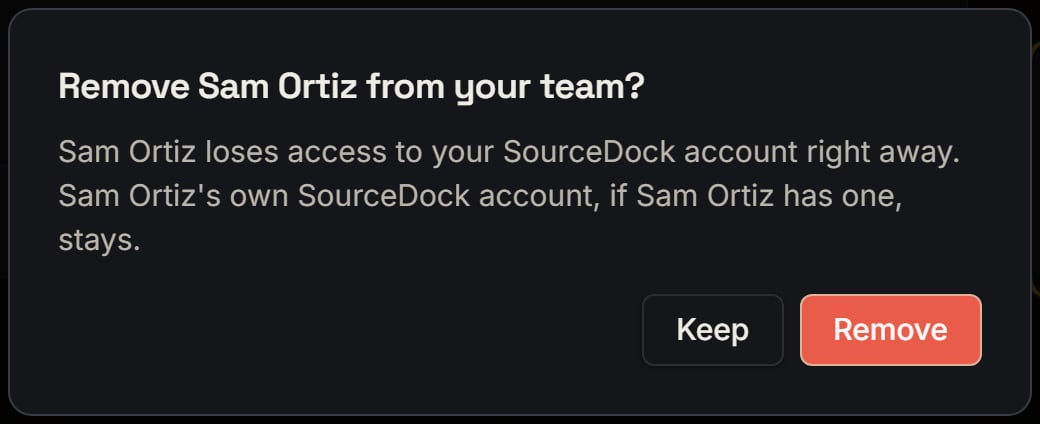
On their row, click Change access to pick other pages, then Save. Click Remove to take them off the team. They lose access to your account right away, and the seat frees at once. Their own SourceDock account, if they have one, stays.To bring someone back, send a new invite.
Removing a manager: the box before anything happens. Notice Keep closes it and nothing changes.
More details
Change access
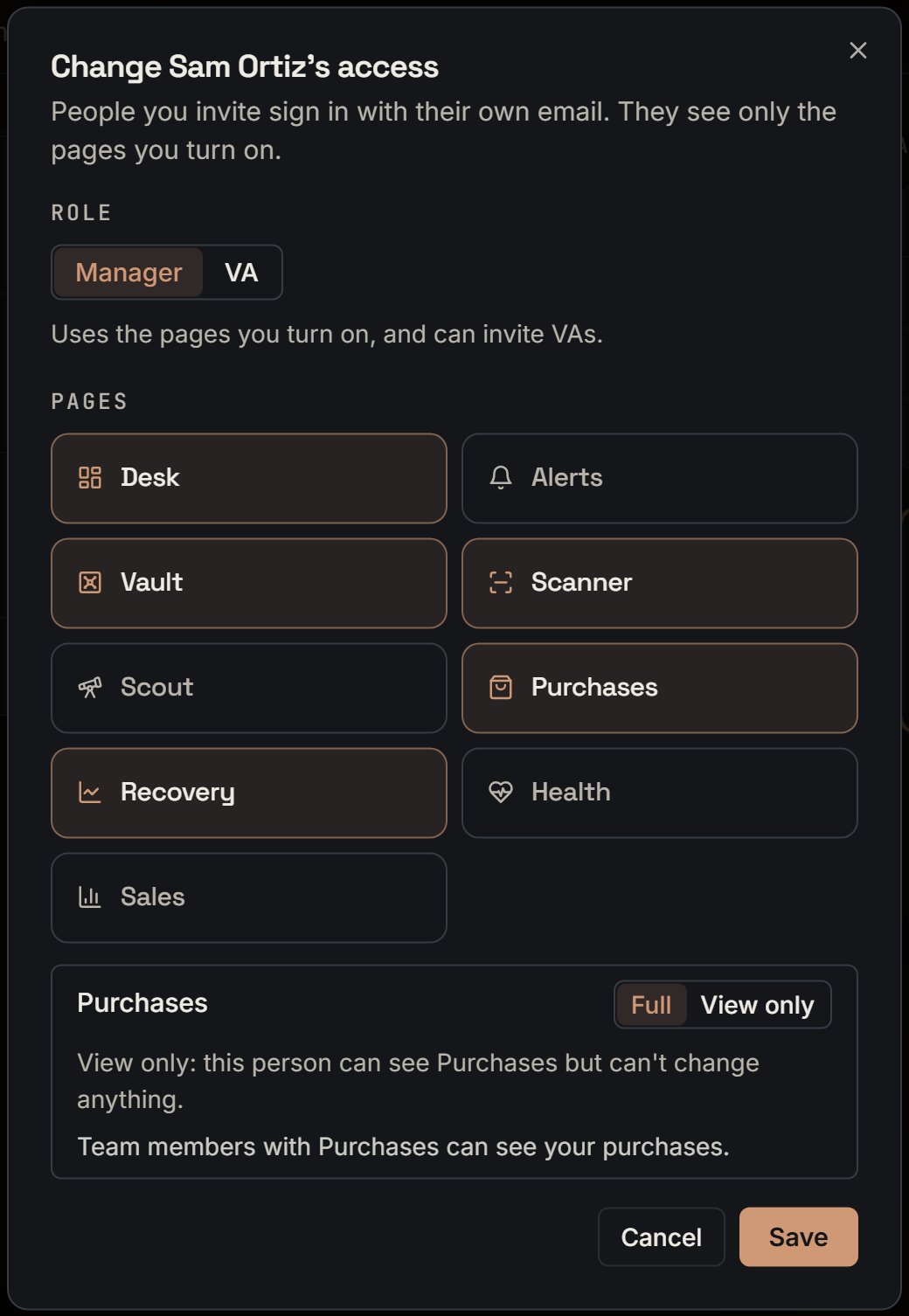
The box has the role and the pages, but no email box. A note says Access saved. In a new invite, changing the role resets the pages. Here it doesn’t, so their pages stay until you change the switches.
Change access. Notice there is no email box, and five pages are on.
Leave a team
A team member clicks Leave team on their card. The box says they lose access right away, and that the owner has to invite them again to come back. Stay closes it.They land in their own account. With no plan of their own, that’s the plan page.
Who can do what
You can do this to anyone. A manager can do it to a VA, but not to another manager. A manager can’t cancel a manager’s invite, and sees A manager can manage VAs, not other managers.
If it can't find them
SourceDock couldn’t find this invite. or SourceDock couldn’t find this team member. means they’re already gone.
{"docsConfig":{"theme":"mint","$schema":"https://mintlify.com/docs.json","name":"SourceDock","colors":{"primary":"#EA580C","light":"#FF9A5A","dark":"#EA580C"},"logo":{"light":"https://mintcdn.com/sourcedock/qOyT6VleObj7HrsZ/logo/light.svg?fit=max\u0026auto=format\u0026n=qOyT6VleObj7HrsZ\u0026q=85\u0026s=fac497db707183ccf027093f15f21cd7","dark":"https://mintcdn.com/sourcedock/qOyT6VleObj7HrsZ/logo/dark.svg?fit=max\u0026auto=format\u0026n=qOyT6VleObj7HrsZ\u0026q=85\u0026s=7c4a164f66e528a64c1d35bc9596867e","href":"https://sourcedock.io"},"favicon":"https://mintcdn.com/sourcedock/PvFEadQJVbcHct-s/favicon.png?fit=max\u0026auto=format\u0026n=PvFEadQJVbcHct-s\u0026q=85\u0026s=b2a8ed72213fc5eb8082f24866be78d9","appearance":{"default":"dark"},"background":{"color":{"dark":"#020609"}},"navbar":{"links":[{"href":"https://discord.gg/ssWsu5jHe","label":"Community"}],"primary":{"type":"button","label":"Open SourceDock","href":"https://app.sourcedock.io"}},"footer":{"socials":{"website":"https://sourcedock.io","discord":"https://discord.gg/ssWsu5jHe"}},"icons":{"library":"lucide"},"styling":{"latex":false},"navigation":{"pages":[]}},"deployment":{"deploymentMetadataValue":{"subdomain":"sourcedock","hasAudioNarration":false,"actualSubdomain":"sourcedock","customDomains":["docs.sourcedock.io"],"gitSource":{"type":"github","owner":"source-dock","repo":"sourcedock-docs","deployBranch":"main","contentDirectory":"","isPrivate":true,"mountPath":"","label":""},"entitlements":{"AI_CHAT":{"status":"DISABLED"}},"buildId":"6b010c47965586a741a14e90","clientVersion":"0.0.4270","searchFilterCounts":[{"language":"default","tag":"Docs","count":190},{"language":"default","tag":"Operate","count":62},{"language":"default","tag":"Get started","count":52},{"language":"default","tag":"Academy","count":29},{"language":"default","tag":"Source","count":27},{"language":"default","tag":"The desk","count":26},{"language":"default","tag":"Reference","count":19},{"language":"default","tag":"Chrome extension","count":16},{"language":"default","tag":"Claims","count":12},{"language":"default","tag":"Capital Recovery","count":11}]},"assistantConfig":{"enableAskAiButton":false,"enableStarterQuestions":false,"enableContextualStarterQuestions":false,"enableAskAiSearchBar":true},"basePath":"","hasChatPermissions":false,"hasWebMcpPermissions":false,"toggles":[{"name":"kill-isr","enabled":true,"variant":{"name":"disabled","enabled":false,"feature_enabled":true},"impressionData":false},{"name":"custom-rbac-roles","enabled":true,"variant":{"name":"disabled","enabled":false,"feature_enabled":true},"impressionData":false},{"name":"agent-mintlify-slack","enabled":true,"variant":{"name":"disabled","enabled":false,"feature_enabled":true},"impressionData":false},{"name":"agent-integrations-settings","enabled":true,"variant":{"name":"disabled","enabled":false,"feature_enabled":true},"impressionData":false},{"name":"rbac-expansion","enabled":true,"variant":{"name":"disabled","enabled":false,"feature_enabled":true},"impressionData":false},{"name":"automations-pr-grouping","enabled":true,"variant":{"name":"disabled","enabled":false,"feature_enabled":true},"impressionData":false},{"name":"custom-prefix","enabled":true,"variant":{"name":"disabled","enabled":false,"feature_enabled":true},"impressionData":false},{"name":"analytics-v7","enabled":true,"variant":{"name":"disabled","enabled":false,"feature_enabled":true},"impressionData":false},{"name":"user-flows-analytics","enabled":true,"variant":{"name":"disabled","enabled":false,"feature_enabled":true},"impressionData":false},{"name":"no-publish-flow","enabled":true,"variant":{"name":"disabled","enabled":false,"feature_enabled":true},"impressionData":false},{"name":"workos-onboarding","enabled":true,"variant":{"name":"disabled","enabled":false,"feature_enabled":true},"impressionData":false},{"name":"snapshot-serving-live","enabled":true,"variant":{"name":"disabled","enabled":false,"feature_enabled":true},"impressionData":false},{"name":"stripTemperatureMiddleware","enabled":true,"variant":{"name":"disabled","enabled":false,"feature_enabled":true},"impressionData":false},{"name":"support-platform-pylon-zendesk","enabled":true,"variant":{"name":"disabled","enabled":false,"feature_enabled":true},"impressionData":false},{"name":"snapshot-serving","enabled":true,"variant":{"name":"disabled","enabled":false,"feature_enabled":true},"impressionData":false},{"name":"instant-rollback","enabled":true,"variant":{"name":"disabled","enabled":false,"feature_enabled":true},"impressionData":false},{"name":"granular-notifications-server","enabled":true,"variant":{"name":"disabled","enabled":false,"feature_enabled":true},"impressionData":false},{"name":"granular-notifications","enabled":true,"variant":{"name":"disabled","enabled":false,"feature_enabled":true},"impressionData":false},{"name":"automations-fable","enabled":true,"variant":{"name":"disabled","enabled":false,"feature_enabled":true},"impressionData":false},{"name":"fixed-ai-action-pricing","enabled":true,"variant":{"name":"disabled","enabled":false,"feature_enabled":true},"impressionData":false},{"name":"site-roles","enabled":true,"variant":{"name":"disabled","enabled":false,"feature_enabled":true},"impressionData":false},{"name":"automation-resolve-merge-conflict","enabled":true,"variant":{"name":"disabled","enabled":false,"feature_enabled":true},"impressionData":false},{"name":"scoped-publishing","enabled":true,"variant":{"name":"disabled","enabled":false,"feature_enabled":true},"impressionData":false},{"name":"mintql","enabled":true,"variant":{"name":"disabled","enabled":false,"feature_enabled":true},"impressionData":false},{"name":"page-level-analytics","enabled":true,"variant":{"name":"disabled","enabled":false,"feature_enabled":true},"impressionData":false},{"name":"editor-version-history-v2","enabled":true,"variant":{"name":"disabled","enabled":false,"feature_enabled":true},"impressionData":false},{"name":"billing-page-v2","enabled":true,"variant":{"name":"disabled","enabled":false,"feature_enabled":true},"impressionData":false},{"name":"full-page-search","enabled":true,"variant":{"name":"disabled","enabled":false,"feature_enabled":true},"impressionData":false},{"name":"workspace-projects","enabled":true,"variant":{"name":"disabled","enabled":false,"feature_enabled":true},"impressionData":false},{"name":"assistant-v5","enabled":true,"variant":{"name":"disabled","enabled":false,"feature_enabled":true},"impressionData":false},{"name":"fork-pr-previews","enabled":true,"variant":{"name":"disabled","enabled":false,"feature_enabled":true},"impressionData":false},{"name":"revalidation-jwt","enabled":true,"variant":{"name":"disabled","enabled":false,"feature_enabled":true},"impressionData":false},{"name":"workos-sso-scim","enabled":true,"variant":{"name":"disabled","enabled":false,"feature_enabled":true},"impressionData":false},{"name":"hobby-abuse-scan","enabled":true,"variant":{"name":"disabled","enabled":false,"feature_enabled":true},"impressionData":false},{"name":"dashboard-inbox","enabled":true,"variant":{"name":"disabled","enabled":false,"feature_enabled":true},"impressionData":false},{"name":"workos-signup","enabled":true,"variant":{"name":"disabled","enabled":false,"feature_enabled":true},"impressionData":false},{"name":"turbopuffer-dual-write","enabled":true,"variant":{"name":"disabled","enabled":false,"feature_enabled":true},"impressionData":false},{"name":"workos-enabled","enabled":true,"variant":{"name":"disabled","enabled":false,"feature_enabled":true},"impressionData":false},{"name":"approve-review-flow","enabled":true,"variant":{"name":"disabled","enabled":false,"feature_enabled":true},"impressionData":false},{"name":"editor-metadata","enabled":true,"variant":{"name":"disabled","enabled":false,"feature_enabled":true},"impressionData":false},{"name":"sso-setup-deadline-banner","enabled":true,"variant":{"name":"disabled","enabled":false,"feature_enabled":true},"impressionData":false},{"name":"turbopuffer-serve","enabled":true,"variant":{"name":"disabled","enabled":false,"feature_enabled":true},"impressionData":false},{"name":"live-agents","enabled":true,"variant":{"name":"disabled","enabled":false,"feature_enabled":true},"impressionData":false},{"name":"starter-pricing","enabled":true,"variant":{"name":"control","enabled":true,"payload":{"type":"string","value":"control"},"feature_enabled":true},"impressionData":false},{"name":"llms-txt-v2","enabled":true,"variant":{"name":"disabled","enabled":false,"feature_enabled":true},"impressionData":false},{"name":"wildcard-email-auth","enabled":true,"variant":{"name":"disabled","enabled":false,"feature_enabled":true},"impressionData":false}],"googleFontsInlined":false},"customCss":[{"filePath":"academy.css","content":".sd-orange-text{color:#C2410C}.dark .sd-orange-text{color:#FF9A5A}"}]}
{"page":{"pagePath":"get-started/team-change-or-remove","slug":"/get-started/team-change-or-remove","pageMetadata":{"title":"Change or remove a team member","sidebarTitle":"Change or remove someone","description":"1 min read · Change their role or pages, take them off the team, or leave a team yourself.","icon":"user-cog","href":"/get-started/team-change-or-remove"},"description":{"compiledSource":"\"use strict\";\nconst {jsx: _jsx} = arguments[0];\nconst {useMDXComponents: _provideComponents} = arguments[0];\nfunction _createMdxContent(props) {\n const _components = {\n p: \"p\",\n ..._provideComponents(),\n ...props.components\n };\n return _jsx(_components.p, {\n children: \"1 min read · Change their role or pages, take them off the team, or leave a team yourself.\"\n });\n}\nfunction MDXContent(props = {}) {\n const {wrapper: MDXLayout} = {\n ..._provideComponents(),\n ...props.components\n };\n return MDXLayout ? _jsx(MDXLayout, {\n ...props,\n children: _jsx(_createMdxContent, {\n ...props\n })\n }) : _createMdxContent(props);\n}\nreturn {\n default: MDXContent\n};\n","frontmatter":{},"scope":{}},"pageType":"default","mdx":{"mdxSource":{"compiledSource":"\"use strict\";const{Fragment:_Fragment,jsx:_jsx,jsxs:_jsxs}=arguments[0];const{useMDXComponents:_provideComponents}=arguments[0];function _createMdxContent(props){const _components={p:`p`,strong:`strong`,..._provideComponents(),...props.components},{Accordion,AccordionGroup,Frame,Heading,OptimizedImage}=_components;if(!Accordion)_missingMdxReference(`Accordion`,true);if(!AccordionGroup)_missingMdxReference(`AccordionGroup`,true);if(!Frame)_missingMdxReference(`Frame`,true);if(!Heading)_missingMdxReference(`Heading`,true);if(!OptimizedImage)_missingMdxReference(`OptimizedImage`,true);return _jsxs(_Fragment,{children:[_jsx(Heading,{level:`2`,id:`in-short`,children:`In short`}),`\n`,_jsxs(_components.p,{children:[`On their row, click `,_jsx(_components.strong,{children:`Change access`}),` to pick other pages, then `,_jsx(_components.strong,{children:`Save`}),`. Click `,_jsx(_components.strong,{children:`Remove`}),` to take them off the team. They lose access to your account right away, and the seat frees at once. Their own SourceDock account, if they have one, stays.`]}),`\n`,_jsx(_components.p,{children:`To bring someone back, send a new invite.`}),`\n`,_jsx(Frame,{caption:`Removing a manager: the box before anything happens. Notice Keep closes it and nothing changes.`,children:_jsx(OptimizedImage,{src:`https://mintcdn.com/sourcedock/hBQ-HhjlmlJM4ba4/images/deep-dives/team-in-depth/08-maya-remove-sam-box.png?fit=max\u0026auto=format\u0026n=hBQ-HhjlmlJM4ba4\u0026q=85\u0026s=89dcfafb831d41955f1da3503760d441`,alt:`A box titled Remove Sam Ortiz from your team? with a line saying he loses access right away and his own account stays, and Keep and Remove buttons.`,\"data-og-width\":`1040`,width:`1040`,\"data-og-height\":`424`,height:`424`,\"data-path\":`images/deep-dives/team-in-depth/08-maya-remove-sam-box.png`,\"data-optimize\":`true`,\"data-opv\":`3`,srcset:`https://mintcdn.com/sourcedock/hBQ-HhjlmlJM4ba4/images/deep-dives/team-in-depth/08-maya-remove-sam-box.png?w=280\u0026fit=max\u0026auto=format\u0026n=hBQ-HhjlmlJM4ba4\u0026q=85\u0026s=aba95bce0f9e3dc058bbd3d3f58c7da9 280w, https://mintcdn.com/sourcedock/hBQ-HhjlmlJM4ba4/images/deep-dives/team-in-depth/08-maya-remove-sam-box.png?w=560\u0026fit=max\u0026auto=format\u0026n=hBQ-HhjlmlJM4ba4\u0026q=85\u0026s=735131e0d3ffcf988aef3fdea4b9ca3d 560w, https://mintcdn.com/sourcedock/hBQ-HhjlmlJM4ba4/images/deep-dives/team-in-depth/08-maya-remove-sam-box.png?w=840\u0026fit=max\u0026auto=format\u0026n=hBQ-HhjlmlJM4ba4\u0026q=85\u0026s=8c75872faadfe021d974f2c8a38aa9a3 840w, https://mintcdn.com/sourcedock/hBQ-HhjlmlJM4ba4/images/deep-dives/team-in-depth/08-maya-remove-sam-box.png?w=1100\u0026fit=max\u0026auto=format\u0026n=hBQ-HhjlmlJM4ba4\u0026q=85\u0026s=92ebcbfbf9c39cb99bc1828f6c340126 1100w, https://mintcdn.com/sourcedock/hBQ-HhjlmlJM4ba4/images/deep-dives/team-in-depth/08-maya-remove-sam-box.png?w=1650\u0026fit=max\u0026auto=format\u0026n=hBQ-HhjlmlJM4ba4\u0026q=85\u0026s=5b91796aa35717beccf5b4c5dbac4588 1650w, https://mintcdn.com/sourcedock/hBQ-HhjlmlJM4ba4/images/deep-dives/team-in-depth/08-maya-remove-sam-box.png?w=2500\u0026fit=max\u0026auto=format\u0026n=hBQ-HhjlmlJM4ba4\u0026q=85\u0026s=e01672fd538a95d175ba0efb370d708e 2500w`})}),`\n`,_jsx(Heading,{level:`2`,id:`more-details`,children:`More details`}),`\n`,_jsxs(AccordionGroup,{children:[_jsxs(Accordion,{title:`Change access`,id:`change-access`,children:[_jsxs(_components.p,{children:[`The box has the role and the pages, but no email box. A note says `,_jsx(_components.strong,{children:`Access saved.`}),` In a new invite, changing the role resets the pages. Here it doesn’t, so their pages stay until you change the switches.`]}),_jsx(Frame,{caption:`Change access. Notice there is no email box, and five pages are on.`,children:_jsx(OptimizedImage,{src:`https://mintcdn.com/sourcedock/hBQ-HhjlmlJM4ba4/images/deep-dives/team-in-depth/09-maya-change-access-sam.png?fit=max\u0026auto=format\u0026n=hBQ-HhjlmlJM4ba4\u0026q=85\u0026s=ee8db8af8850cdbeafb483a8f7ab5455`,alt:`A box titled Change Sam Ortiz's access with Role (Manager picked), page switches with Desk, Vault, Scanner, Purchases and Recovery on, a Purchases box set to Full, and Cancel and Save.`,\"data-og-width\":`1040`,width:`1040`,\"data-og-height\":`1506`,height:`1506`,\"data-path\":`images/deep-dives/team-in-depth/09-maya-change-access-sam.png`,\"data-optimize\":`true`,\"data-opv\":`3`,srcset:`https://mintcdn.com/sourcedock/hBQ-HhjlmlJM4ba4/images/deep-dives/team-in-depth/09-maya-change-access-sam.png?w=280\u0026fit=max\u0026auto=format\u0026n=hBQ-HhjlmlJM4ba4\u0026q=85\u0026s=360f5d89c2493a2886e621c669a5b445 280w, https://mintcdn.com/sourcedock/hBQ-HhjlmlJM4ba4/images/deep-dives/team-in-depth/09-maya-change-access-sam.png?w=560\u0026fit=max\u0026auto=format\u0026n=hBQ-HhjlmlJM4ba4\u0026q=85\u0026s=eeb44fb54c5b38b2b91afb40ee83705b 560w, https://mintcdn.com/sourcedock/hBQ-HhjlmlJM4ba4/images/deep-dives/team-in-depth/09-maya-change-access-sam.png?w=840\u0026fit=max\u0026auto=format\u0026n=hBQ-HhjlmlJM4ba4\u0026q=85\u0026s=f2e9b4a58629ba8cb142cf0a87f8ca14 840w, https://mintcdn.com/sourcedock/hBQ-HhjlmlJM4ba4/images/deep-dives/team-in-depth/09-maya-change-access-sam.png?w=1100\u0026fit=max\u0026auto=format\u0026n=hBQ-HhjlmlJM4ba4\u0026q=85\u0026s=62b99b4e403bba80b085661dc18c03ec 1100w, https://mintcdn.com/sourcedock/hBQ-HhjlmlJM4ba4/images/deep-dives/team-in-depth/09-maya-change-access-sam.png?w=1650\u0026fit=max\u0026auto=format\u0026n=hBQ-HhjlmlJM4ba4\u0026q=85\u0026s=e642adc3b72a47f68699bedb3c86a0d2 1650w, https://mintcdn.com/sourcedock/hBQ-HhjlmlJM4ba4/images/deep-dives/team-in-depth/09-maya-change-access-sam.png?w=2500\u0026fit=max\u0026auto=format\u0026n=hBQ-HhjlmlJM4ba4\u0026q=85\u0026s=f1da99f9f437086b4d1bfae67378d2a9 2500w`})})]}),_jsxs(Accordion,{title:`Leave a team`,id:`leave-a-team`,children:[_jsxs(_components.p,{children:[`A team member clicks `,_jsx(_components.strong,{children:`Leave team`}),` on their card. The box says they lose access right away, and that the owner has to invite them again to come back. `,_jsx(_components.strong,{children:`Stay`}),` closes it.`]}),_jsx(_components.p,{children:`They land in their own account. With no plan of their own, that’s the plan page.`})]}),_jsx(Accordion,{title:`Who can do what`,id:`who-can-do-what`,children:_jsxs(_components.p,{children:[`You can do this to anyone. A manager can do it to a VA, but not to another manager. A manager can’t cancel a manager’s invite, and sees `,_jsx(_components.strong,{children:`A manager can manage VAs, not other managers.`})]})}),_jsx(Accordion,{title:`If it can't find them`,id:`if-it-cant-find-them`,children:_jsxs(_components.p,{children:[_jsx(_components.strong,{children:`SourceDock couldn’t find this invite.`}),` or `,_jsx(_components.strong,{children:`SourceDock couldn’t find this team member.`}),` means they’re already gone.`]})})]})]})}function MDXContent(props={}){const{wrapper:MDXLayout}={..._provideComponents(),...props.components};return MDXLayout?_jsx(MDXLayout,{...props,children:_jsx(_createMdxContent,{...props})}):_createMdxContent(props)}return{default:MDXContent};function _missingMdxReference(id,component){throw new Error(`Expected `+(component?`component`:`object`)+\" `\"+id+\"` to be defined: you likely forgot to import, pass, or provide it.\")}","frontmatter":{},"scope":{"config":{},"pageMetadata":{"title":"Change or remove a team member","sidebarTitle":"Change or remove someone","description":"1 min read · Change their role or pages, take them off the team, or leave a team yourself.","icon":"user-cog","href":"/get-started/team-change-or-remove"}}},"mdxSourceWithNoJs":null},"mdxExtracts":{"tableOfContents":[{"title":"In short","slug":"in-short","depth":2,"children":[]},{"title":"More details","slug":"more-details","depth":2,"children":[]}],"codeExamples":{}},"jsLinks":[],"subdomain":"sourcedock","siteName":"SourceDock","title":"Change or remove a team member - SourceDock","navMaps":{"firstHrefInVersion":{},"firstHrefInLanguage":{}},"lastModified":"2026-11-07T18:04:48.827Z","originalFileLocation":"get-started/team-change-or-remove.mdx"},"headHtml":"\u003cscript data-mint-head>(function(){var d=document.documentElement,p=null;if(!p){try{p=localStorage.getItem(\"isDarkMode\")}catch(e){}if(p==='true')p='dark';else if(p==='false')p='light';if(p!=='light'\u0026\u0026p!=='dark'\u0026\u0026p!=='system')p=\"dark\"}var r=p==='system'?(matchMedia(\"(prefers-color-scheme: dark)\").matches?'dark':'light'):p;d.classList.remove(r==='dark'?'light':'dark');d.classList.add(r);d.setAttribute(\"data-theme-preference\",p)})();\u003c/script>\u003cmeta data-mint-head name=\"description\" content=\"1 min read · Change their role or pages, take them off the team, or leave a team yourself.\">\u003cmeta data-mint-head name=\"application-name\" content=\"SourceDock\">\u003cmeta data-mint-head name=\"generator\" content=\"Mintlify\">\u003clink data-mint-head rel=\"apple-touch-icon\" type=\"image/png\" sizes=\"180x180\" href=\"https://mintcdn.com/sourcedock/PvFEadQJVbcHct-s/favicon.png?fit=max\u0026amp;auto=format\u0026amp;n=PvFEadQJVbcHct-s\u0026amp;q=85\u0026amp;s=b2a8ed72213fc5eb8082f24866be78d9\">\u003clink data-mint-head rel=\"icon\" type=\"image/png\" sizes=\"32x32\" href=\"https://mintcdn.com/sourcedock/PvFEadQJVbcHct-s/favicon.png?fit=max\u0026amp;auto=format\u0026amp;n=PvFEadQJVbcHct-s\u0026amp;q=85\u0026amp;s=b2a8ed72213fc5eb8082f24866be78d9\">\u003clink data-mint-head rel=\"icon\" type=\"image/png\" sizes=\"16x16\" href=\"https://mintcdn.com/sourcedock/PvFEadQJVbcHct-s/favicon.png?fit=max\u0026amp;auto=format\u0026amp;n=PvFEadQJVbcHct-s\u0026amp;q=85\u0026amp;s=b2a8ed72213fc5eb8082f24866be78d9\">\u003clink data-mint-head rel=\"shortcut icon\" type=\"image/png\" href=\"https://mintcdn.com/sourcedock/PvFEadQJVbcHct-s/favicon.png?fit=max\u0026amp;auto=format\u0026amp;n=PvFEadQJVbcHct-s\u0026amp;q=85\u0026amp;s=b2a8ed72213fc5eb8082f24866be78d9\">\u003cmeta data-mint-head property=\"og:title\" content=\"Change or remove a team member - SourceDock\">\u003cmeta data-mint-head property=\"og:description\" content=\"1 min read · Change their role or pages, take them off the team, or leave a team yourself.\">\u003cmeta data-mint-head property=\"og:site_name\" content=\"SourceDock\">\u003cmeta data-mint-head property=\"og:url\" content=\"https://docs.sourcedock.io/get-started/team-change-or-remove\">\u003cmeta data-mint-head property=\"og:type\" content=\"website\">\u003cmeta data-mint-head property=\"og:image\" content=\"https://sourcedock.mintlify.site/_mintlify/api/og/v2?division=Team+members\u0026amp;title=Change+or+remove+a+team+member\u0026amp;description=1+min+read+%C2%B7+Change+their+role+or+pages%2C+take+them+off+the+team%2C+or+leave+a+team+yourself.\u0026amp;theme=a9389db1756ac6faaddb7eff\u0026amp;signature=f3aad41cd1e8d7d1e4d1fcf0dc94f706b59650b53a89581e46443b811e8654bd\">\u003cmeta data-mint-head property=\"og:image:width\" content=\"1200\">\u003cmeta data-mint-head property=\"og:image:height\" content=\"630\">\u003cmeta data-mint-head name=\"twitter:card\" content=\"summary_large_image\">\u003cmeta data-mint-head name=\"twitter:title\" content=\"Change or remove a team member - SourceDock\">\u003cmeta data-mint-head name=\"twitter:description\" content=\"1 min read · Change their role or pages, take them off the team, or leave a team yourself.\">\u003cmeta data-mint-head name=\"twitter:image\" content=\"https://sourcedock.mintlify.site/_mintlify/api/og/v2?division=Team+members\u0026amp;title=Change+or+remove+a+team+member\u0026amp;description=1+min+read+%C2%B7+Change+their+role+or+pages%2C+take+them+off+the+team%2C+or+leave+a+team+yourself.\u0026amp;theme=a9389db1756ac6faaddb7eff\u0026amp;signature=f3aad41cd1e8d7d1e4d1fcf0dc94f706b59650b53a89581e46443b811e8654bd\">\u003cmeta data-mint-head name=\"twitter:image:width\" content=\"1200\">\u003cmeta data-mint-head name=\"twitter:image:height\" content=\"630\">\u003cmeta data-mint-head name=\"msapplication-config\" content=\"https://mintlify.s3.us-west-1.amazonaws.com/sourcedock/_generated/favicon/browserconfig.xml?v=3\">\u003cmeta data-mint-head name=\"apple-mobile-web-app-title\" content=\"SourceDock\">\u003cmeta data-mint-head name=\"msapplication-TileColor\" content=\"#EA580C\">\u003clink data-mint-head rel=\"canonical\" href=\"https://docs.sourcedock.io/get-started/team-change-or-remove\">\u003clink data-mint-head rel=\"alternate\" type=\"application/xml\" href=\"/sitemap.xml\">\u003clink data-mint-head rel=\"alternate\" type=\"text/markdown\" href=\"/get-started/team-change-or-remove.md\">\u003cscript data-mint-head type=\"application/ld+json\">{\"@context\":\"https://schema.org\",\"@graph\":[{\"@type\":\"Organization\",\"@id\":\"https://docs.sourcedock.io/#organization\",\"name\":\"SourceDock\",\"url\":\"https://docs.sourcedock.io\",\"logo\":{\"@type\":\"ImageObject\",\"url\":\"https://mintcdn.com/sourcedock/qOyT6VleObj7HrsZ/logo/light.svg?fit=max\u0026auto=format\u0026n=qOyT6VleObj7HrsZ\u0026q=85\u0026s=fac497db707183ccf027093f15f21cd7\"}},{\"@type\":\"WebSite\",\"@id\":\"https://docs.sourcedock.io#website\",\"name\":\"SourceDock\",\"url\":\"https://docs.sourcedock.io\",\"publisher\":{\"@id\":\"https://docs.sourcedock.io/#organization\"}},{\"@type\":\"WebPage\",\"@id\":\"https://docs.sourcedock.io/get-started/team-change-or-remove#webpage\",\"url\":\"https://docs.sourcedock.io/get-started/team-change-or-remove\",\"name\":\"Change or remove a team member\",\"description\":\"1 min read · Change their role or pages, take them off the team, or leave a team yourself.\",\"dateModified\":\"2026-11-07T18:04:48.827Z\",\"isPartOf\":{\"@id\":\"https://docs.sourcedock.io#website\"},\"breadcrumb\":{\"@id\":\"https://docs.sourcedock.io/get-started/team-change-or-remove#breadcrumb\"}},{\"@type\":\"BreadcrumbList\",\"@id\":\"https://docs.sourcedock.io/get-started/team-change-or-remove#breadcrumb\",\"itemListElement\":[{\"@type\":\"ListItem\",\"position\":1,\"name\":\"Get started\",\"item\":\"https://docs.sourcedock.io\"},{\"@type\":\"ListItem\",\"position\":2,\"name\":\"Team members\",\"item\":\"https://docs.sourcedock.io/get-started/team\"},{\"@type\":\"ListItem\",\"position\":3,\"name\":\"Change or remove a team member\",\"item\":\"https://docs.sourcedock.io/get-started/team-change-or-remove\"}]},{\"@type\":[\"Article\",\"TechArticle\"],\"@id\":\"https://docs.sourcedock.io/get-started/team-change-or-remove#article\",\"headline\":\"Change or remove a team member\",\"name\":\"Change or remove a team member\",\"description\":\"1 min read · Change their role or pages, take them off the team, or leave a team yourself.\",\"url\":\"https://docs.sourcedock.io/get-started/team-change-or-remove\",\"mainEntityOfPage\":{\"@id\":\"https://docs.sourcedock.io/get-started/team-change-or-remove#webpage\"},\"dateModified\":\"2026-11-07T18:04:48.827Z\",\"publisher\":{\"@id\":\"https://docs.sourcedock.io/#organization\"},\"isPartOf\":{\"@id\":\"https://docs.sourcedock.io#website\"}}]}\u003c/script>\u003cscript data-mint-head type=\"application/ld+json\">{\"@context\":\"https://schema.org\",\"@type\":\"WebSite\",\"name\":\"SourceDock\",\"publisher\":{\"@type\":\"Organization\",\"name\":\"SourceDock\"},\"provider\":{\"@type\":\"Organization\",\"name\":\"Mintlify\",\"url\":\"https://mintlify.com\"}}\u003c/script>","agentPointerHref":"/get-started/team-change-or-remove.md","siteName":"SourceDock","nav":{"global":null,"tabs":[{"tab":"Docs","groups":[{"group":"Get started","pages":[{"title":"Welcome to SourceDock","icon":"house","href":""},{"title":"Quickstart","icon":"rocket","href":"/get-started/quickstart"},{"group":"Setup","pages":[{"title":"Setup: your first day","icon":"list-checks","href":"/get-started/setup"},{"title":"Make your SourceDock account","sidebarTitle":"Make your account","icon":"user-plus","href":"/get-started/setup-sign-up"},{"title":"Start your 14-day trial","sidebarTitle":"Start your trial","icon":"play","href":"/get-started/setup-trial"},{"title":"Setup: connect Amazon","sidebarTitle":"Connect Amazon","icon":"link","href":"/get-started/setup-connect-amazon"},{"title":"Setup: import your history","sidebarTitle":"Import your history","icon":"history","href":"/get-started/setup-import-history"},{"title":"Setup: add your buy costs","sidebarTitle":"Add your buy costs","icon":"file-spreadsheet","href":"/get-started/setup-costs"},{"title":"Setup: review and import","sidebarTitle":"Review and import","icon":"circle-check","href":"/get-started/setup-review"},{"title":"Setup: units you shipped yourself","sidebarTitle":"Units you shipped yourself","icon":"truck","href":"/get-started/setup-shipped-yourself"},{"title":"Leave setup and come back","sidebarTitle":"Leave and come back","icon":"corner-up-left","href":"/get-started/setup-leave-and-return"},{"title":"Setup problems","icon":"triangle-alert","href":"/get-started/setup-problems"}]},{"title":"Connections","icon":"cable","href":"/get-started/connections"},{"title":"Google Sheets","icon":"sheet","href":"/get-started/google-sheets"},{"group":"Account","pages":[{"title":"Account","icon":"user","href":"/get-started/account"},{"title":"Account security","sidebarTitle":"Security","icon":"shield","href":"/get-started/account-security"},{"title":"Yearly reports for your accountant","sidebarTitle":"Reports","icon":"file-spreadsheet","href":"/get-started/account-reports"},{"title":"What's in a Capital Recovery Report","sidebarTitle":"What's in a report","icon":"table","href":"/get-started/account-report-details"},{"title":"Start your import over, or delete your account","sidebarTitle":"Danger","icon":"triangle-alert","href":"/get-started/account-danger"}]},{"group":"Team members","pages":[{"title":"Team members","icon":"users","href":"/get-started/team"},{"title":"Invite someone to your team","sidebarTitle":"Invite someone","icon":"user-plus","href":"/get-started/team-invite"},{"title":"Accept a team invite","sidebarTitle":"Accept an invite","icon":"mail-check","href":"/get-started/team-accept"},{"title":"What each team role sees","sidebarTitle":"What each role sees","icon":"shield","href":"/get-started/team-roles"},{"title":"Which pages you can share with your team","sidebarTitle":"Which pages you can share","description":"2 min read · The nine switches, Full and View only on Purchases, and what a helper never sees.","icon":"toggle-right","href":"/get-started/team-pages"},{"title":"Change or remove a team member","sidebarTitle":"Change or remove someone","icon":"user-cog","href":"/get-started/team-change-or-remove"},{"title":"When your plan gets smaller","description":"2 min read · What happens to your team when you move down, a payment fails, or your plan ends.","icon":"user-minus","href":"/get-started/team-plan-changes"}]},{"title":"Turn features on and off","icon":"sliders-horizontal","href":"/get-started/features"},{"group":"Profit and settings","pages":[{"title":"The profit calculator and every setting","sidebarTitle":"Profit and settings","icon":"calculator","href":"/get-started/profit-calculator-and-settings"},{"title":"The bar and the Desk settings","sidebarTitle":"The bar and the Desk","icon":"panel-top","href":"/get-started/settings-bar-and-desk"},{"title":"The Restock reminders card","sidebarTitle":"Restock reminders","icon":"bell-ring","href":"/get-started/settings-restock-reminders"},{"title":"Auto-cancel purchases that never arrive","sidebarTitle":"Purchases that never arrive","icon":"calendar-x","href":"/get-started/settings-auto-cancel"},{"title":"How profit adds up","icon":"calculator","href":"/get-started/profit-how-it-adds-up"},{"title":"Cost settings for profit","sidebarTitle":"Cost settings","icon":"sliders-horizontal","href":"/get-started/profit-cost-settings"},{"title":"Sale price and goals","icon":"target","href":"/get-started/profit-price-and-goals"},{"title":"FBM profit, and what the Vault does differently","sidebarTitle":"FBM and the Vault","icon":"truck","href":"/get-started/profit-fbm-and-vault"}]},{"group":"Phone app","pages":[{"title":"Phone app","icon":"smartphone","href":"/get-started/phone-app"},{"title":"The phone app's bars and shortcuts","sidebarTitle":"Bars and shortcuts","icon":"layout-panel-top","href":"/get-started/phone-app-bars"},{"title":"The Desk on your phone","sidebarTitle":"The Desk","icon":"layout-dashboard","href":"/get-started/phone-app-desk"},{"title":"Look up a product on your phone","sidebarTitle":"Look up a product","icon":"scan-barcode","href":"/get-started/phone-app-look-up"},{"title":"Read a product's profit on your phone","sidebarTitle":"Read a product's profit","icon":"calculator","href":"/get-started/phone-app-profit"},{"title":"Photos and receipts on your phone","sidebarTitle":"Photos and receipts","icon":"camera","href":"/get-started/phone-app-photos"},{"title":"Lists and detail sheets on your phone","sidebarTitle":"Lists and detail sheets","icon":"list","href":"/get-started/phone-app-lists"},{"title":"Alerts on your phone","icon":"bell-ring","href":"/get-started/phone-app-alerts"}]},{"group":"Plans and billing","pages":[{"title":"Plans and billing","icon":"credit-card","href":"/get-started/billing"},{"title":"What each SourceDock plan has","sidebarTitle":"What each plan has","icon":"layers","href":"/get-started/billing-plans"},{"title":"Your 14-day free trial","sidebarTitle":"Your free trial","icon":"calendar-clock","href":"/get-started/billing-trial"},{"title":"Trial checks and Start my plan","sidebarTitle":"Trial checks and Start my plan","icon":"gauge","href":"/get-started/billing-start-my-plan"},{"title":"Codes on your SourceDock plan","sidebarTitle":"Codes","icon":"ticket","href":"/get-started/billing-codes"},{"title":"The Billing page","icon":"receipt","href":"/get-started/billing-page"},{"title":"Switch plans or cancel","sidebarTitle":"Switch or cancel","icon":"repeat","href":"/get-started/billing-switch-or-cancel"},{"title":"When a payment fails","sidebarTitle":"A failed payment","icon":"credit-card","href":"/get-started/billing-failed-payment"},{"title":"What happens to your data","icon":"database","href":"/get-started/billing-your-data"}]}]},{"group":"Source","pages":[{"group":"Gate Scanner","pages":[{"title":"Gate Scanner","icon":"scan-line","href":"/source/gate-scanner"},{"title":"Add your ASINs to the Gate Scanner","sidebarTitle":"Add your ASINs","icon":"list-plus","href":"/source/gate-scanner-add-asins"},{"title":"Run a Gate Scanner scan","sidebarTitle":"Run a scan","icon":"play","href":"/source/gate-scanner-run"},{"title":"What each Gate Scanner verdict means","sidebarTitle":"What each verdict means","icon":"shield-check","href":"/source/gate-scanner-verdicts"},{"title":"Read the Gate Scanner results","sidebarTitle":"Read the results","icon":"table","href":"/source/gate-scanner-results"},{"title":"Save Gate Scanner results to your Vault","sidebarTitle":"Save to your Vault","icon":"archive","href":"/source/gate-scanner-save"},{"title":"Verify a product with the extension","sidebarTitle":"Verify with the extension","icon":"badge-check","href":"/source/gate-scanner-verify"},{"title":"Export a scan, or open it in Keepa","sidebarTitle":"Export and Open in Keepa","icon":"download","href":"/source/gate-scanner-export"},{"title":"Recent scans in the Gate Scanner","sidebarTitle":"Recent scans","icon":"history","href":"/source/gate-scanner-recent"},{"title":"Gate Scanner free checks and plans","sidebarTitle":"Free checks and plans","icon":"gauge","href":"/source/gate-scanner-limits"},{"title":"When a Gate Scanner scan stops or fails","sidebarTitle":"When a scan stops or fails","icon":"triangle-alert","href":"/source/gate-scanner-problems"}]},{"group":"Vault","pages":[{"title":"Vault","icon":"vault","href":"/source/prospect-vault"},{"title":"Add a product to your Vault","sidebarTitle":"Add a product","icon":"plus","href":"/source/vault-add"},{"title":"Read your Vault list","sidebarTitle":"Read the list","icon":"table","href":"/source/vault-list"},{"title":"How the Vault works out profit","sidebarTitle":"How profit is worked out","icon":"calculator","href":"/source/vault-profit"},{"title":"FBM in the Vault","sidebarTitle":"FBM and Compare","icon":"truck","href":"/source/vault-fbm"},{"title":"One product in your Vault","sidebarTitle":"One product","icon":"package","href":"/source/vault-one-product"},{"title":"Set an alert on a Vault product","sidebarTitle":"Set an alert","icon":"bell","href":"/source/vault-alerts"},{"title":"Act on many Vault products","sidebarTitle":"Actions and many products","icon":"list-checks","href":"/source/vault-actions"}]},{"group":"Scout","pages":[{"title":"Scout","icon":"telescope","href":"/source/scout"},{"title":"Watch a storefront with Scout","sidebarTitle":"Watch a storefront","icon":"plus","href":"/source/scout-watch"},{"title":"How often Scout checks","sidebarTitle":"How often it checks","icon":"clock","href":"/source/scout-checks"},{"title":"Scout's tiles and storefront cards","sidebarTitle":"Tiles and storefront cards","icon":"layout-grid","href":"/source/scout-tiles-and-cards"},{"title":"Read a Scout find","sidebarTitle":"Read a find","icon":"search","href":"/source/scout-read-a-find"},{"title":"Save or acknowledge Scout finds","sidebarTitle":"Save or acknowledge","icon":"archive","href":"/source/scout-save-and-acknowledge"},{"title":"Search, sort, and filter Scout finds","sidebarTitle":"Search, sort, and filter","icon":"list-filter","href":"/source/scout-filters"},{"title":"Scout notices, export, and plans","sidebarTitle":"Notices, export, and plans","icon":"bell","href":"/source/scout-notify-export-plans"}]}]},{"group":"Operate","pages":[{"title":"Record what you buy, each way","icon":"shopping-cart","href":"/operate/record-a-purchase"},{"title":"Import from Amazon","icon":"import","href":"/operate/import-from-amazon"},{"title":"Your buy sheet","icon":"file-spreadsheet","href":"/operate/buy-sheets"},{"group":"Purchases","pages":[{"title":"Purchases","icon":"shopping-bag","href":"/operate/purchases"},{"title":"The Record purchase sheet","sidebarTitle":"Record a purchase","icon":"clipboard-pen","href":"/operate/purchases-record-sheet"},{"title":"Receipts and box photos","icon":"paperclip","href":"/operate/purchases-receipts"},{"title":"Cost, Expected Profit and Current Profit","sidebarTitle":"Cost and profit","icon":"calculator","href":"/operate/purchases-profit"},{"title":"Move an order along","icon":"route","href":"/operate/purchases-stages"},{"title":"Cancel an order","icon":"circle-x","href":"/operate/purchases-cancel"},{"title":"Write off units that won't sell","sidebarTitle":"Write-offs","icon":"file-x","href":"/operate/purchases-write-offs"},{"title":"Gift cards and split payments","icon":"gift","href":"/operate/gift-cards"},{"title":"Find the right orders","icon":"search","href":"/operate/purchases-find"},{"title":"One order's row","icon":"rows-3","href":"/operate/purchases-rows"},{"title":"Reconcile on Purchases, card by card","sidebarTitle":"Reconcile cards","icon":"list-checks","href":"/operate/purchases-reconcile"}]},{"title":"FBA vs FBM, and orders split across the two","icon":"split","href":"/operate/fba-vs-fbm"},{"group":"Capital Recovery","pages":[{"title":"Capital Recovery","icon":"chart-line","href":"/operate/capital-recovery"},{"title":"The top of Capital Recovery","sidebarTitle":"The top of the page","icon":"gauge","href":"/operate/capital-recovery-top-cards"},{"title":"Where your money sits","icon":"chart-pie","href":"/operate/capital-recovery-breakdown"},{"title":"The Capital Recovery product list","sidebarTitle":"The product list","icon":"list","href":"/operate/capital-recovery-product-list"},{"title":"The Capital Recovery chips","sidebarTitle":"The chips","icon":"list-filter","href":"/operate/capital-recovery-chips"},{"title":"Open a product on Capital Recovery","sidebarTitle":"Open a product","icon":"panel-top-open","href":"/operate/capital-recovery-open-a-product"},{"title":"Units at Amazon","icon":"warehouse","href":"/operate/capital-recovery-units"},{"title":"The side panel and the ledger","icon":"receipt-text","href":"/operate/capital-recovery-ledger"},{"title":"One product, every number","icon":"calculator","href":"/operate/capital-recovery-numbers"},{"title":"A product you bought more than once","sidebarTitle":"Batches","icon":"layers","href":"/operate/capital-recovery-batches"},{"title":"Wallet: your Amazon payouts","sidebarTitle":"Wallet","icon":"wallet","href":"/operate/capital-recovery-wallet"}]},{"title":"Capital Recovery vs Sales","icon":"scale","href":"/operate/capital-recovery-vs-sales"},{"title":"Replans: when a shipment doesn't match the plan","icon":"route","href":"/operate/replans"},{"group":"Sales","pages":[{"title":"Sales","icon":"chart-column","href":"/operate/sales"},{"title":"The Sales tiles","sidebarTitle":"The tiles","icon":"layout-grid","href":"/operate/sales-tiles"},{"title":"How the Sales numbers add up","sidebarTitle":"How the numbers add up","icon":"calculator","href":"/operate/sales-how-numbers-add-up"},{"title":"est., dashes and missing costs on Sales","sidebarTitle":"est., dashes and missing costs","icon":"circle-help","href":"/operate/sales-est-and-dashes"},{"title":"The Sales forecast","sidebarTitle":"The forecast","icon":"trending-up","href":"/operate/sales-forecast"},{"title":"The Sales chart and products","sidebarTitle":"The chart and the products","icon":"table","href":"/operate/sales-products"},{"title":"The Sales full ledger","sidebarTitle":"The full ledger","icon":"receipt-text","href":"/operate/sales-ledger"},{"title":"Amazon's fee lines on Sales","sidebarTitle":"Amazon's fee lines","icon":"percent","href":"/operate/sales-fees"},{"title":"Stores on Sales: Canada, Mexico, and All stores","sidebarTitle":"Stores","icon":"globe","href":"/operate/sales-stores"},{"title":"Write-offs and expenses on Sales","sidebarTitle":"Write-offs and expenses","icon":"file-minus","href":"/operate/sales-write-offs"}]},{"group":"Claims","pages":[{"title":"Claims: money Amazon owes you","icon":"scale","href":"/operate/claims"},{"title":"Read a claim card and file it","sidebarTitle":"File a claim","icon":"send","href":"/operate/claims-file"},{"title":"A claim's Details and See details","sidebarTitle":"Details and See details","icon":"file-search","href":"/operate/claims-details"},{"title":"The Issues box: not a claim yet","sidebarTitle":"The Issues box","icon":"hourglass","href":"/operate/claims-issues"},{"title":"How long you have to claim","sidebarTitle":"How long you have","icon":"timer","href":"/operate/claims-time"},{"title":"Every kind of claim: at Amazon and on returns","sidebarTitle":"Claims at Amazon","icon":"package-x","href":"/operate/claims-kinds"},{"title":"Claims on shipments","icon":"package-open","href":"/operate/claims-shipments"},{"title":"Needs a look: claims Amazon's reports can't prove","sidebarTitle":"Needs a look","icon":"eye","href":"/operate/claims-needs-a-look"},{"title":"After you file: Filed claims","sidebarTitle":"After you file","icon":"clock","href":"/operate/claims-filed"},{"title":"When Amazon says no","sidebarTitle":"Denied","icon":"ban","href":"/operate/claims-denied"},{"title":"Paid out: what Amazon paid","sidebarTitle":"Paid out","icon":"badge-dollar-sign","href":"/operate/claims-paid"},{"title":"Not a claim, and a claim you can't find","sidebarTitle":"Not a claim","icon":"circle-help","href":"/operate/claims-not-a-claim"}]},{"group":"Reviews","pages":[{"title":"Reviews","icon":"message-square-quote","href":"/operate/reviews"},{"title":"Start a Reviews campaign","sidebarTitle":"Start a campaign","icon":"play","href":"/operate/reviews-start"},{"title":"Who Reviews asks","sidebarTitle":"Who gets asked","icon":"users","href":"/operate/reviews-who"},{"title":"The Reviews order list","sidebarTitle":"The order list","icon":"list","href":"/operate/reviews-orders"},{"title":"Change a Reviews campaign","sidebarTitle":"Change a campaign","icon":"pencil","href":"/operate/reviews-change"}]},{"group":"Expenses","pages":[{"title":"Expenses","icon":"receipt","href":"/operate/expenses"},{"title":"Add an expense","icon":"plus","href":"/operate/expenses-add"},{"title":"Which day an expense counts","sidebarTitle":"Which day a charge counts","icon":"calendar-days","href":"/operate/expenses-charges"},{"title":"Read the Expenses page","sidebarTitle":"Read the page","icon":"table","href":"/operate/expenses-page"},{"title":"Change, stop, or delete an expense","sidebarTitle":"Change, stop, or delete","icon":"pencil","href":"/operate/expenses-change"},{"title":"Import and export expenses","sidebarTitle":"Import and export","icon":"file-up","href":"/operate/expenses-import-export"},{"title":"Where expenses show up","sidebarTitle":"Where the money shows up","icon":"git-compare","href":"/operate/expenses-on-your-profit"}]}]},{"group":"The desk","pages":[{"group":"Command desk","pages":[{"title":"Command desk","icon":"layout-dashboard","href":"/desk/command-desk"},{"title":"The top of the Desk and its days","sidebarTitle":"The top and the days","icon":"calendar-days","href":"/desk/desk-top"},{"title":"Sales and profit on the Desk","sidebarTitle":"Sales and profit","icon":"chart-column","href":"/desk/desk-sales"},{"title":"Amazon owes you and Capital at work","icon":"wallet","href":"/desk/desk-money"},{"title":"Open alerts and Reorder now","icon":"list-todo","href":"/desk/desk-alerts-and-reorder"},{"title":"The bars across the top","sidebarTitle":"Bars across the top","icon":"panel-top","href":"/desk/desk-bars"},{"title":"Moving around SourceDock","sidebarTitle":"Moving around","icon":"compass","href":"/desk/desk-moving-around"}]},{"group":"Alerts","pages":[{"title":"Alerts","icon":"bell","href":"/desk/alerts"},{"title":"Alerts: Money to claim","sidebarTitle":"Money to claim","icon":"badge-dollar-sign","href":"/desk/alerts-money-to-claim"},{"title":"Alerts: Fix counts","sidebarTitle":"Fix counts","icon":"wrench","href":"/desk/alerts-fix-counts"},{"title":"Alerts: Sell faster","sidebarTitle":"Sell faster","icon":"gauge","href":"/desk/alerts-sell-faster"},{"title":"Alerts: Buy next","sidebarTitle":"Buy next","icon":"shopping-cart","href":"/desk/alerts-buy-next"},{"title":"Alerts: Account health, Early warnings and Feedback","sidebarTitle":"Health, warnings, feedback","icon":"triangle-alert","href":"/desk/alerts-account-and-warnings"},{"title":"Sounds, pop-ups and phone alerts","icon":"bell-ring","href":"/desk/alerts-sounds"},{"title":"Hide an alert, and what the counts mean","sidebarTitle":"Hide and counts","icon":"eye-off","href":"/desk/alerts-hide"}]},{"group":"Account health","pages":[{"title":"Account health","icon":"heart-pulse","href":"/desk/account-health"},{"title":"Account Health Rating and status","sidebarTitle":"Rating and status","icon":"gauge","href":"/desk/health-rating"},{"title":"IP complaints and policy issues","sidebarTitle":"Complaints and policy issues","icon":"shield-alert","href":"/desk/health-complaints"},{"title":"Order rates on Account health","sidebarTitle":"Order rates","icon":"package-check","href":"/desk/health-orders"},{"title":"Account health warnings and alerts","sidebarTitle":"Warnings and alerts","icon":"triangle-alert","href":"/desk/health-warnings"},{"title":"Account health plans and missing numbers","sidebarTitle":"Plans and missing numbers","icon":"circle-help","href":"/desk/health-plans"}]},{"group":"Restock reminders","pages":[{"title":"Restock reminders","icon":"package","href":"/desk/restock-reminders"},{"title":"The Restock reminders card","sidebarTitle":"The settings card","icon":"sliders-horizontal","href":"/desk/restock-settings"},{"title":"When a restock reminder comes","sidebarTitle":"When a reminder comes","icon":"calendar-clock","href":"/desk/restock-when"},{"title":"Where you see restock reminders","sidebarTitle":"Where you see it","icon":"map-pin","href":"/desk/restock-where"},{"title":"Restock emails and phone notices","sidebarTitle":"The email and the phone","icon":"mail","href":"/desk/restock-email-phone"}]}]},{"group":"Reference","pages":[{"title":"Reconcile and Jax","icon":"scale","href":"/reference/reconcile"},{"group":"Chrome extension","pages":[{"title":"Chrome extension","icon":"puzzle","href":"/reference/chrome-extension"},{"title":"Where the panel sits","icon":"panel-right","href":"/reference/chrome-extension-panel"},{"title":"The product row and Alerts","icon":"package","href":"/reference/chrome-extension-product"},{"title":"Quick info","icon":"zap","href":"/reference/chrome-extension-quick-info"},{"title":"Where the sale price comes from","sidebarTitle":"The sale price","icon":"tag","href":"/reference/chrome-extension-sale-price"},{"title":"The profit calculator","icon":"calculator","href":"/reference/chrome-extension-calculator"},{"title":"Each fee, line by line","sidebarTitle":"Each fee","icon":"receipt","href":"/reference/chrome-extension-fees"},{"title":"Switch to FBM","icon":"truck","href":"/reference/chrome-extension-fbm"},{"title":"Offers and Show stock","icon":"users","href":"/reference/chrome-extension-offers"},{"title":"The Buy Box pie and Variations","sidebarTitle":"Buy Box pie and Variations","icon":"chart-pie","href":"/reference/chrome-extension-buy-box-pie"},{"title":"Seller Lookup","icon":"user-search","href":"/reference/chrome-extension-seller-lookup"},{"title":"Find on Amazon","icon":"search","href":"/reference/chrome-extension-find"},{"title":"The extension's Vault tab","sidebarTitle":"Vault tab","icon":"vault","href":"/reference/chrome-extension-vault"},{"title":"The extension's Purchase tab","sidebarTitle":"Purchase tab","icon":"shopping-cart","href":"/reference/chrome-extension-purchase"},{"title":"The Account tab and Settings","sidebarTitle":"Account and Settings","icon":"settings","href":"/reference/chrome-extension-settings"},{"title":"Verify and Check now","icon":"shield-check","href":"/reference/chrome-extension-verify"}]},{"title":"Glossary, A to L","sidebarTitle":"Glossary, A to L","icon":"book-open","href":"/reference/glossary"},{"title":"Glossary, M to Z","sidebarTitle":"Glossary, M to Z","icon":"book-open","href":"/reference/glossary-m-z"}]},{"group":"Guides","pages":[{"title":"How SourceDock fits together","icon":"route","href":"/guides/how-sourcedock-fits-together"},{"title":"Where each setting lives","icon":"sliders-horizontal","href":"/guides/settings-map"},{"title":"A regular day in SourceDock","icon":"sun","href":"/guides/a-regular-day"},{"title":"Vault or Profit calculator?","icon":"calculator","href":"/guides/vault-vs-profit-calculator"}]}]},{"tab":"Academy","icon":"graduation-cap","pages":[{"title":"Academy","href":"/academy"}]}]},"basePath":"","title":"Change or remove a team member - SourceDock","deploymentId":"dpl_DyXGnKeCjZyA3sUdfMJ7FjkdBefg","buildId":"dpl_DyXGnKeCjZyA3sUdfMJ7FjkdBefg","dynamics":["07c022d89b","a74be98ba7"],"chunks":["Frame-D0FT0qQs.js","DynamicMarkdown-CQM9Bhbv.js","zoom-image-lightbox-BQ4tbj_9.js","lightbox-handle-r17bVUz3.js"]}