

In short
These settings are in the Profit calculator group on Account > Features, under COSTS and GOALS. Change a box, and it saves by itself. The newest save wins on every device. Say the blender makes $3.36. Raise Prep per item from $0.40 to $1.00, and the profit falls by $0.60, to $2.76.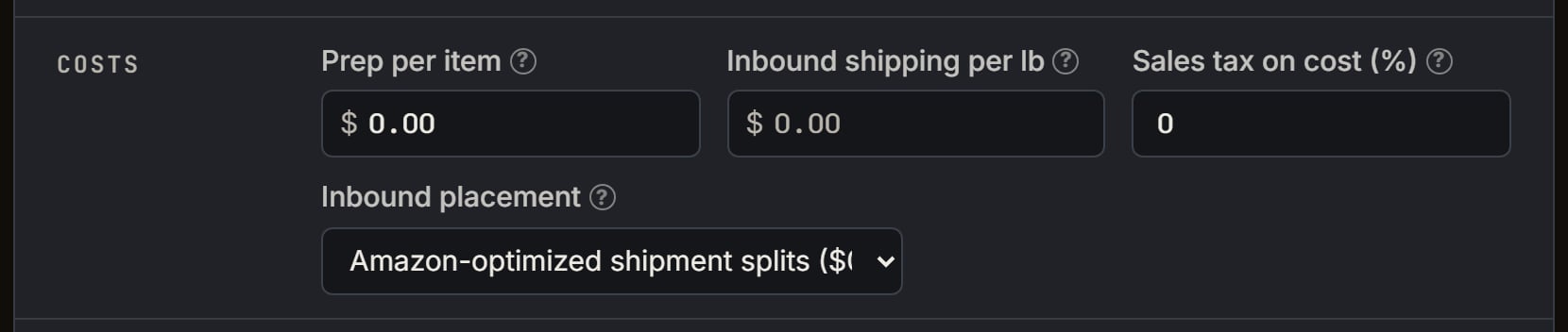
Demo login, set for the Uno walk: the Costs part. Notice Inbound placement is on Amazon-optimized shipment splits ($0). It starts on Minimal.
More details
Sales tax on cost
Sales tax on cost
Sales tax on cost (%) starts at 0. At 8%, the tax on $12.00 is $0.96. It’s rounded to the cent. This percent also fills the Sales tax (%) box on the extension’s Add purchase form.
Inbound shipping per lb
Inbound shipping per lb
It starts empty. SourceDock then uses your store’s own cost per pound from recent US boxes, when it has one and the weight is known. The note says something like “Shipping to Amazon: $0.45/lb, from your recent boxes.”Type $0.00, and that’s your rate. It wins over your boxes. Clear the box to go back.No weight and no rate of your own means $0.00. A rate you set, with no weight known, leaves the profit blank until you type Weight (lb).
Months in storage
Months in storage
It starts at 0, so storage is left out. You can type 0 through 36, including part of a month. The box on the calculator is the same setting.Storage is the size times Amazon’s monthly rate, in the store’s money. The US and the UK charge per cubic foot, and Canada per cubic metre.
On a UK store, storage has its 20% VAT inside.Use peak storage fees uses the higher rate all year, on every store.
Inbound placement
Inbound placement
- Amazon-optimized shipment splits ($0): the fee is $0, and the line hides.
- Minimal shipment splits: the start. It uses the highest rate Amazon lists for the size and weight, marked estimated.
- Partial shipment splits: for bulky items only. Otherwise it uses the Minimal rate.
With no size
With no size
With no package size and months above 0, the profit hides, and a line says storage can’t be added. The placement fee needs a size too.To see a profit, set the months to 0 and pick Amazon-optimized shipment splits ($0).
Outside the US
Outside the US
The placement rates, the low-stock fee and the figures from your boxes are US only. Storage is US, Canada and UK.On a Canada or UK store, the placement fee is left out on every option, so it never hides the profit. Storage needs the product’s size: with none, set Months in storage to 0. A prep cost and a shipping rate you type still count.On a UK store, money is in £. The referral, closing and FBA fees show as Amazon charges them, with VAT and Amazon’s 2% digital services fee inside. Their hover says Includes VAT and Amazon’s digital services fee. Storage has its VAT inside and no digital services fee. Books carry 0% VAT, everything else 20%. Your prep and inbound shipping per lb are saved in US dollars, so they show changed to £.The VAT inside the sale price counts as profit until you turn on Exclude VAT on the Sales page. The calculator follows that switch. Then the VAT line’s hover says Exclude VAT is on, so profit leaves it out. It also shows the VAT on the prices and the VAT on Amazon’s fees.