3 min read · The same profit panel as the Chrome extension, and what’s different on a phone.
In short
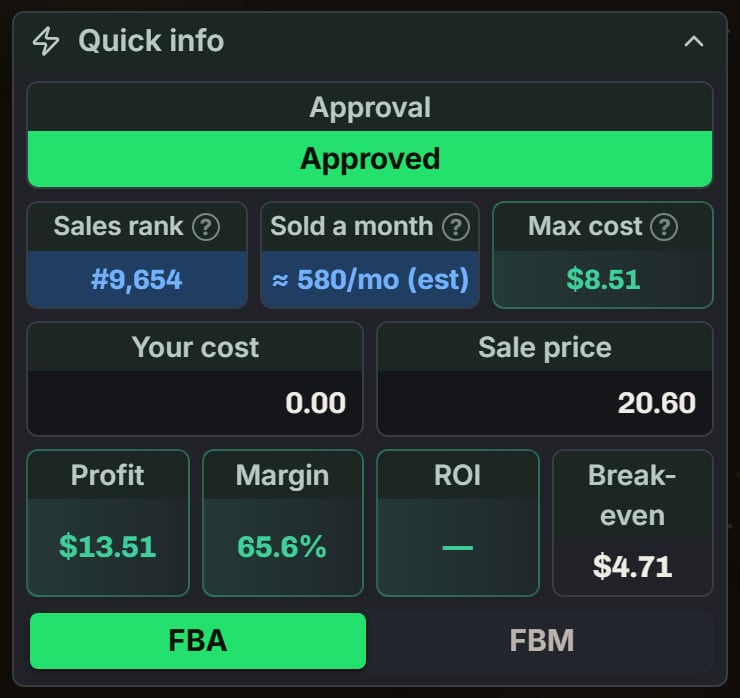
The phone shows the Chrome extension’s own profit panel, with the same words and math. Type Your cost. You see Profit, Margin, ROI, Break-even, and Max cost, the most you can pay and still meet your goals.Say a blender sells for $40.00, and Amazon keeps $11.50 in fees. You pay $18.00. Your profit is $10.50, and your ROI is 58.3%.
Uno card game on the phone, with no cost typed. Notice Approved, the (est) after Sold a month, and the ROI dash.
Product, Quick info, Profit calculator, Alerts, Offers, and Variations.In Product, the Vault badge saves the product with this cost. Once it’s saved, the badge opens the Vault on it. The + icon opens the form to record a purchase.
Approval
Quick info starts with Approval. With your store connected, SourceDock checks by itself: Approved, Needs approval, Blocked, or Not checked. If it couldn’t, Check now shows. The answer stays on this phone for a day. With no store, it says Connect your store to check.
What's different on a phone
Sold a month is an estimate from the rank, marked “(est)”.
The panel’s settings aren’t here. Set them in Account > Features.
Its sections keep their starting order, and the Buy Box pie never shows.
Tips that need a mouse aren’t here. Tap the seller badges on Offers to read about them.
The extension’s Seller Central check for a product that needs approval isn’t here.
When the numbers wait
Profit stays ”-” until the price, fees, and every cost turned on are known. A line under Quick info says why, like Nobody is selling this new on Amazon right now. Type a sale price.With your own per-pound rate and no weight, it asks for Weight (lb). Max cost can say Needs a price, Needs weight, or Below your goals.With no store connected, type a price. The panel says Estimated fees and offers Connect your store for exact fees.
FBM
Prices you type for a product are kept in this browser, and they come back next time.Tap FBM to add a Your shipping box. Blank, it uses the FBM shipping saved in SourceDock. With none saved, it says Not counted. On a Canada or Mexico store, FBM profit is in that store’s own money.
Offers and Show stock
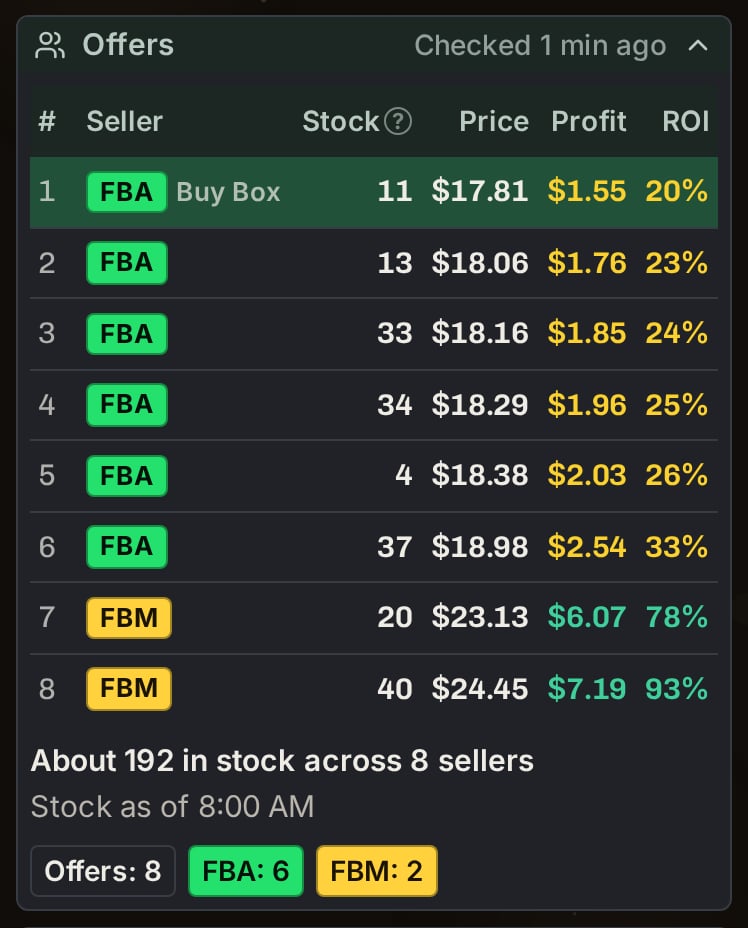
Offers lists live sellers, cheapest first, under Seller, Price, Profit, and ROI. Red is a loss, yellow is under a goal, and green is the rest.Tap Show stock to see how many units each seller has. It comes with every paid plan. If you made your account on or after November 5, 2026, your trial doesn’t include it.
YETI mug: Offers after Show stock on a phone. Notice the Stock column and the total under it.
Every seller
Amazon sends only its 20 cheapest offers. If a product has more, up to 100, Show stock adds the rest from Keepa. Each added row has a small Keepa tag. Their prices can be up to 3 hours old.All users share a daily amount for this. When it runs out, it says “Every seller is used up for today. Showing Amazon’s 20 cheapest.”
{"docsConfig":{"theme":"mint","$schema":"https://mintlify.com/docs.json","name":"SourceDock","colors":{"primary":"#EA580C","light":"#FF9A5A","dark":"#EA580C"},"logo":{"light":"https://mintcdn.com/sourcedock/qOyT6VleObj7HrsZ/logo/light.svg?fit=max\u0026auto=format\u0026n=qOyT6VleObj7HrsZ\u0026q=85\u0026s=fac497db707183ccf027093f15f21cd7","dark":"https://mintcdn.com/sourcedock/qOyT6VleObj7HrsZ/logo/dark.svg?fit=max\u0026auto=format\u0026n=qOyT6VleObj7HrsZ\u0026q=85\u0026s=7c4a164f66e528a64c1d35bc9596867e","href":"https://sourcedock.io"},"favicon":"https://mintcdn.com/sourcedock/PvFEadQJVbcHct-s/favicon.png?fit=max\u0026auto=format\u0026n=PvFEadQJVbcHct-s\u0026q=85\u0026s=b2a8ed72213fc5eb8082f24866be78d9","appearance":{"default":"dark"},"background":{"color":{"dark":"#020609"}},"navbar":{"links":[{"href":"https://discord.gg/ssWsu5jHe","label":"Community"}],"primary":{"type":"button","label":"Open SourceDock","href":"https://app.sourcedock.io"}},"footer":{"socials":{"website":"https://sourcedock.io","discord":"https://discord.gg/ssWsu5jHe"}},"icons":{"library":"lucide"},"styling":{"latex":false},"navigation":{"pages":[]}},"deployment":{"deploymentMetadataValue":{"subdomain":"sourcedock","hasAudioNarration":false,"actualSubdomain":"sourcedock","customDomains":["docs.sourcedock.io"],"gitSource":{"type":"github","owner":"source-dock","repo":"sourcedock-docs","deployBranch":"main","contentDirectory":"","isPrivate":true,"mountPath":"","label":""},"entitlements":{"AI_CHAT":{"status":"DISABLED"}},"buildId":"6b010c47965586a741a14e90","clientVersion":"0.0.4270","searchFilterCounts":[{"language":"default","tag":"Docs","count":190},{"language":"default","tag":"Operate","count":62},{"language":"default","tag":"Get started","count":52},{"language":"default","tag":"Academy","count":29},{"language":"default","tag":"Source","count":27},{"language":"default","tag":"The desk","count":26},{"language":"default","tag":"Reference","count":19},{"language":"default","tag":"Chrome extension","count":16},{"language":"default","tag":"Claims","count":12},{"language":"default","tag":"Capital Recovery","count":11}]},"assistantConfig":{"enableAskAiButton":false,"enableStarterQuestions":false,"enableContextualStarterQuestions":false,"enableAskAiSearchBar":true},"basePath":"","hasChatPermissions":false,"hasWebMcpPermissions":false,"toggles":[{"name":"kill-isr","enabled":true,"variant":{"name":"disabled","enabled":false,"feature_enabled":true},"impressionData":false},{"name":"custom-rbac-roles","enabled":true,"variant":{"name":"disabled","enabled":false,"feature_enabled":true},"impressionData":false},{"name":"agent-mintlify-slack","enabled":true,"variant":{"name":"disabled","enabled":false,"feature_enabled":true},"impressionData":false},{"name":"agent-integrations-settings","enabled":true,"variant":{"name":"disabled","enabled":false,"feature_enabled":true},"impressionData":false},{"name":"rbac-expansion","enabled":true,"variant":{"name":"disabled","enabled":false,"feature_enabled":true},"impressionData":false},{"name":"automations-pr-grouping","enabled":true,"variant":{"name":"disabled","enabled":false,"feature_enabled":true},"impressionData":false},{"name":"custom-prefix","enabled":true,"variant":{"name":"disabled","enabled":false,"feature_enabled":true},"impressionData":false},{"name":"analytics-v7","enabled":true,"variant":{"name":"disabled","enabled":false,"feature_enabled":true},"impressionData":false},{"name":"user-flows-analytics","enabled":true,"variant":{"name":"disabled","enabled":false,"feature_enabled":true},"impressionData":false},{"name":"no-publish-flow","enabled":true,"variant":{"name":"disabled","enabled":false,"feature_enabled":true},"impressionData":false},{"name":"workos-onboarding","enabled":true,"variant":{"name":"disabled","enabled":false,"feature_enabled":true},"impressionData":false},{"name":"snapshot-serving-live","enabled":true,"variant":{"name":"disabled","enabled":false,"feature_enabled":true},"impressionData":false},{"name":"stripTemperatureMiddleware","enabled":true,"variant":{"name":"disabled","enabled":false,"feature_enabled":true},"impressionData":false},{"name":"support-platform-pylon-zendesk","enabled":true,"variant":{"name":"disabled","enabled":false,"feature_enabled":true},"impressionData":false},{"name":"snapshot-serving","enabled":true,"variant":{"name":"disabled","enabled":false,"feature_enabled":true},"impressionData":false},{"name":"instant-rollback","enabled":true,"variant":{"name":"disabled","enabled":false,"feature_enabled":true},"impressionData":false},{"name":"granular-notifications-server","enabled":true,"variant":{"name":"disabled","enabled":false,"feature_enabled":true},"impressionData":false},{"name":"granular-notifications","enabled":true,"variant":{"name":"disabled","enabled":false,"feature_enabled":true},"impressionData":false},{"name":"automations-fable","enabled":true,"variant":{"name":"disabled","enabled":false,"feature_enabled":true},"impressionData":false},{"name":"fixed-ai-action-pricing","enabled":true,"variant":{"name":"disabled","enabled":false,"feature_enabled":true},"impressionData":false},{"name":"site-roles","enabled":true,"variant":{"name":"disabled","enabled":false,"feature_enabled":true},"impressionData":false},{"name":"automation-resolve-merge-conflict","enabled":true,"variant":{"name":"disabled","enabled":false,"feature_enabled":true},"impressionData":false},{"name":"scoped-publishing","enabled":true,"variant":{"name":"disabled","enabled":false,"feature_enabled":true},"impressionData":false},{"name":"mintql","enabled":true,"variant":{"name":"disabled","enabled":false,"feature_enabled":true},"impressionData":false},{"name":"page-level-analytics","enabled":true,"variant":{"name":"disabled","enabled":false,"feature_enabled":true},"impressionData":false},{"name":"editor-version-history-v2","enabled":true,"variant":{"name":"disabled","enabled":false,"feature_enabled":true},"impressionData":false},{"name":"billing-page-v2","enabled":true,"variant":{"name":"disabled","enabled":false,"feature_enabled":true},"impressionData":false},{"name":"full-page-search","enabled":true,"variant":{"name":"disabled","enabled":false,"feature_enabled":true},"impressionData":false},{"name":"workspace-projects","enabled":true,"variant":{"name":"disabled","enabled":false,"feature_enabled":true},"impressionData":false},{"name":"assistant-v5","enabled":true,"variant":{"name":"disabled","enabled":false,"feature_enabled":true},"impressionData":false},{"name":"fork-pr-previews","enabled":true,"variant":{"name":"disabled","enabled":false,"feature_enabled":true},"impressionData":false},{"name":"revalidation-jwt","enabled":true,"variant":{"name":"disabled","enabled":false,"feature_enabled":true},"impressionData":false},{"name":"workos-sso-scim","enabled":true,"variant":{"name":"disabled","enabled":false,"feature_enabled":true},"impressionData":false},{"name":"hobby-abuse-scan","enabled":true,"variant":{"name":"disabled","enabled":false,"feature_enabled":true},"impressionData":false},{"name":"dashboard-inbox","enabled":true,"variant":{"name":"disabled","enabled":false,"feature_enabled":true},"impressionData":false},{"name":"workos-signup","enabled":true,"variant":{"name":"disabled","enabled":false,"feature_enabled":true},"impressionData":false},{"name":"turbopuffer-dual-write","enabled":true,"variant":{"name":"disabled","enabled":false,"feature_enabled":true},"impressionData":false},{"name":"workos-enabled","enabled":true,"variant":{"name":"disabled","enabled":false,"feature_enabled":true},"impressionData":false},{"name":"approve-review-flow","enabled":true,"variant":{"name":"disabled","enabled":false,"feature_enabled":true},"impressionData":false},{"name":"editor-metadata","enabled":true,"variant":{"name":"disabled","enabled":false,"feature_enabled":true},"impressionData":false},{"name":"sso-setup-deadline-banner","enabled":true,"variant":{"name":"disabled","enabled":false,"feature_enabled":true},"impressionData":false},{"name":"turbopuffer-serve","enabled":true,"variant":{"name":"disabled","enabled":false,"feature_enabled":true},"impressionData":false},{"name":"live-agents","enabled":true,"variant":{"name":"disabled","enabled":false,"feature_enabled":true},"impressionData":false},{"name":"starter-pricing","enabled":true,"variant":{"name":"treatment","enabled":true,"payload":{"type":"string","value":"treatment"},"feature_enabled":true},"impressionData":false},{"name":"llms-txt-v2","enabled":true,"variant":{"name":"disabled","enabled":false,"feature_enabled":true},"impressionData":false},{"name":"wildcard-email-auth","enabled":true,"variant":{"name":"disabled","enabled":false,"feature_enabled":true},"impressionData":false}],"googleFontsInlined":false},"customCss":[{"filePath":"academy.css","content":".sd-orange-text{color:#C2410C}.dark .sd-orange-text{color:#FF9A5A}"}]}
{"page":{"pagePath":"get-started/phone-app-profit","slug":"/get-started/phone-app-profit","pageMetadata":{"title":"Read a product's profit on your phone","sidebarTitle":"Read a product's profit","description":"3 min read · The same profit panel as the Chrome extension, and what's different on a phone.","icon":"calculator","href":"/get-started/phone-app-profit"},"description":{"compiledSource":"\"use strict\";\nconst {jsx: _jsx} = arguments[0];\nconst {useMDXComponents: _provideComponents} = arguments[0];\nfunction _createMdxContent(props) {\n const _components = {\n p: \"p\",\n ..._provideComponents(),\n ...props.components\n };\n return _jsx(_components.p, {\n children: \"3 min read · The same profit panel as the Chrome extension, and what’s different on a phone.\"\n });\n}\nfunction MDXContent(props = {}) {\n const {wrapper: MDXLayout} = {\n ..._provideComponents(),\n ...props.components\n };\n return MDXLayout ? _jsx(MDXLayout, {\n ...props,\n children: _jsx(_createMdxContent, {\n ...props\n })\n }) : _createMdxContent(props);\n}\nreturn {\n default: MDXContent\n};\n","frontmatter":{},"scope":{}},"pageType":"default","mdx":{"mdxSource":{"compiledSource":"\"use strict\";const{Fragment:_Fragment,jsx:_jsx,jsxs:_jsxs}=arguments[0];const{useMDXComponents:_provideComponents}=arguments[0];function _createMdxContent(props){const _components={a:`a`,li:`li`,p:`p`,strong:`strong`,ul:`ul`,..._provideComponents(),...props.components},{Accordion,AccordionGroup,Frame,Heading,OptimizedImage}=_components;if(!Accordion)_missingMdxReference(`Accordion`,true);if(!AccordionGroup)_missingMdxReference(`AccordionGroup`,true);if(!Frame)_missingMdxReference(`Frame`,true);if(!Heading)_missingMdxReference(`Heading`,true);if(!OptimizedImage)_missingMdxReference(`OptimizedImage`,true);return _jsxs(_Fragment,{children:[_jsx(Heading,{level:`2`,id:`in-short`,children:`In short`}),`\n`,_jsxs(_components.p,{children:[`The phone shows the Chrome extension’s own profit panel, with the same words and math. Type `,_jsx(_components.strong,{children:`Your cost`}),`. You see `,_jsx(_components.strong,{children:`Profit`}),`, `,_jsx(_components.strong,{children:`Margin`}),`, `,_jsx(_components.strong,{children:`ROI`}),`, `,_jsx(_components.strong,{children:`Break-even`}),`, and `,_jsx(_components.strong,{children:`Max cost`}),`, the most you can pay and still meet your goals.`]}),`\n`,_jsx(_components.p,{children:`Say a blender sells for $40.00, and Amazon keeps $11.50 in fees. You pay $18.00. Your profit is $10.50, and your ROI is 58.3%.`}),`\n`,_jsx(Frame,{caption:`Uno card game on the phone, with no cost typed. Notice Approved, the (est) after Sold a month, and the ROI dash.`,children:_jsx(OptimizedImage,{src:`https://mintcdn.com/sourcedock/hBQ-HhjlmlJM4ba4/images/deep-dives/phone-app-in-depth/11-uno-quick-info.png?fit=max\u0026auto=format\u0026n=hBQ-HhjlmlJM4ba4\u0026q=85\u0026s=11c8c63a2d943364dad34047ba72254f`,alt:`The phone's Quick info: Approval Approved, Sales rank #9,654, Sold a month about 580/mo (est), Max cost $8.51, Your cost 0.00, Sale price 20.60, Profit $13.51, Margin 65.6%, ROI a dash, Break-even $4.71, and FBA picked.`,\"data-og-width\":`740`,width:`740`,\"data-og-height\":`698`,height:`698`,\"data-path\":`images/deep-dives/phone-app-in-depth/11-uno-quick-info.png`,\"data-optimize\":`true`,\"data-opv\":`3`,srcset:`https://mintcdn.com/sourcedock/hBQ-HhjlmlJM4ba4/images/deep-dives/phone-app-in-depth/11-uno-quick-info.png?w=280\u0026fit=max\u0026auto=format\u0026n=hBQ-HhjlmlJM4ba4\u0026q=85\u0026s=693f910c0870baaf85d3c2c77fcb6368 280w, https://mintcdn.com/sourcedock/hBQ-HhjlmlJM4ba4/images/deep-dives/phone-app-in-depth/11-uno-quick-info.png?w=560\u0026fit=max\u0026auto=format\u0026n=hBQ-HhjlmlJM4ba4\u0026q=85\u0026s=b36ebbe6589a91dcf5ae2d7a7a6c5f23 560w, https://mintcdn.com/sourcedock/hBQ-HhjlmlJM4ba4/images/deep-dives/phone-app-in-depth/11-uno-quick-info.png?w=840\u0026fit=max\u0026auto=format\u0026n=hBQ-HhjlmlJM4ba4\u0026q=85\u0026s=82999360141a3a7fa63030ed332bb861 840w, https://mintcdn.com/sourcedock/hBQ-HhjlmlJM4ba4/images/deep-dives/phone-app-in-depth/11-uno-quick-info.png?w=1100\u0026fit=max\u0026auto=format\u0026n=hBQ-HhjlmlJM4ba4\u0026q=85\u0026s=0ae947ce483bfd581f83a69428d2c784 1100w, https://mintcdn.com/sourcedock/hBQ-HhjlmlJM4ba4/images/deep-dives/phone-app-in-depth/11-uno-quick-info.png?w=1650\u0026fit=max\u0026auto=format\u0026n=hBQ-HhjlmlJM4ba4\u0026q=85\u0026s=6daeddca5c0a9772ea13ad2df68172fa 1650w, https://mintcdn.com/sourcedock/hBQ-HhjlmlJM4ba4/images/deep-dives/phone-app-in-depth/11-uno-quick-info.png?w=2500\u0026fit=max\u0026auto=format\u0026n=hBQ-HhjlmlJM4ba4\u0026q=85\u0026s=c084d1937f4b4ed163aafbfaec92bb73 2500w`})}),`\n`,_jsxs(_components.p,{children:[`For the whole panel, see `,_jsx(_components.a,{href:`/reference/chrome-extension`,children:`Chrome extension`}),`.`]}),`\n`,_jsx(Heading,{level:`2`,id:`more-details`,children:`More details`}),`\n`,_jsxs(AccordionGroup,{children:[_jsxs(Accordion,{title:`The sections`,id:`the-sections`,children:[_jsxs(_components.p,{children:[_jsx(_components.strong,{children:`Product`}),`, `,_jsx(_components.strong,{children:`Quick info`}),`, `,_jsx(_components.strong,{children:`Profit calculator`}),`, `,_jsx(_components.strong,{children:`Alerts`}),`, `,_jsx(_components.strong,{children:`Offers`}),`, and `,_jsx(_components.strong,{children:`Variations`}),`.`]}),_jsxs(_components.p,{children:[`In `,_jsx(_components.strong,{children:`Product`}),`, the `,_jsx(_components.strong,{children:`Vault`}),` badge saves the product with this cost. Once it’s saved, the badge opens the Vault on it. The + icon opens the form to record a purchase.`]})]}),_jsx(Accordion,{title:`Approval`,id:`approval`,children:_jsxs(_components.p,{children:[_jsx(_components.strong,{children:`Quick info`}),` starts with `,_jsx(_components.strong,{children:`Approval`}),`. With your store connected, SourceDock checks by itself: `,_jsx(_components.strong,{children:`Approved`}),`, `,_jsx(_components.strong,{children:`Needs approval`}),`, `,_jsx(_components.strong,{children:`Blocked`}),`, or `,_jsx(_components.strong,{children:`Not checked`}),`. If it couldn’t, `,_jsx(_components.strong,{children:`Check now`}),` shows. The answer stays on this phone for a day. With no store, it says `,_jsx(_components.strong,{children:`Connect your store to check`}),`.`]})}),_jsx(Accordion,{title:`What's different on a phone`,id:`whats-different-on-a-phone`,children:_jsxs(_components.ul,{children:[`\n`,_jsxs(_components.li,{children:[_jsx(_components.strong,{children:`Sold a month`}),` is an estimate from the rank, marked “(est)”.`]}),`\n`,_jsxs(_components.li,{children:[`The panel’s settings aren’t here. Set them in `,_jsx(_components.strong,{children:`Account`}),` > Features.`]}),`\n`,_jsx(_components.li,{children:`Its sections keep their starting order, and the Buy Box pie never shows.`}),`\n`,_jsxs(_components.li,{children:[`Tips that need a mouse aren’t here. Tap the seller badges on `,_jsx(_components.strong,{children:`Offers`}),` to read about them.`]}),`\n`,_jsx(_components.li,{children:`The extension’s Seller Central check for a product that needs approval isn’t here.`}),`\n`]})}),_jsxs(Accordion,{title:`When the numbers wait`,id:`when-the-numbers-wait`,children:[_jsxs(_components.p,{children:[`Profit stays ”-” until the price, fees, and every cost turned on are known. A line under `,_jsx(_components.strong,{children:`Quick info`}),` says why, like `,_jsx(_components.strong,{children:`Nobody is selling this new on Amazon right now. Type a sale price.`})]}),_jsxs(_components.p,{children:[`With your own per-pound rate and no weight, it asks for `,_jsx(_components.strong,{children:`Weight (lb)`}),`. `,_jsx(_components.strong,{children:`Max cost`}),` can say `,_jsx(_components.strong,{children:`Needs a price`}),`, `,_jsx(_components.strong,{children:`Needs weight`}),`, or `,_jsx(_components.strong,{children:`Below your goals`}),`.`]}),_jsxs(_components.p,{children:[`With no store connected, type a price. The panel says `,_jsx(_components.strong,{children:`Estimated fees`}),` and offers `,_jsx(_components.strong,{children:`Connect your store for exact fees`}),`.`]})]}),_jsxs(Accordion,{title:`FBM`,id:`fbm`,children:[_jsx(_components.p,{children:`Prices you type for a product are kept in this browser, and they come back next time.`}),_jsxs(_components.p,{children:[`Tap `,_jsx(_components.strong,{children:`FBM`}),` to add a `,_jsx(_components.strong,{children:`Your shipping`}),` box. Blank, it uses the FBM shipping saved in SourceDock. With none saved, it says `,_jsx(_components.strong,{children:`Not counted`}),`. On a Canada or Mexico store, FBM profit is in that store’s own money.`]})]}),_jsxs(Accordion,{title:`Offers and Show stock`,id:`offers-and-show-stock`,children:[_jsxs(_components.p,{children:[_jsx(_components.strong,{children:`Offers`}),` lists live sellers, cheapest first, under `,_jsx(_components.strong,{children:`Seller`}),`, `,_jsx(_components.strong,{children:`Price`}),`, `,_jsx(_components.strong,{children:`Profit`}),`, and `,_jsx(_components.strong,{children:`ROI`}),`. Red is a loss, yellow is under a goal, and green is the rest.`]}),_jsxs(_components.p,{children:[`Tap `,_jsx(_components.strong,{children:`Show stock`}),` to see how many units each seller has. It comes with every paid plan. If you made your account on or after November 5, 2026, your trial doesn’t include it.`]}),_jsx(Frame,{caption:`YETI mug: Offers after Show stock on a phone. Notice the Stock column and the total under it.`,children:_jsx(OptimizedImage,{src:`https://mintcdn.com/sourcedock/nmCNTrWjl5xtsYgv/images/deep-dives/phone-app-in-depth/14-mug-show-stock.png?fit=max\u0026auto=format\u0026n=nmCNTrWjl5xtsYgv\u0026q=85\u0026s=ead0fbf53d545510b3046e6b0883322d`,alt:`An Offers list of 8 offers with a Stock column: 11, 13, 33, 34, 4, 37, 20 and 40. Under it: About 192 in stock across 8 sellers, and Stock as of 8:00 AM.`,\"data-og-width\":`748`,width:`748`,\"data-og-height\":`928`,height:`928`,\"data-path\":`images/deep-dives/phone-app-in-depth/14-mug-show-stock.png`,\"data-optimize\":`true`,\"data-opv\":`3`,srcset:`https://mintcdn.com/sourcedock/nmCNTrWjl5xtsYgv/images/deep-dives/phone-app-in-depth/14-mug-show-stock.png?w=280\u0026fit=max\u0026auto=format\u0026n=nmCNTrWjl5xtsYgv\u0026q=85\u0026s=e2fde95aa9301af2fc329ee8c6492e10 280w, https://mintcdn.com/sourcedock/nmCNTrWjl5xtsYgv/images/deep-dives/phone-app-in-depth/14-mug-show-stock.png?w=560\u0026fit=max\u0026auto=format\u0026n=nmCNTrWjl5xtsYgv\u0026q=85\u0026s=b701e31730b40332bc476adc07a37631 560w, https://mintcdn.com/sourcedock/nmCNTrWjl5xtsYgv/images/deep-dives/phone-app-in-depth/14-mug-show-stock.png?w=840\u0026fit=max\u0026auto=format\u0026n=nmCNTrWjl5xtsYgv\u0026q=85\u0026s=94adc3699d09fd47666139b00ef52903 840w, https://mintcdn.com/sourcedock/nmCNTrWjl5xtsYgv/images/deep-dives/phone-app-in-depth/14-mug-show-stock.png?w=1100\u0026fit=max\u0026auto=format\u0026n=nmCNTrWjl5xtsYgv\u0026q=85\u0026s=53bd043c4d1b15fa34cd1669850edc19 1100w, https://mintcdn.com/sourcedock/nmCNTrWjl5xtsYgv/images/deep-dives/phone-app-in-depth/14-mug-show-stock.png?w=1650\u0026fit=max\u0026auto=format\u0026n=nmCNTrWjl5xtsYgv\u0026q=85\u0026s=cb0b4e1401e131c5b90bd084485e2874 1650w, https://mintcdn.com/sourcedock/nmCNTrWjl5xtsYgv/images/deep-dives/phone-app-in-depth/14-mug-show-stock.png?w=2500\u0026fit=max\u0026auto=format\u0026n=nmCNTrWjl5xtsYgv\u0026q=85\u0026s=5681192a87050552a6a4924f7864f738 2500w`})})]}),_jsxs(Accordion,{title:`Every seller`,id:`every-seller`,children:[_jsxs(_components.p,{children:[`Amazon sends only its 20 cheapest offers. If a product has more, up to 100, `,_jsx(_components.strong,{children:`Show stock`}),` adds the rest from Keepa. Each added row has a small `,_jsx(_components.strong,{children:`Keepa`}),` tag. Their prices can be up to 3 hours old.`]}),_jsx(_components.p,{children:`All users share a daily amount for this. When it runs out, it says “Every seller is used up for today. Showing Amazon’s 20 cheapest.”`})]})]})]})}function MDXContent(props={}){const{wrapper:MDXLayout}={..._provideComponents(),...props.components};return MDXLayout?_jsx(MDXLayout,{...props,children:_jsx(_createMdxContent,{...props})}):_createMdxContent(props)}return{default:MDXContent};function _missingMdxReference(id,component){throw new Error(`Expected `+(component?`component`:`object`)+\" `\"+id+\"` to be defined: you likely forgot to import, pass, or provide it.\")}","frontmatter":{},"scope":{"config":{},"pageMetadata":{"title":"Read a product's profit on your phone","sidebarTitle":"Read a product's profit","description":"3 min read · The same profit panel as the Chrome extension, and what's different on a phone.","icon":"calculator","href":"/get-started/phone-app-profit"}}},"mdxSourceWithNoJs":null},"mdxExtracts":{"tableOfContents":[{"title":"In short","slug":"in-short","depth":2,"children":[]},{"title":"More details","slug":"more-details","depth":2,"children":[]}],"codeExamples":{}},"jsLinks":[],"subdomain":"sourcedock","siteName":"SourceDock","title":"Read a product's profit on your phone - SourceDock","navMaps":{"firstHrefInVersion":{},"firstHrefInLanguage":{}},"lastModified":"2026-11-07T18:01:41.351Z","originalFileLocation":"get-started/phone-app-profit.mdx"},"headHtml":"\u003cscript data-mint-head>(function(){var d=document.documentElement,p=null;if(!p){try{p=localStorage.getItem(\"isDarkMode\")}catch(e){}if(p==='true')p='dark';else if(p==='false')p='light';if(p!=='light'\u0026\u0026p!=='dark'\u0026\u0026p!=='system')p=\"dark\"}var r=p==='system'?(matchMedia(\"(prefers-color-scheme: dark)\").matches?'dark':'light'):p;d.classList.remove(r==='dark'?'light':'dark');d.classList.add(r);d.setAttribute(\"data-theme-preference\",p)})();\u003c/script>\u003cmeta data-mint-head name=\"description\" content=\"3 min read · The same profit panel as the Chrome extension, and what\u0026#x27;s different on a phone.\">\u003cmeta data-mint-head name=\"application-name\" content=\"SourceDock\">\u003cmeta data-mint-head name=\"generator\" content=\"Mintlify\">\u003clink data-mint-head rel=\"apple-touch-icon\" type=\"image/png\" sizes=\"180x180\" href=\"https://mintcdn.com/sourcedock/PvFEadQJVbcHct-s/favicon.png?fit=max\u0026amp;auto=format\u0026amp;n=PvFEadQJVbcHct-s\u0026amp;q=85\u0026amp;s=b2a8ed72213fc5eb8082f24866be78d9\">\u003clink data-mint-head rel=\"icon\" type=\"image/png\" sizes=\"32x32\" href=\"https://mintcdn.com/sourcedock/PvFEadQJVbcHct-s/favicon.png?fit=max\u0026amp;auto=format\u0026amp;n=PvFEadQJVbcHct-s\u0026amp;q=85\u0026amp;s=b2a8ed72213fc5eb8082f24866be78d9\">\u003clink data-mint-head rel=\"icon\" type=\"image/png\" sizes=\"16x16\" href=\"https://mintcdn.com/sourcedock/PvFEadQJVbcHct-s/favicon.png?fit=max\u0026amp;auto=format\u0026amp;n=PvFEadQJVbcHct-s\u0026amp;q=85\u0026amp;s=b2a8ed72213fc5eb8082f24866be78d9\">\u003clink data-mint-head rel=\"shortcut icon\" type=\"image/png\" href=\"https://mintcdn.com/sourcedock/PvFEadQJVbcHct-s/favicon.png?fit=max\u0026amp;auto=format\u0026amp;n=PvFEadQJVbcHct-s\u0026amp;q=85\u0026amp;s=b2a8ed72213fc5eb8082f24866be78d9\">\u003cmeta data-mint-head property=\"og:title\" content=\"Read a product\u0026#x27;s profit on your phone - SourceDock\">\u003cmeta data-mint-head property=\"og:description\" content=\"3 min read · The same profit panel as the Chrome extension, and what\u0026#x27;s different on a phone.\">\u003cmeta data-mint-head property=\"og:site_name\" content=\"SourceDock\">\u003cmeta data-mint-head property=\"og:url\" content=\"https://docs.sourcedock.io/get-started/phone-app-profit\">\u003cmeta data-mint-head property=\"og:type\" content=\"website\">\u003cmeta data-mint-head property=\"og:image\" content=\"https://sourcedock.mintlify.site/_mintlify/api/og/v2?division=Phone+app\u0026amp;title=Read+a+product%27s+profit+on+your+phone\u0026amp;description=3+min+read+%C2%B7+The+same+profit+panel+as+the+Chrome+extension%2C+and+what%27s+different+on+a+phone.\u0026amp;theme=a9389db1756ac6faaddb7eff\u0026amp;signature=df46aa59aafe8ae3656075701785b3e6414c4e5161458120f89f19c4fb9514a5\">\u003cmeta data-mint-head property=\"og:image:width\" content=\"1200\">\u003cmeta data-mint-head property=\"og:image:height\" content=\"630\">\u003cmeta data-mint-head name=\"twitter:card\" content=\"summary_large_image\">\u003cmeta data-mint-head name=\"twitter:title\" content=\"Read a product\u0026#x27;s profit on your phone - SourceDock\">\u003cmeta data-mint-head name=\"twitter:description\" content=\"3 min read · The same profit panel as the Chrome extension, and what\u0026#x27;s different on a phone.\">\u003cmeta data-mint-head name=\"twitter:image\" content=\"https://sourcedock.mintlify.site/_mintlify/api/og/v2?division=Phone+app\u0026amp;title=Read+a+product%27s+profit+on+your+phone\u0026amp;description=3+min+read+%C2%B7+The+same+profit+panel+as+the+Chrome+extension%2C+and+what%27s+different+on+a+phone.\u0026amp;theme=a9389db1756ac6faaddb7eff\u0026amp;signature=df46aa59aafe8ae3656075701785b3e6414c4e5161458120f89f19c4fb9514a5\">\u003cmeta data-mint-head name=\"twitter:image:width\" content=\"1200\">\u003cmeta data-mint-head name=\"twitter:image:height\" content=\"630\">\u003cmeta data-mint-head name=\"msapplication-config\" content=\"https://mintlify.s3.us-west-1.amazonaws.com/sourcedock/_generated/favicon/browserconfig.xml?v=3\">\u003cmeta data-mint-head name=\"apple-mobile-web-app-title\" content=\"SourceDock\">\u003cmeta data-mint-head name=\"msapplication-TileColor\" content=\"#EA580C\">\u003clink data-mint-head rel=\"canonical\" href=\"https://docs.sourcedock.io/get-started/phone-app-profit\">\u003clink data-mint-head rel=\"alternate\" type=\"application/xml\" href=\"/sitemap.xml\">\u003clink data-mint-head rel=\"alternate\" type=\"text/markdown\" href=\"/get-started/phone-app-profit.md\">\u003cscript data-mint-head type=\"application/ld+json\">{\"@context\":\"https://schema.org\",\"@graph\":[{\"@type\":\"Organization\",\"@id\":\"https://docs.sourcedock.io/#organization\",\"name\":\"SourceDock\",\"url\":\"https://docs.sourcedock.io\",\"logo\":{\"@type\":\"ImageObject\",\"url\":\"https://mintcdn.com/sourcedock/qOyT6VleObj7HrsZ/logo/light.svg?fit=max\u0026auto=format\u0026n=qOyT6VleObj7HrsZ\u0026q=85\u0026s=fac497db707183ccf027093f15f21cd7\"}},{\"@type\":\"WebSite\",\"@id\":\"https://docs.sourcedock.io#website\",\"name\":\"SourceDock\",\"url\":\"https://docs.sourcedock.io\",\"publisher\":{\"@id\":\"https://docs.sourcedock.io/#organization\"}},{\"@type\":\"WebPage\",\"@id\":\"https://docs.sourcedock.io/get-started/phone-app-profit#webpage\",\"url\":\"https://docs.sourcedock.io/get-started/phone-app-profit\",\"name\":\"Read a product's profit on your phone\",\"description\":\"3 min read · The same profit panel as the Chrome extension, and what's different on a phone.\",\"dateModified\":\"2026-11-07T18:01:41.351Z\",\"isPartOf\":{\"@id\":\"https://docs.sourcedock.io#website\"},\"breadcrumb\":{\"@id\":\"https://docs.sourcedock.io/get-started/phone-app-profit#breadcrumb\"}},{\"@type\":\"BreadcrumbList\",\"@id\":\"https://docs.sourcedock.io/get-started/phone-app-profit#breadcrumb\",\"itemListElement\":[{\"@type\":\"ListItem\",\"position\":1,\"name\":\"Get started\",\"item\":\"https://docs.sourcedock.io\"},{\"@type\":\"ListItem\",\"position\":2,\"name\":\"Phone app\",\"item\":\"https://docs.sourcedock.io/get-started/phone-app\"},{\"@type\":\"ListItem\",\"position\":3,\"name\":\"Read a product's profit on your phone\",\"item\":\"https://docs.sourcedock.io/get-started/phone-app-profit\"}]},{\"@type\":[\"Article\",\"TechArticle\"],\"@id\":\"https://docs.sourcedock.io/get-started/phone-app-profit#article\",\"headline\":\"Read a product's profit on your phone\",\"name\":\"Read a product's profit on your phone\",\"description\":\"3 min read · The same profit panel as the Chrome extension, and what's different on a phone.\",\"url\":\"https://docs.sourcedock.io/get-started/phone-app-profit\",\"mainEntityOfPage\":{\"@id\":\"https://docs.sourcedock.io/get-started/phone-app-profit#webpage\"},\"dateModified\":\"2026-11-07T18:01:41.351Z\",\"publisher\":{\"@id\":\"https://docs.sourcedock.io/#organization\"},\"isPartOf\":{\"@id\":\"https://docs.sourcedock.io#website\"}}]}\u003c/script>\u003cscript data-mint-head type=\"application/ld+json\">{\"@context\":\"https://schema.org\",\"@type\":\"WebSite\",\"name\":\"SourceDock\",\"publisher\":{\"@type\":\"Organization\",\"name\":\"SourceDock\"},\"provider\":{\"@type\":\"Organization\",\"name\":\"Mintlify\",\"url\":\"https://mintlify.com\"}}\u003c/script>","agentPointerHref":"/get-started/phone-app-profit.md","siteName":"SourceDock","nav":{"global":null,"tabs":[{"tab":"Docs","groups":[{"group":"Get started","pages":[{"title":"Welcome to SourceDock","icon":"house","href":""},{"title":"Quickstart","icon":"rocket","href":"/get-started/quickstart"},{"group":"Setup","pages":[{"title":"Setup: your first day","icon":"list-checks","href":"/get-started/setup"},{"title":"Make your SourceDock account","sidebarTitle":"Make your account","icon":"user-plus","href":"/get-started/setup-sign-up"},{"title":"Start your 14-day trial","sidebarTitle":"Start your trial","icon":"play","href":"/get-started/setup-trial"},{"title":"Setup: connect Amazon","sidebarTitle":"Connect Amazon","icon":"link","href":"/get-started/setup-connect-amazon"},{"title":"Setup: import your history","sidebarTitle":"Import your history","icon":"history","href":"/get-started/setup-import-history"},{"title":"Setup: add your buy costs","sidebarTitle":"Add your buy costs","icon":"file-spreadsheet","href":"/get-started/setup-costs"},{"title":"Setup: review and import","sidebarTitle":"Review and import","icon":"circle-check","href":"/get-started/setup-review"},{"title":"Setup: units you shipped yourself","sidebarTitle":"Units you shipped yourself","icon":"truck","href":"/get-started/setup-shipped-yourself"},{"title":"Leave setup and come back","sidebarTitle":"Leave and come back","icon":"corner-up-left","href":"/get-started/setup-leave-and-return"},{"title":"Setup problems","icon":"triangle-alert","href":"/get-started/setup-problems"}]},{"title":"Connections","icon":"cable","href":"/get-started/connections"},{"title":"Google Sheets","icon":"sheet","href":"/get-started/google-sheets"},{"group":"Account","pages":[{"title":"Account","icon":"user","href":"/get-started/account"},{"title":"Account security","sidebarTitle":"Security","icon":"shield","href":"/get-started/account-security"},{"title":"Yearly reports for your accountant","sidebarTitle":"Reports","icon":"file-spreadsheet","href":"/get-started/account-reports"},{"title":"What's in a Capital Recovery Report","sidebarTitle":"What's in a report","icon":"table","href":"/get-started/account-report-details"},{"title":"Start your import over, or delete your account","sidebarTitle":"Danger","icon":"triangle-alert","href":"/get-started/account-danger"}]},{"group":"Team members","pages":[{"title":"Team members","icon":"users","href":"/get-started/team"},{"title":"Invite someone to your team","sidebarTitle":"Invite someone","icon":"user-plus","href":"/get-started/team-invite"},{"title":"Accept a team invite","sidebarTitle":"Accept an invite","icon":"mail-check","href":"/get-started/team-accept"},{"title":"What each team role sees","sidebarTitle":"What each role sees","icon":"shield","href":"/get-started/team-roles"},{"title":"Which pages you can share with your team","sidebarTitle":"Which pages you can share","icon":"toggle-right","href":"/get-started/team-pages"},{"title":"Change or remove a team member","sidebarTitle":"Change or remove someone","icon":"user-cog","href":"/get-started/team-change-or-remove"},{"title":"When your plan gets smaller","icon":"user-minus","href":"/get-started/team-plan-changes"}]},{"title":"Turn features on and off","icon":"sliders-horizontal","href":"/get-started/features"},{"group":"Profit and settings","pages":[{"title":"The profit calculator and every setting","sidebarTitle":"Profit and settings","icon":"calculator","href":"/get-started/profit-calculator-and-settings"},{"title":"The bar and the Desk settings","sidebarTitle":"The bar and the Desk","icon":"panel-top","href":"/get-started/settings-bar-and-desk"},{"title":"The Restock reminders card","sidebarTitle":"Restock reminders","icon":"bell-ring","href":"/get-started/settings-restock-reminders"},{"title":"Auto-cancel purchases that never arrive","sidebarTitle":"Purchases that never arrive","icon":"calendar-x","href":"/get-started/settings-auto-cancel"},{"title":"How profit adds up","icon":"calculator","href":"/get-started/profit-how-it-adds-up"},{"title":"Cost settings for profit","sidebarTitle":"Cost settings","icon":"sliders-horizontal","href":"/get-started/profit-cost-settings"},{"title":"Sale price and goals","icon":"target","href":"/get-started/profit-price-and-goals"},{"title":"FBM profit, and what the Vault does differently","sidebarTitle":"FBM and the Vault","icon":"truck","href":"/get-started/profit-fbm-and-vault"}]},{"group":"Phone app","pages":[{"title":"Phone app","icon":"smartphone","href":"/get-started/phone-app"},{"title":"The phone app's bars and shortcuts","sidebarTitle":"Bars and shortcuts","icon":"layout-panel-top","href":"/get-started/phone-app-bars"},{"title":"The Desk on your phone","sidebarTitle":"The Desk","icon":"layout-dashboard","href":"/get-started/phone-app-desk"},{"title":"Look up a product on your phone","sidebarTitle":"Look up a product","description":"2 min read · Paste a link, scan a barcode, type a name, or take a picture of the box.","icon":"scan-barcode","href":"/get-started/phone-app-look-up"},{"title":"Read a product's profit on your phone","sidebarTitle":"Read a product's profit","icon":"calculator","href":"/get-started/phone-app-profit"},{"title":"Photos and receipts on your phone","sidebarTitle":"Photos and receipts","description":"2 min read · Add a receipt or box photos to an order, right from the store.","icon":"camera","href":"/get-started/phone-app-photos"},{"title":"Lists and detail sheets on your phone","sidebarTitle":"Lists and detail sheets","icon":"list","href":"/get-started/phone-app-lists"},{"title":"Alerts on your phone","icon":"bell-ring","href":"/get-started/phone-app-alerts"}]},{"group":"Plans and billing","pages":[{"title":"Plans and billing","icon":"credit-card","href":"/get-started/billing"},{"title":"What each SourceDock plan has","sidebarTitle":"What each plan has","icon":"layers","href":"/get-started/billing-plans"},{"title":"Your 14-day free trial","sidebarTitle":"Your free trial","icon":"calendar-clock","href":"/get-started/billing-trial"},{"title":"Trial checks and Start my plan","sidebarTitle":"Trial checks and Start my plan","icon":"gauge","href":"/get-started/billing-start-my-plan"},{"title":"Codes on your SourceDock plan","sidebarTitle":"Codes","icon":"ticket","href":"/get-started/billing-codes"},{"title":"The Billing page","icon":"receipt","href":"/get-started/billing-page"},{"title":"Switch plans or cancel","sidebarTitle":"Switch or cancel","icon":"repeat","href":"/get-started/billing-switch-or-cancel"},{"title":"When a payment fails","sidebarTitle":"A failed payment","icon":"credit-card","href":"/get-started/billing-failed-payment"},{"title":"What happens to your data","icon":"database","href":"/get-started/billing-your-data"}]}]},{"group":"Source","pages":[{"group":"Gate Scanner","pages":[{"title":"Gate Scanner","icon":"scan-line","href":"/source/gate-scanner"},{"title":"Add your ASINs to the Gate Scanner","sidebarTitle":"Add your ASINs","icon":"list-plus","href":"/source/gate-scanner-add-asins"},{"title":"Run a Gate Scanner scan","sidebarTitle":"Run a scan","icon":"play","href":"/source/gate-scanner-run"},{"title":"What each Gate Scanner verdict means","sidebarTitle":"What each verdict means","icon":"shield-check","href":"/source/gate-scanner-verdicts"},{"title":"Read the Gate Scanner results","sidebarTitle":"Read the results","icon":"table","href":"/source/gate-scanner-results"},{"title":"Save Gate Scanner results to your Vault","sidebarTitle":"Save to your Vault","icon":"archive","href":"/source/gate-scanner-save"},{"title":"Verify a product with the extension","sidebarTitle":"Verify with the extension","icon":"badge-check","href":"/source/gate-scanner-verify"},{"title":"Export a scan, or open it in Keepa","sidebarTitle":"Export and Open in Keepa","icon":"download","href":"/source/gate-scanner-export"},{"title":"Recent scans in the Gate Scanner","sidebarTitle":"Recent scans","icon":"history","href":"/source/gate-scanner-recent"},{"title":"Gate Scanner free checks and plans","sidebarTitle":"Free checks and plans","icon":"gauge","href":"/source/gate-scanner-limits"},{"title":"When a Gate Scanner scan stops or fails","sidebarTitle":"When a scan stops or fails","icon":"triangle-alert","href":"/source/gate-scanner-problems"}]},{"group":"Vault","pages":[{"title":"Vault","icon":"vault","href":"/source/prospect-vault"},{"title":"Add a product to your Vault","sidebarTitle":"Add a product","icon":"plus","href":"/source/vault-add"},{"title":"Read your Vault list","sidebarTitle":"Read the list","icon":"table","href":"/source/vault-list"},{"title":"How the Vault works out profit","sidebarTitle":"How profit is worked out","icon":"calculator","href":"/source/vault-profit"},{"title":"FBM in the Vault","sidebarTitle":"FBM and Compare","icon":"truck","href":"/source/vault-fbm"},{"title":"One product in your Vault","sidebarTitle":"One product","icon":"package","href":"/source/vault-one-product"},{"title":"Set an alert on a Vault product","sidebarTitle":"Set an alert","icon":"bell","href":"/source/vault-alerts"},{"title":"Act on many Vault products","sidebarTitle":"Actions and many products","icon":"list-checks","href":"/source/vault-actions"}]},{"group":"Scout","pages":[{"title":"Scout","icon":"telescope","href":"/source/scout"},{"title":"Watch a storefront with Scout","sidebarTitle":"Watch a storefront","icon":"plus","href":"/source/scout-watch"},{"title":"How often Scout checks","sidebarTitle":"How often it checks","icon":"clock","href":"/source/scout-checks"},{"title":"Scout's tiles and storefront cards","sidebarTitle":"Tiles and storefront cards","icon":"layout-grid","href":"/source/scout-tiles-and-cards"},{"title":"Read a Scout find","sidebarTitle":"Read a find","icon":"search","href":"/source/scout-read-a-find"},{"title":"Save or acknowledge Scout finds","sidebarTitle":"Save or acknowledge","icon":"archive","href":"/source/scout-save-and-acknowledge"},{"title":"Search, sort, and filter Scout finds","sidebarTitle":"Search, sort, and filter","icon":"list-filter","href":"/source/scout-filters"},{"title":"Scout notices, export, and plans","sidebarTitle":"Notices, export, and plans","icon":"bell","href":"/source/scout-notify-export-plans"}]}]},{"group":"Operate","pages":[{"title":"Record what you buy, each way","icon":"shopping-cart","href":"/operate/record-a-purchase"},{"title":"Import from Amazon","icon":"import","href":"/operate/import-from-amazon"},{"title":"Your buy sheet","icon":"file-spreadsheet","href":"/operate/buy-sheets"},{"group":"Purchases","pages":[{"title":"Purchases","icon":"shopping-bag","href":"/operate/purchases"},{"title":"The Record purchase sheet","sidebarTitle":"Record a purchase","icon":"clipboard-pen","href":"/operate/purchases-record-sheet"},{"title":"Receipts and box photos","icon":"paperclip","href":"/operate/purchases-receipts"},{"title":"Cost, Expected Profit and Current Profit","sidebarTitle":"Cost and profit","icon":"calculator","href":"/operate/purchases-profit"},{"title":"Move an order along","icon":"route","href":"/operate/purchases-stages"},{"title":"Cancel an order","icon":"circle-x","href":"/operate/purchases-cancel"},{"title":"Write off units that won't sell","sidebarTitle":"Write-offs","icon":"file-x","href":"/operate/purchases-write-offs"},{"title":"Gift cards and split payments","icon":"gift","href":"/operate/gift-cards"},{"title":"Find the right orders","icon":"search","href":"/operate/purchases-find"},{"title":"One order's row","icon":"rows-3","href":"/operate/purchases-rows"},{"title":"Reconcile on Purchases, card by card","sidebarTitle":"Reconcile cards","icon":"list-checks","href":"/operate/purchases-reconcile"}]},{"title":"FBA vs FBM, and orders split across the two","icon":"split","href":"/operate/fba-vs-fbm"},{"group":"Capital Recovery","pages":[{"title":"Capital Recovery","icon":"chart-line","href":"/operate/capital-recovery"},{"title":"The top of Capital Recovery","sidebarTitle":"The top of the page","icon":"gauge","href":"/operate/capital-recovery-top-cards"},{"title":"Where your money sits","icon":"chart-pie","href":"/operate/capital-recovery-breakdown"},{"title":"The Capital Recovery product list","sidebarTitle":"The product list","icon":"list","href":"/operate/capital-recovery-product-list"},{"title":"The Capital Recovery chips","sidebarTitle":"The chips","icon":"list-filter","href":"/operate/capital-recovery-chips"},{"title":"Open a product on Capital Recovery","sidebarTitle":"Open a product","icon":"panel-top-open","href":"/operate/capital-recovery-open-a-product"},{"title":"Units at Amazon","icon":"warehouse","href":"/operate/capital-recovery-units"},{"title":"The side panel and the ledger","icon":"receipt-text","href":"/operate/capital-recovery-ledger"},{"title":"One product, every number","icon":"calculator","href":"/operate/capital-recovery-numbers"},{"title":"A product you bought more than once","sidebarTitle":"Batches","icon":"layers","href":"/operate/capital-recovery-batches"},{"title":"Wallet: your Amazon payouts","sidebarTitle":"Wallet","icon":"wallet","href":"/operate/capital-recovery-wallet"}]},{"title":"Capital Recovery vs Sales","icon":"scale","href":"/operate/capital-recovery-vs-sales"},{"title":"Replans: when a shipment doesn't match the plan","icon":"route","href":"/operate/replans"},{"group":"Sales","pages":[{"title":"Sales","icon":"chart-column","href":"/operate/sales"},{"title":"The Sales tiles","sidebarTitle":"The tiles","icon":"layout-grid","href":"/operate/sales-tiles"},{"title":"How the Sales numbers add up","sidebarTitle":"How the numbers add up","icon":"calculator","href":"/operate/sales-how-numbers-add-up"},{"title":"est., dashes and missing costs on Sales","sidebarTitle":"est., dashes and missing costs","icon":"circle-help","href":"/operate/sales-est-and-dashes"},{"title":"The Sales forecast","sidebarTitle":"The forecast","icon":"trending-up","href":"/operate/sales-forecast"},{"title":"The Sales chart and products","sidebarTitle":"The chart and the products","icon":"table","href":"/operate/sales-products"},{"title":"The Sales full ledger","sidebarTitle":"The full ledger","icon":"receipt-text","href":"/operate/sales-ledger"},{"title":"Amazon's fee lines on Sales","sidebarTitle":"Amazon's fee lines","icon":"percent","href":"/operate/sales-fees"},{"title":"Stores on Sales: Canada, Mexico, and All stores","sidebarTitle":"Stores","icon":"globe","href":"/operate/sales-stores"},{"title":"Write-offs and expenses on Sales","sidebarTitle":"Write-offs and expenses","icon":"file-minus","href":"/operate/sales-write-offs"}]},{"group":"Claims","pages":[{"title":"Claims: money Amazon owes you","icon":"scale","href":"/operate/claims"},{"title":"Read a claim card and file it","sidebarTitle":"File a claim","icon":"send","href":"/operate/claims-file"},{"title":"A claim's Details and See details","sidebarTitle":"Details and See details","icon":"file-search","href":"/operate/claims-details"},{"title":"The Issues box: not a claim yet","sidebarTitle":"The Issues box","icon":"hourglass","href":"/operate/claims-issues"},{"title":"How long you have to claim","sidebarTitle":"How long you have","icon":"timer","href":"/operate/claims-time"},{"title":"Every kind of claim: at Amazon and on returns","sidebarTitle":"Claims at Amazon","icon":"package-x","href":"/operate/claims-kinds"},{"title":"Claims on shipments","icon":"package-open","href":"/operate/claims-shipments"},{"title":"Needs a look: claims Amazon's reports can't prove","sidebarTitle":"Needs a look","icon":"eye","href":"/operate/claims-needs-a-look"},{"title":"After you file: Filed claims","sidebarTitle":"After you file","icon":"clock","href":"/operate/claims-filed"},{"title":"When Amazon says no","sidebarTitle":"Denied","icon":"ban","href":"/operate/claims-denied"},{"title":"Paid out: what Amazon paid","sidebarTitle":"Paid out","icon":"badge-dollar-sign","href":"/operate/claims-paid"},{"title":"Not a claim, and a claim you can't find","sidebarTitle":"Not a claim","icon":"circle-help","href":"/operate/claims-not-a-claim"}]},{"group":"Reviews","pages":[{"title":"Reviews","icon":"message-square-quote","href":"/operate/reviews"},{"title":"Start a Reviews campaign","sidebarTitle":"Start a campaign","icon":"play","href":"/operate/reviews-start"},{"title":"Who Reviews asks","sidebarTitle":"Who gets asked","icon":"users","href":"/operate/reviews-who"},{"title":"The Reviews order list","sidebarTitle":"The order list","icon":"list","href":"/operate/reviews-orders"},{"title":"Change a Reviews campaign","sidebarTitle":"Change a campaign","icon":"pencil","href":"/operate/reviews-change"}]},{"group":"Expenses","pages":[{"title":"Expenses","icon":"receipt","href":"/operate/expenses"},{"title":"Add an expense","icon":"plus","href":"/operate/expenses-add"},{"title":"Which day an expense counts","sidebarTitle":"Which day a charge counts","icon":"calendar-days","href":"/operate/expenses-charges"},{"title":"Read the Expenses page","sidebarTitle":"Read the page","icon":"table","href":"/operate/expenses-page"},{"title":"Change, stop, or delete an expense","sidebarTitle":"Change, stop, or delete","icon":"pencil","href":"/operate/expenses-change"},{"title":"Import and export expenses","sidebarTitle":"Import and export","icon":"file-up","href":"/operate/expenses-import-export"},{"title":"Where expenses show up","sidebarTitle":"Where the money shows up","icon":"git-compare","href":"/operate/expenses-on-your-profit"}]}]},{"group":"The desk","pages":[{"group":"Command desk","pages":[{"title":"Command desk","icon":"layout-dashboard","href":"/desk/command-desk"},{"title":"The top of the Desk and its days","sidebarTitle":"The top and the days","icon":"calendar-days","href":"/desk/desk-top"},{"title":"Sales and profit on the Desk","sidebarTitle":"Sales and profit","icon":"chart-column","href":"/desk/desk-sales"},{"title":"Amazon owes you and Capital at work","icon":"wallet","href":"/desk/desk-money"},{"title":"Open alerts and Reorder now","icon":"list-todo","href":"/desk/desk-alerts-and-reorder"},{"title":"The bars across the top","sidebarTitle":"Bars across the top","icon":"panel-top","href":"/desk/desk-bars"},{"title":"Moving around SourceDock","sidebarTitle":"Moving around","icon":"compass","href":"/desk/desk-moving-around"}]},{"group":"Alerts","pages":[{"title":"Alerts","icon":"bell","href":"/desk/alerts"},{"title":"Alerts: Money to claim","sidebarTitle":"Money to claim","icon":"badge-dollar-sign","href":"/desk/alerts-money-to-claim"},{"title":"Alerts: Fix counts","sidebarTitle":"Fix counts","icon":"wrench","href":"/desk/alerts-fix-counts"},{"title":"Alerts: Sell faster","sidebarTitle":"Sell faster","icon":"gauge","href":"/desk/alerts-sell-faster"},{"title":"Alerts: Buy next","sidebarTitle":"Buy next","icon":"shopping-cart","href":"/desk/alerts-buy-next"},{"title":"Alerts: Account health, Early warnings and Feedback","sidebarTitle":"Health, warnings, feedback","icon":"triangle-alert","href":"/desk/alerts-account-and-warnings"},{"title":"Sounds, pop-ups and phone alerts","icon":"bell-ring","href":"/desk/alerts-sounds"},{"title":"Hide an alert, and what the counts mean","sidebarTitle":"Hide and counts","icon":"eye-off","href":"/desk/alerts-hide"}]},{"group":"Account health","pages":[{"title":"Account health","icon":"heart-pulse","href":"/desk/account-health"},{"title":"Account Health Rating and status","sidebarTitle":"Rating and status","icon":"gauge","href":"/desk/health-rating"},{"title":"IP complaints and policy issues","sidebarTitle":"Complaints and policy issues","icon":"shield-alert","href":"/desk/health-complaints"},{"title":"Order rates on Account health","sidebarTitle":"Order rates","icon":"package-check","href":"/desk/health-orders"},{"title":"Account health warnings and alerts","sidebarTitle":"Warnings and alerts","icon":"triangle-alert","href":"/desk/health-warnings"},{"title":"Account health plans and missing numbers","sidebarTitle":"Plans and missing numbers","icon":"circle-help","href":"/desk/health-plans"}]},{"group":"Restock reminders","pages":[{"title":"Restock reminders","icon":"package","href":"/desk/restock-reminders"},{"title":"The Restock reminders card","sidebarTitle":"The settings card","icon":"sliders-horizontal","href":"/desk/restock-settings"},{"title":"When a restock reminder comes","sidebarTitle":"When a reminder comes","icon":"calendar-clock","href":"/desk/restock-when"},{"title":"Where you see restock reminders","sidebarTitle":"Where you see it","icon":"map-pin","href":"/desk/restock-where"},{"title":"Restock emails and phone notices","sidebarTitle":"The email and the phone","icon":"mail","href":"/desk/restock-email-phone"}]}]},{"group":"Reference","pages":[{"title":"Reconcile and Jax","icon":"scale","href":"/reference/reconcile"},{"group":"Chrome extension","pages":[{"title":"Chrome extension","icon":"puzzle","href":"/reference/chrome-extension"},{"title":"Where the panel sits","icon":"panel-right","href":"/reference/chrome-extension-panel"},{"title":"The product row and Alerts","icon":"package","href":"/reference/chrome-extension-product"},{"title":"Quick info","icon":"zap","href":"/reference/chrome-extension-quick-info"},{"title":"Where the sale price comes from","sidebarTitle":"The sale price","icon":"tag","href":"/reference/chrome-extension-sale-price"},{"title":"The profit calculator","icon":"calculator","href":"/reference/chrome-extension-calculator"},{"title":"Each fee, line by line","sidebarTitle":"Each fee","icon":"receipt","href":"/reference/chrome-extension-fees"},{"title":"Switch to FBM","icon":"truck","href":"/reference/chrome-extension-fbm"},{"title":"Offers and Show stock","icon":"users","href":"/reference/chrome-extension-offers"},{"title":"The Buy Box pie and Variations","sidebarTitle":"Buy Box pie and Variations","icon":"chart-pie","href":"/reference/chrome-extension-buy-box-pie"},{"title":"Seller Lookup","icon":"user-search","href":"/reference/chrome-extension-seller-lookup"},{"title":"Find on Amazon","icon":"search","href":"/reference/chrome-extension-find"},{"title":"The extension's Vault tab","sidebarTitle":"Vault tab","icon":"vault","href":"/reference/chrome-extension-vault"},{"title":"The extension's Purchase tab","sidebarTitle":"Purchase tab","icon":"shopping-cart","href":"/reference/chrome-extension-purchase"},{"title":"The Account tab and Settings","sidebarTitle":"Account and Settings","icon":"settings","href":"/reference/chrome-extension-settings"},{"title":"Verify and Check now","icon":"shield-check","href":"/reference/chrome-extension-verify"}]},{"title":"Glossary, A to L","sidebarTitle":"Glossary, A to L","icon":"book-open","href":"/reference/glossary"},{"title":"Glossary, M to Z","sidebarTitle":"Glossary, M to Z","icon":"book-open","href":"/reference/glossary-m-z"}]},{"group":"Guides","pages":[{"title":"How SourceDock fits together","icon":"route","href":"/guides/how-sourcedock-fits-together"},{"title":"Where each setting lives","icon":"sliders-horizontal","href":"/guides/settings-map"},{"title":"A regular day in SourceDock","icon":"sun","href":"/guides/a-regular-day"},{"title":"Vault or Profit calculator?","icon":"calculator","href":"/guides/vault-vs-profit-calculator"}]}]},{"tab":"Academy","icon":"graduation-cap","pages":[{"title":"Academy","href":"/academy"}]}]},"basePath":"","title":"Read a product's profit on your phone - SourceDock","deploymentId":"dpl_DyXGnKeCjZyA3sUdfMJ7FjkdBefg","buildId":"dpl_DyXGnKeCjZyA3sUdfMJ7FjkdBefg","dynamics":["07c022d89b","a74be98ba7"],"chunks":["Frame-D0FT0qQs.js","DynamicMarkdown-CQM9Bhbv.js","zoom-image-lightbox-BQ4tbj_9.js","lightbox-handle-r17bVUz3.js"]}