

In short
Can’t fix a row today? Click × on it, then Hide for 7 days. A small note says “Hidden for 7 days”, with Undo. In the phone app, × hides the row for 7 days in one tap. Never want to see a row again? Click ×, then Dismiss for good. Say you already called the store about a late order. Hide its row until tomorrow: click the clock, then Until tomorrow. If the problem is still there when the time is up, the row comes back.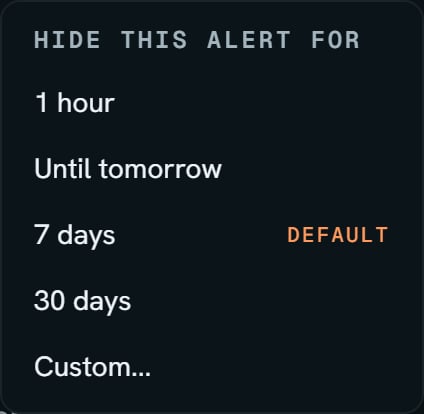
Demo store: a row's clock pressed. Notice 7 days is marked DEFAULT, the same as the X.
More details
Pick how long
Pick how long
The clock opens HIDE THIS ALERT FOR: 1 hour, Until tomorrow, 7 days, 30 days, and Custom…, which asks for a date and Hide until this date. A bad date says Pick a real date. A date already past says That window has already ended. A custom hide lasts through the end of that day.The note lasts 8 seconds. Undo brings the row back, with no pop-up.
How a hide works
How a hide works
A hide is saved with your login, for this store, so it holds on every device. Hidden rows leave the chips, the count, and the bar. A hide is for one row, and for one product when the row names one.There’s no list of hidden alerts. They return when the window ends, or with Undo.
Dismiss for good
Dismiss for good
Click × on a row, then Dismiss for good. A note says “Dismissed for good:” and the row’s words, with Undo. The note lasts 6 seconds.A dismissed row never comes back by itself. It leaves the list, the chips, the Desk’s counts, the bar and the phone app’s Alerts page. Like a hide, it’s saved with your login, for this store.While you have any, a Dismissed chip with its count sits at the end of Show me (on the Advanced view, beside the count). It lists each dismissed row with its day. Click Bring back to put one back on the list.Say you dismiss “3 products selling out fast”. If a 4th product joins later, the row comes back as “1 more product selling out fast”, over “You dismissed the other 3.”
What brings a row back
What brings a row back
- The refund row comes back each Monday (UTC) until you answer it.
- A Vault alert that fires again is a new row.
- Reorder soon comes back when a new product joins it.
- The health row comes back with a newer drop or complaint.
- A group you hid comes back when something new joins it, counting only the new ones: “1 more product selling slowly”, over “You hid the other 2 until Nov 8.” Purchases rows come back in their own unit, like “2 more units never arrived from the store”.
The counts on the Desk and the bar
The counts on the Desk and the bar
Open alerts on the Desk counts every row, by section. The Alerts pill on the bar shows the same total. Over 99, it reads 99+.The line under the Desk’s greeting counts fewer, because it leaves out early warnings with no dollars and claims Amazon paid.While Amazon’s numbers are still matching, after a first sync, a rebuild, or an import, Recovery and Purchases rows are held. A Canada store shows money with “CA$” in front. A Mexico store has no Recovery rows.
When the list is empty
When the list is empty
Each chip has its own line, like Nothing ready to claim right now., No counts to fix., or Everything is on pace.
When it can't load
When it can't load
Nothing is deleted, unless your store has a delete date, and then it says so, like “SourceDock deletes your Amazon store data on Nov 30. Pick a plan before then to keep it.”