

In short
A find shows what the product sells for, how many sellers offer it, about how many sell a month, and if you can sell it. Say a shop adds a red toy truck. Its line reads “8 offers (5 FBA) · Rank 12,450 · ≈ 40/mo (est) · Storefront’s price $22.00 FBM”. The big price says Sells for $24.00, “Buy Box · FBA”. The pill says Approved.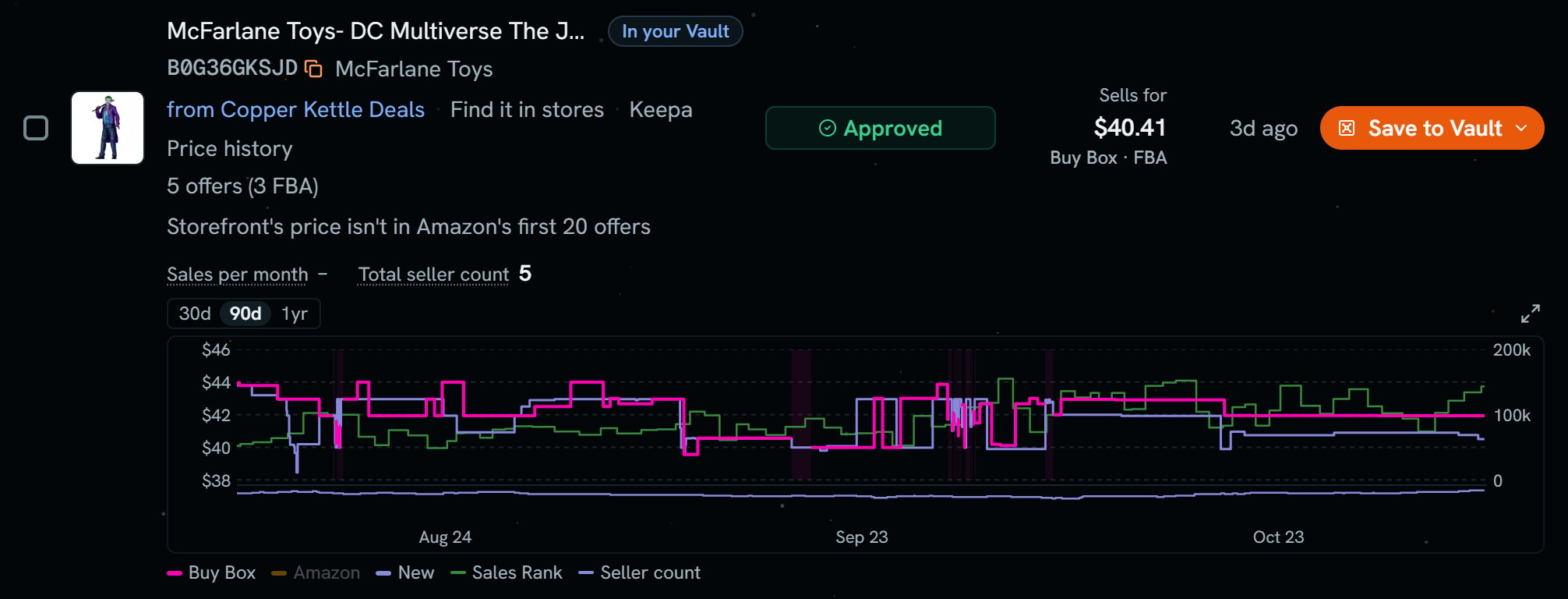
The Joker figure from Copper Kettle Deals: one find. Notice the line 5 offers (3 FBA), the price chart, and Sells for $40.41 Buy Box FBA.
More details
The title line
The title line
The title opens the product on Amazon. just found shows for 15 minutes. In your Vault shows if it’s in your Vault on this marketplace. “Bought before · Mar 12” shows if you bought it before, with your latest purchase order in this marketplace. A cancelled one doesn’t count.Under it are the ASIN, the brand, and the shop. Then Find it in stores, which searches the name, Keepa, and Price history.
The market line
The market line
- Offers: how many sellers offer it new. “(5 FBA)” says how many have Amazon ship it. The rest ship it themselves.
- Rank: Amazon’s Best Sellers Rank. Lower sells faster.
- ≈ 40/mo (est): a monthly sales estimate, not Amazon’s own order count. It uses Amazon’s “bought in past month” count first, then Keepa’s rank drops, then a rank model. With no rank, there’s no estimate.
- Storefront’s price: the shop’s own offer, with shipping. FBM means the shop ships it. If it has an FBA and an FBM offer, Scout keeps the FBA one.
The big price
The big price
Sells for means someone holds Amazon’s Add to Cart button, and it shows that price. The tag says who ships it, like “Buy Box · FBA”.If nobody holds it, the label says Lowest FBA. Scout never prints 0 for a price Amazon didn’t send.Sells for and Storefront’s price can be a cent apart on the same offer, because they round differently.Until your store has priced the find, it says Price pending. With no store, it says Connect Amazon to see prices. If Amazon has cut the store off, it says Reconnect Amazon to see prices.
The chart
The chart
It opens on 90d. You can pick 30d or 1yr. The lines are Sales Rank, Seller count, New, Amazon, and Buy Box. Tap the chart to make it big. With no history, it says No history saved for this product yet.
The verdict
The verdict
The pill says Approved, Needs approval, Blocked, or Not checked. These are the Gate Scanner’s words. Scout gets them by itself. See How often it checks.Under Needs approval, Apply on SC opens Seller Central’s page to apply for that product, in a new tab.